Maptitude for Redistricting is now available as an ArcGIS extension. As a result, you have access to the redistricting functionality and ease-of-use of Maptitude for Redistricting while leveraging your in-house expertise in ArcGIS software and all of your existing Oracle, SQL Server, DB2, and other data through the ArcGIS DBMS support.
With the ArcGIS redistricting extension, you can integrate online content from Esri and Microsoft's Virtual Earth to create more informative maps for building districts and more professional maps for printing. You can also export your plans to Google Earth.
The ArcGIS redistricting extension features a Plan Manager that serves as your redistricting control center. Use it to organize plans, create any number of plan types (e.g., congressional, state house, state senate, and school district), and save them as Plan Templates. To create a plan, simply choose a template or an existing plan and enter a new name. You can organize plans in libraries by plan type, user, security access, etc., and you can locate, copy, change settings, and password-protect plans.
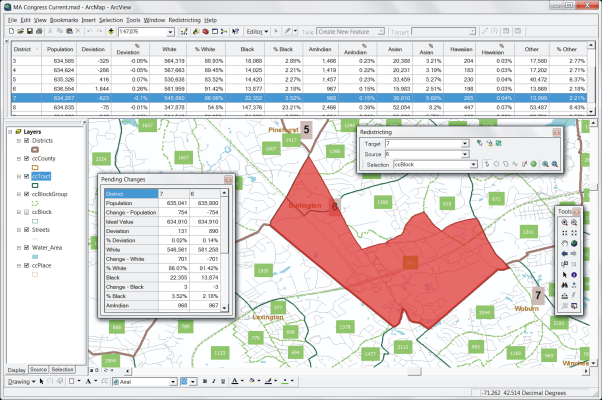
The ArcGIS redistricting extension includes a custom menu and toolbox that let you:
The Maptitude for Redistricting Extension for ArcGIS is compatible with ArcGIS 9 and newer.
Maptitude for Redistricting Extension for ArcGIS includes online help and detailed manuals packed with step-by-step instructions and tutorials. The Plan Manager leads you through the process of creating your first plan and speeds the creation of all additional plans. Caliper also offers classroom training at your site or at our headquarters in Newton, Massachusetts.
With the Maptitude for Redistricting Extension for ArcGIS Plan Manager you can easily manage an unlimited number of plans stored on a computer network. You can quickly find a plan by type, creator, date, key word, etc. The Plan Manager lets you distribute plans for viewing and perform plan management functions across your organization. Data and plans can be stored on individual machines or on one central server with access controlled by both the extension and the network administration software.
For more information on the Maptitude for Redistricting ArcGIS Extension, please download the brochure or contact Caliper Corporation (email: sales@caliper.com or call +1 617-527-4700).
Caliper provides database development, classroom and web-based training, software customization, web design, telephone support, on-site support, priority support, and other related consulting services on a time and materials basis.
Caliper Corporation is a leading developer of transportation and Geographic Information System (GIS) software and applications. Caliper software is used by more than 70,000 users in over 70 countries.