Last updated on June 16, 2026
Finding Directions
You can use the Directions  tool to determine a driving route between two or more locations* on your map. You can define a start point, an end point, and any number of intermediate stops, then choose whether to find the fastest or shortest route and optionally let Maptitude Online determine the most efficient stop order or to use an order that you specified.
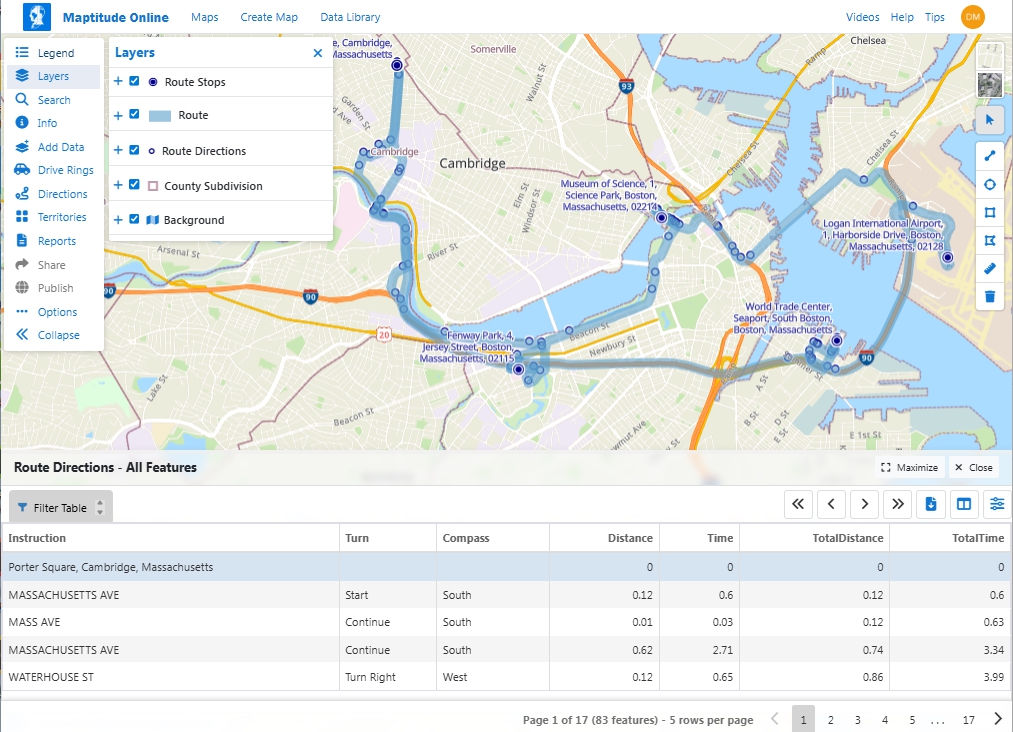
To find directions you specify the stops, choose whether to visit them in order or to optimize the order based on drive-time or distance, and choose whether or not to return to the starting location. Maptitude Online determines a route based on the choices that you made, adds it to the map, along with new point layers for the stops and for the route directions. It also displays a dataview of the route directions.
To Find Directions
- Click Directions on the Sidebar.
- Choose your stops as follows:
To do this... Do this... Choose an origin by clicking on the map Click  and click on one or more locations on the map. Maptitude Online displays a pin icon at each origin location.
Choose an origin from features in a point layer If your map contains a point layer, click  and then choose a layer to use from the Layer drop-down and choose whether to use All Features or a selection set from the Using drop-down.
Enter an address or landmark Click  , enter an address (or landmark such as "Empire State Building" or "La Guardia Airport", and click
  .
.Remove a stop Click  next to the stop you want to delete in the list of route stops or click
  and click on a location on the map .
Manually set the order of stops Click  next to a stop and drag it up or down in the list of route stops.
 - Choose whether to find the fastest (minimize time) or shortest (minimize distance) route from the Route Type drop-down.
- Check the Optimize box to optimize the order to visit the stops based on time/distance or leave the Optimize box unchecked to visit the stops as ordered in the list of route stops.
- Check Round trip (return to start) if you want to return to the first stop after visiting all of the others.
- To set a fixed time to spend at each stop, check the Stay at each stop box and enter a time in hours and minutes.
- Click
 in the Start Driving at box to display the Time Picker and specify the time to start the route.
 - Click OK.
©Copyright Caliper Corporation www.caliper.com • 1172 Beacon St., Suite 300, Newton MA 02461 USA