Last updated on July 20, 2026
Account Settings
Administrative users can choose Settings from the Options and Settings menu (located at the top right-hand corner of the screen in a drop-down under your user name icon) to see and change account details, see subscription and usage limits details, and transfer maps.
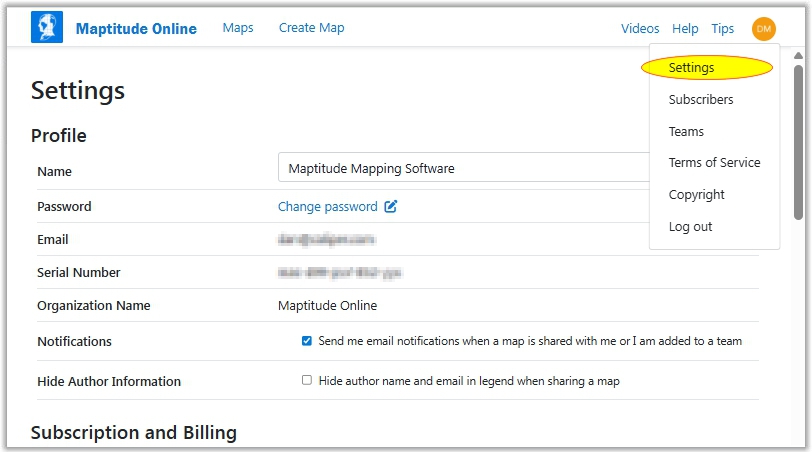
Profile Settings
Use the profile settings to update your profile, manage notifications, and manage information you share in maps:
| To do this... | Do this... |
| Change your profile name | Edit the Name text box. |
| Change your password | Click Change Password and follow the instructions in the email for changing your password. |
| Turn on notifications | Check the Notifications box. |
| Turn off notifications | Remove the check from the Notifications box. |
| Hide author information in shared maps | Check the Hide Author Information box. |
| Show author information in shared maps | Remove the check from the Hide Author Information box. |
Integrations
Use the integrations settings to connect to or disconnect from your Salesforce or Google accounts. A connection is required in order to create new maps from your Salesforce objects or Google Sheets.
Contact User Management
The contact user management settings shows the user that will get all billing and support mail for the account. To change the contact user, choose a user from the drop-down list and click Change Contact User.
Transfer Maps
Maps created by one user can be transferred to another user.
| To do this... | Do this... |
| Transfer all maps to another user | Choose the current owner of the maps from the Transfer from User box, choose the recipient from the To User box, and click Transfer Maps. |
Publicly Shared Maps
For information on the Publicly Shared Maps section, see Sharing a Map.
Subscription and Billing
The Subscription and Billing section shows the dates of your subscription.
Usage Limits
The usage limits show information on your account usage for the current billing cycle. It also shows information on the maximum limits for tables, features, fields, and layers in a map.
 |
TIP: Additional information on your account usage can be found by clicking the Analytics tab. See Analytics for more information. |
Other Settings
In addition, the Options and Settings menu (located at the top right-hand corner of the screen in a drop-down under your user name icon) contains the following items:
| Menu | What it does... |
| Terms of Service | Displays Maptitude Online terms of service |
| Copyright | Displays Maptitude Online copyright information |
| Log out | Ends your Maptitude Online session |
©Copyright Caliper Corporation www.caliper.com