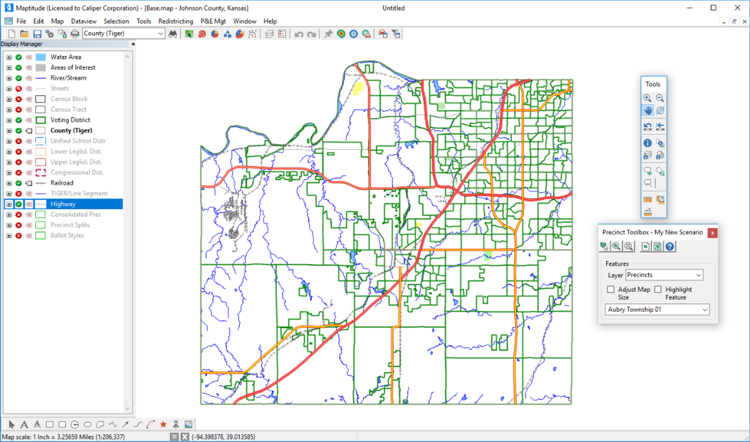
Maptitude for Precinct and Election Management (Maptitude P&E) combines sophisticated software, an easy-to-use interface, and a wide array of customized data to create a complete precinct and election management solution for county and state election offices. Use it alone or in conjunction with your county and statewide voter registration (VR) software.
On this page:
What You Can Do with Maptitude P&E
Other Precinct and Election Management and Redistricting Services
Reprecincting
and Redistricting
Maptitude P&E contains a variety of tools for
modifying precinct boundaries. As you select geographic areas
(such as census blocks), the software computes the number of
registered voters being added to the
precinct, along with any other summary fields you have identified.
You can automatically create a list of
registered voters and street segments where the precinct has
changed. (See below for more information on
redistricting features.)
Create
Precinct Maps, Map Books, and Reports
The Precinct Map dialog box makes it easy to zoom to any precinct,
query information about it, print a map, and print a legal
description (metes and bounds report). Create a complete precinct
map book using predefined templates. Design and print Precinct-Voter
reports that list the number of voters per precinct and any other
attributes you wish to include.
Update Your VR Street Index File in Minutes
Once you have defined your new precinct
boundaries, Maptitude P&E can
automatically update the street index file required by your voter
registration software. You can combine odd
and even ranges, account for precinct splits, and print a sorted
report.
Enhance Voter
Files and Correct Errors
Maptitude
P&E can open and enhance voter files from your VR software.
Sophisticated
geocoding
tools result in a very high match rate. Addresses that don't
geocode can be "pinned in" using the mouse. The geocoder
automatically adds the precinct code and codes for any other layers
requested by the user (e.g. census blocks, districts, and ballot
styles). Compare the results from Maptitude with
data already in the VR file to identify errors. Once all
voters have been geocoded, you can update voter
and party counts in the block, precinct, district, and ballot
style layers, and any other geographic layers you choose. Since this
information is added to the original voter file, it is immediately
available to the VR software.
Precinct Splits
Maptitude
P&E
intersects the precinct layer with all relevant district layers
(e.g. congressional districts, state legislative districts, county
commission districts, school board districts, etc.) to create a
layer made up of precinct pieces or splits within which all
districts are unique. Each precinct split includes the number of
voters and voters by party.
Unique Ballot
Styles
Create a geographic layer of unique ballot styles based on any
combination of other layers (e.g., congressional districts, state
legislative districts, county commission districts, school board
districts, etc.). Create a map for each ballot style or a map book
for all styles. Print ballot style reports sorted by precinct,
ballot style, district IDs, or number of voters in each style.
Create Street Index/Ballot Style reports and files.
Consolidated Precincts
Create
a consolidated precincts layer that combines precincts that have a
common polling place for a particular election. Each consolidated
precinct lists the number of voters, voters by party, and any other
summary fields you choose such as language and ethnicity. The
consolidated precincts report lists the address and phone number of
the polling place as well as the precincts that vote there.
Update Streets
and Other Geographic Features
Maptitude P&E features full geographic editing. Add, remove, and
realign streets, correct street names, address ranges and ZIP codes,
split census blocks, add invisible features that define precinct
boundaries, and make any other changes to the underlying geographic
layers that are required.
P&E Settings
Dialog Box
The P&E Settings dialog box lets you customize the way Maptitude P&E
works. Use it to identify the precinct map, reprecincting plan,
street file, voter file and settings for geocoding, ballot style
layers, layouts for precinct and ballot style map books, and other
relevant settings.
Built on
Maptitude Technology
Maptitude is a full-featured Geographic Information System that has
set new standards for performance and value. It provides a complete
set of desktop mapping and spatial analysis functions. All Maptitude
features are incorporated into Maptitude P&E. You also receive the
standard Maptitude nationwide geographic data sets including streets
with address information, and states, counties, census tracts, and
other census boundaries with hundreds of demographic variables.
Features include:
Easy to Learn
and Use
Maptitude P&E includes on-line help and detailed manuals packed with
step-by-step instructions and tutorials. Each task has a
well-designed dialog box that provides access to all related
functions. Wizards help you create maps, display data using
meaningful themes, geocode information based on street address, and
create precinct and redistricting plans. Caliper Corporation offers
hands-on training at your site or at our training facility in
Newton, MA.
Works with
Most Voter Registration and GIS Software
Maptitude P&E opens voter registration files from most VR software,
either directly or using Microsoft Windows ODBC (Open Database
Connectivity). The program creates street index files in several
formats suitable for import into most VR software. Map ArcView
Shape, MapInfo Tab, and Oracle Spatial files without conversion.
Export precinct boundaries and redistricting plans (geography and
data) to these other formats for use with other GIS software.
Publish Your
Precinct Maps and Information on the Internet
Maptitude P&E lets you save your maps, data tables, charts, layouts,
and reports as JPEG, PNG, and HTML files for static Web publishing.
Caliper Corporation's Maptitude for the Web™ Software makes it easy
to publish your maps as interactive mapping applications on the Web.
For example, users can locate their address on the map, pan and
zoom, display precinct information, and locate their polling place
using a browser.
Customized Precinct and Election Management Data
Maptitude P&E includes data customized for your jurisdiction with the following
geographic data:
Caliper provides consulting services, training, software customization, geocoding, data manipulation, web design, telephone support, and on-site support.
Maptitude P&E contains all of the features found in Maptitude for Redistricting:

 Check out our G2 Reviews

 Call Us
