|
Maptitude for Redistricting Features

Maptitude for Redistricting includes everything you need to build and
analyze redistricting plans.
The custom menus and redistricting toolbox let you:
Organize plans, create any number of plan types, and save them as Plan Templates
To create a plan, simply choose a template or an existing plan and enter a new name. Organize plans in libraries by plan type, user, security access, etc.
Create a new plan from a map, template, or existing plan
You only have to enter the settings once. From then on, you can create a new plan by picking the appropriate template or existing plan
Import and merge plans created by Maptitude for Redistricting or other redistricting software
You can also automatically convert a plan based on a previous version of TIGER geography to a plan using the latest version of TIGER geography without the need to first export to an equivalency file.
Add political data and election results
Use the Disaggregation/Aggregation Wizard to quickly disaggregate election data (usually reported at the precinct or VTD level
of geography) down to Census Block geography and aggregate it up to higher levels of geography. You can join in tables of data
or overlay area layers (e.g., historic precincts) that contain the data.
Designate the control field, number of districts, ideal value, and summary fields
You can also set other plan properties including plan type, creation date, password protection, and backup strategy. You
can also include any number of data fields.
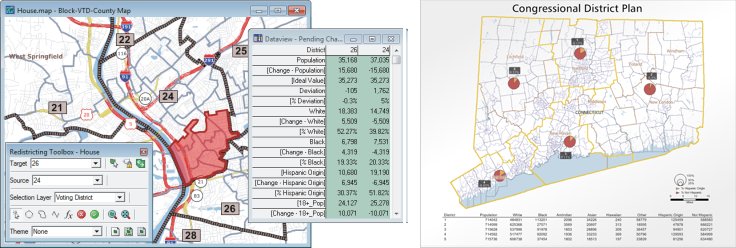
Add areas to a target district using feature selection tools
Select by pointing, by circle, by lasso, by pointing, by line, or by attribute values. Select features in any geographic
layer, such as Census block, voting district, county, or town. Limit the selection to unassigned areas, one district, or
the entire jurisdiction. As you add areas to a district, Maptitude for Redistricting redraws the district boundaries and
updates the control and summary fields to reflect the changes to the current plan.
Easily manage districts
Rename districts, handle multi-member districts, assign both an ID and a long name to districts, lock districts, and mark
them completed.
Capture the current status of a plan as a snapshot
Each plan can have one or more snapshots organized by date and time under the same plan name. Return to any snapshot, and
use it as a departure point in the evolution of the plan or as the starting point for a new plan.
Display attributes for any layer using labels, themes, or dataviews
Create color, pattern, dot-density, scaled-symbol, or chart themes. Display summary information in a table that contains
the district identifier, control field totals, deviation from the ideal value, and the totals and percentages for summary
fields.
Identify communities of interest
Keep geographically cohesive areas, such as cities, neighborhoods, or racial or ethnic enclaves that tend to have similar
interests and vote as a bloc, intact within the same district. Alternatively, for communities that you do split into
multiple districts, run the Communities of Interest reports to calculate the total and percent population of the community
in each district.
Easily find unassigned areas
Automatically assign unassigned areas that are completely surrounded by the same district.
List all noncontiguous portions of districts
Zoom to each noncontiguous portion and easily assign them to the correct district
Compute measures of compactness to assess or defend the districts in a plan
Maptitude for Redistricting computes all of the recognized measures of geographic compactness including
the Reock, Schwartzberg, Perimeter, Polsby-Popper, Length-Width, Population Polygon, Population Circle,
and Ehrenburg metrics.
Export a plan to standard equivalency file formats
Transfer a plan to the Department of Justice or to other redistricting software with no possibility of
a mis-assignment.
Create a map book for some or all of the districts
Display either a single district or the district and all adjoining districts, labeled with the
district name, plan name, plan type, administrator, date created, and date last modified based
on your settings.
Integrate your plans with Google Maps and Google Earth
Save your plans in the Google format (.KML or .KMZ) and add them to Google Maps or Google Earth.
Use the built-in Google Earth toolbox to display Google Earth in Maptitude as part of your plan
or display your plan in Google Earth.
Generate and print over 35 reports and group reports together in report sets
Create reports including population summary, error check, political subdivision splits, incumbents,
plan statistics, plan components, plan comparison, communities of interest, measures of compactness, and more.
Create custom reports and add them to the report menu.
Print a completed plan
Use page layouts to combine maps, data tables, and charts to illustrate your plan.

Works with Most Other GIS and Mapping Software
Maptitude supports over
50 file types and more than 100 GIS and CAD file formats allowing you to
easily migrate your existing geographic data. You can map Esri Shapefiles,
Geodatabases, MapInfo TAB files, and Oracle Spatial tables directly, or use
the built-in translators to import geographic data from a variety of other
software packages and public sources. This extensive library of importers
and exporters is one of the largest in the industry and comes at no
additional charge. You can export plans (geography and data) to these other
formats if your GIS department uses one of these other products.
You can use raster images such as satellite or aerial photographs directly
in your maps. Maptitude includes toolboxes for quickly accessing online
images from TerraServer-USA and Google Earth. You can use the images as a
means of reference or in conjunction with the redistricting tools to draw
your districts.

Easy to Learn and Use
Maptitude for Redistricting includes online help and detailed manuals packed
with step-by-step instructions and tutorials. The Plan Manager leads you
through the process of creating your first plan and speeds the creation of
all additional plans. Other wizards help you create maps, display data using
meaningful themes, and geocode information based on street address. In
addition, Caliper offers training at your site or at our headquarters in
Newton, Massachusetts.
Complete Organizational Solution
With the Maptitude for Redistricting Plan Manager you can easily manage an
unlimited number of plans stored on a computer network. You can quickly find
a plan by type, creator, date, key word, etc. The Plan Manager lets you
distribute plans for viewing and perform plan management functions across
your organization. Data and plans can be stored on individual machines or on
one central server with access controlled by both Maptitude for
Redistricting and the network administration software.
System Requirements
Maptitude for Redistricting runs on Microsoft Windows XP, Vista, or Windows
7. Minimum hardware includes a DVD-ROM drive and 1GB of memory. Disk space
requirements vary by jurisdiction (200MB–1GB).
Other Redistricting Services
Caliper provides database development, hands-on training, software
customization, web design, telephone support, on-site support, priority
support, and other related consulting services on a time and materials
basis.
Caliper
is the developer of the U.S. Census Bureau’s MAF/TIGER Partnership
Software that has been used by Census Bureau partners to update the
geography for the 2010 Census.
Ordering
Please contact Howard Simkowitz, Director, Government Services, at
202-652-1024 or
by email for pricing
information or call Caliper at 617-527-4700 to place your order.
<<Previous
Next>>
|