I am using my own streets layer (or a
modified version of the one that came with MTPE). How can I get the
Legal Description report to use that data?
The Legal Description report requires that the precinct layer and two
additional layers, CCCNTYT.CDF and CCTGRLN.CDF, are on your map.
The TIGER/Line file (CCTGRLN.CDF) that we distribute is basically the
master file of all census geography.
It contains not only street features, but also railroads, rivers, and
other census geography (some of which can be delineated by non physical
features - i.e. school district boundaries).
It is easy to create your own TIGER/Line database using special tools
included with MTPE. There are
three stages to this process:
- Create a TIGER/Line
database
-
Choose
Redistricting-Plan Utilities-Create TIGER/Line DB.
-
Type in the name TIGER, browse to a location where you would like to
save your new file, and click Save.
MTPE will create a new geographic file named TIGER.DBD that contains many
data fields, but no geography.
Populate the new
TIGER/Line database with features
-
Create a new map which contains your streets file and the TIGER/Line
database created above.
-
Change the working layer to TIGER/Line Segment.
-
Choose Tools-Map Editing-Copy & Paste Segments.
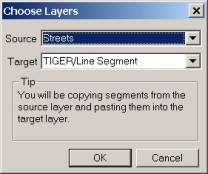
The Source should be Streets and the Target should be TIGER/Line
Segment. Click OK.
-
Fill in the Source field for each Target field according to the table
below. Your field names may be
somewhat different if you are using your own data.
|
Target Field |
Source Field |
|
CFCC |
CLASS |
|
FENAME |
NAME |
|
FRADDL |
[START LEFT] |
|
TOADDL |
[END LEFT] |
|
FRADDR |
[START RIGHT] |
|
TOADDR |
[END RIGHT] |
|
ZIPL |
[LEFT ZIP] |
|
ZIPR |
[RIGHT ZIP] |
Change the Snap tolerance to 1 pixel and check the boxes to Allow snapping
to a nearby segment and Allow creation of new endpoints.
Click OK when finished.
-
Click the Select Source Segments tool (far left) in the Copy & Paste
Segments toolbox. Find a street
segment that is on the edge your streets.
You will need to remember the location of this segment in the
next steps.
-
Click the Find Target Placement tool (yellow light) in the Copy & Paste
Segments toolbox.
-
Click the Paste New Segments tool (green light) in the Copy & Paste
Segments toolbox. This adds the
selected street to the new TIGER/Line database you created earlier.
-
Close the Copy & Paste Segments toolbox.
-
Change the working layer to Streets.
-
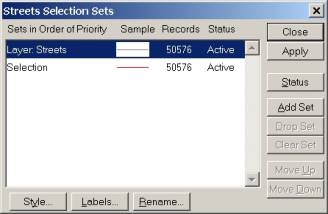
Click the Select by Pointing tool in the Tools toolbox. Drag a box around the entire extent of streets in the streets
layer. You can check to see that
you got all of the streets by choosing Selection-Settings
and checking that Layer: Streets and Selection contain the same number
of records. Click Close when you
are done.
-
Deselect the street you added to the TIGER/Line layer in step 5 above by
holding the Ctrl key on your keyboard and clicking on the segment with
the Select by Pointing tool still activated.
You can check to see that you deselected the street by choosing
Selection-Settings and checking that Selection contains
one less record than Layer: Streets. Click Close when you are done.
-
Change the working layer to TIGER/Line Segment.
-
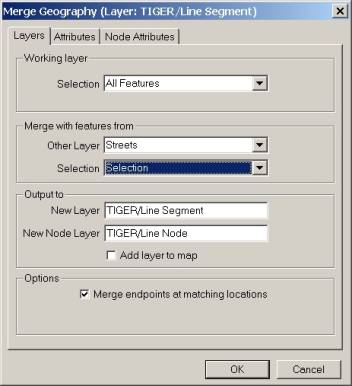
Choose Tools-Geographic Utilities-Merge Geography. Match your settings to the picture below.
-
Click the Attributes tab. Fill
in the Other layer field for each Working layer field according to the
table below.
|
Working Layer Field |
Other Layer Field |
|
CFCC |
CLASS |
|
FENAME |
NAME |
|
FRADDL |
[START LEFT] |
|
TOADDL |
[END LEFT] |
|
FRADDR |
[START RIGHT] |
|
TOADDR |
[END RIGHT] |
|
ZIPL |
[LEFT ZIP] |
|
ZIPR |
[RIGHT ZIP] |
Click OK when finished.
-
Name the new geographic file TIGER2. Click Save. A new
standard geographic file that contains all of your streets and the
contents of the TIGER/Line layer is created.
You merge additional layers into the new TIGER/Line layer using the same
methods as above into you have created a TIGER/Line Segment layer that
contains the necessary features for your Legal Description report.
Export the TIGER/Line
database to a compact geographic file
The TIGER/Line Segment layer must be a compact geographic file to be used by
the Legal Description report.
You can export your TIGER/Line Segment layer to a compact geographic file
(CDF) using Tools-Export. The new file
should be named CCTGRLN.CDF file and saved in a location where MTPE can
write to it.
Back to Tech Corner Support Page
 Call Us
