
Contiguity is the redistricting principle that all parts of a district should be connected. Maptitude for Redistricting contains tools that inspect each district and identify pieces that are disconnected from one another. Once you have identified the disconnected pieces, you can use the tool to zoom to each piece and manually adjust the assignment. Alternatively, you can have Maptitude for Redistricting automatically assign unassigned areas that are completely surrounded by a single district.is the redistricting principle that all parts of a district should be connected. Maptitude for Redistricting contains tools that inspect each district and identify pieces that are disconnected from one another. Once you have identified disconnected pieces you can use the tool to zoom to each piece and manually adjust the assignment.
To Find Non-Contiguous Areas in a District
1. Choose Redistricting>Plan Integrity>Find Non-Contiguous Areas to display the
Non-Contiguous Areas toolbox. The toolbox displays a list of districts and their non-contiguous areas, if any.
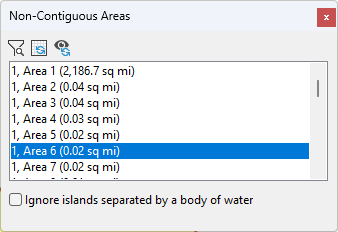
2. Highlight one or more areas in the scroll list.
3. Click  to zoom to the chosen areas. Maptitude for Redistricting zooms the map to display the non-contiguous area or areas.
4. Click  to only display non-contiguous districts at the current zoom level.
5. Click  once you have made the areas contiguous, to eliminate them from the list.
6. Click the Close box in the upper-right corner of the Non-Contiguous Areas toolbox when you are done finding non-contiguous areas.
Maptitude for Redistricting closes the Non-Contiguous Areas toolbox.