Maptitude is mapping software that lets you create maps using your own data. Whether you store your data in Microsoft Excel, Access, and SQL Server, or as CSV, text, dBASE, Oracle, or any ODBC compliant data source, Maptitude can work with your data. See below for a full list of supported file formats.
Create-a-Map Wizard™ gives you start-to-finish assistance for locating (geocoding), geographically analyzing, and mapping your data. In a few easy steps, you can locate your customers, color code ZIP/Postal Codes with your sales data, build bands around your stores, and much more.
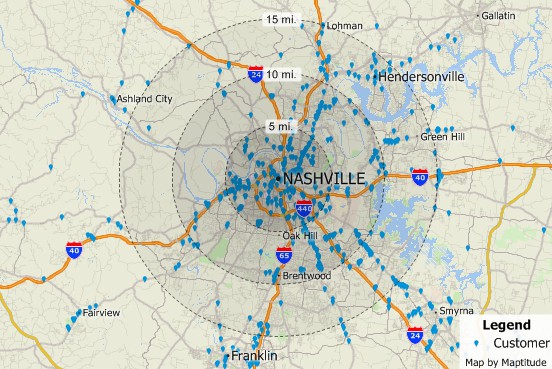
Pin map your data
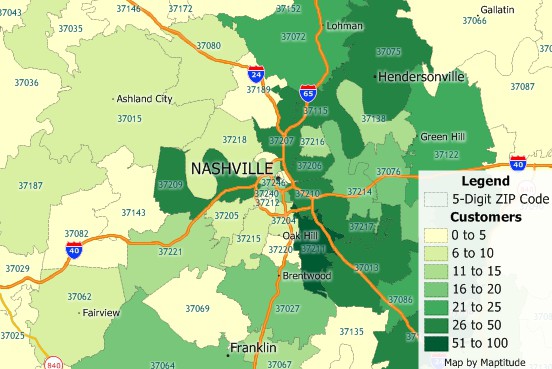
Map your data by postal code
You can use the powerful database capabilities of Maptitude to join your data to an existing map layer. You can then use your data to create themes, add labels, or analyze geographically. You can also display tables that show data from the map layer side-by-side with your own data. You can even create formulas that combine data from the two different sources.
You can also use the built-in geocoding tools to pin map your data. By locating a point feature for every record in your table you can see the distribution of your customers, facilities, or other resources.
Maptitude is data mapping software that supports over 50 file types and more than 100 GIS and CAD formats. You can map Esri Shapefiles (see a short demo), MapInfo TAB files, MapPoint PTM files, and Oracle Spatial or Microsoft SQL Server tables directly, or use the built-in translators to import geographic data from a variety of other software packages and public sources. This extensive library of importers and exporters (see the table below) is one of the largest in the industry and comes at no additional charge. This makes Maptitude the perfect choice for a new GIS purchase because you can work with your existing installation or easily migrate your data from your current GIS software.
You can also use raster images such as satellite or aerial photographs directly in your maps. Maptitude includes toolboxes for quickly accessing on-line images from OpenGIS Web Map Services and Google Earth. These images can be used as a means of reference or in conjunction with the map editing tools to create or edit geographic files.
A built-in interface to Global Positioning System (GPS) devices lets you track and record your location and build geographic databases as you work. With a GPS and a laptop, users in the field can create accurate geographic files of public utilities, corporate facilities, geographic features, and more.
| Map, GIS, and CAD formats supported in Maptitude | Import | Open | Export | |
|---|---|---|---|---|
| AutoCAD Drawing Binary files | DWG |  |
- | - |
| AutoCAD Drawing Exchange format files (version R14 and earlier) | DXF | |
- | |
| Caliper Compact Data Format files | CDF | N/A | |
|
| Caliper Standard Data Format files | DBD | N/A | |
|
| Caliper Compressed Workspace files | WRKZ | N/A | |
|
| Caliper Workspace Files files | WRK | N/A | |
|
| DeLorme (Street Atlas/Topo USA) drawing file | AN1 | |
- | - |
| Digital Elevation Model files (USGS, NOAA, DTED, Esri Binary) | DEM; G03; G98; DT0; DT1; DT2; FLT | |
- | - |
| Digital Line Graph format files (USGS, NWI, NATSGO, STATSGO, SURGO) | DLG; OPT;STD; LGO; LGS; GRF; 0AF; 0SF; ATT; SYM | |
- | - |
| Digitizing tablets | Wintab compliant drivers | - | |
- |
| Esri Arc ASCII Grid | ASC, ADF | |
- | - |
| Esri ArcSDE File Geodatabase (requires ArcGIS to be installed) | SDE | |
|
|
| Esri ArcView 3.x Project files and Legend Files | APR; AVL | - | |
- |
| Esri Feature Class | GDB | |
|
|
| Esri File Geodatabase | GDB | |
|
|
| Esri Export format files | E00 | |
- | - |
| Esri Personal Geodatabase files | MDB | |
|
- |
| Esri Shapefiles | SHP | |
|
|
| Esri Ungenerate format files | LIN; PTS | |
- | |
| ETAK MapBase format files | MBS | |
- | - |
| FlatGeobuf | FGB | |
|
|
| Garmin MapSource | GDB | |
- | - |
| GeoJson | GEOJSON; JSON | |
|
|
| GeoPackage | GPKG | |
|
- |
| Google Earth Documents | KML; KMZ | |
- | |
| GPS playback data files | GPS | - | |
|
| GPS device serial port | NMEA 0183 | - | |
- |
| GPX GPS Exchange format | GPX | |
- | - |
| Intergraph Design files (ISFF or V7) | DGN | |
- | - |
| Interim Terrain Data (ITD) files | SLF | |
- | - |
| MapInfo Interchange Format files | MIF | |
- | |
| MapInfo TAB files | TAB | |
|
- |
| Metadata (Federal Geographic Data Committee standard) | MET | - | |
|
| Microsoft AutoRoute | AXE | |
- | - |
| Microsoft MapPoint | PTM | |
- | - |
| Microsoft Streets & Trips | EST | |
- | - |
| Microsoft MapPoint route waypoints | AXE; EST; PTM | |
- | - |
| Microsoft MapPoint Territory Layer with no data fields | AXE; EST; PTM | |
- | - |
| Microsoft SQL Server Spatial Layer | MSSQL; MDF | |
|
|
| National Transportation Atlas Dataset (NTAD) format files | PNT; LNK; NOD; GEO; | |
- | - |
| ODBC database with coordinates for points files | ODBC (SQL etc.) | |
|
- |
| OpenStreetMap files | OSM | |
- | - |
| Oracle Version 12c (and older versions) Oracle Spatial databases | SDO | |
|
|
| Ordnance Survey NTF format files | NTF | |
- | - |
| Planning Interim Terrain Data (PITD) | SLF | |
- | - |
| PostgreSQL Spatial Layer (using PostGIS) | |
|
|
|
| Spatial Data Transfer Standard (SDTS) files | DDF | |
- | - |
| Strategic Mapping (Atlas) Boundary ASCII format files | BNA | |
- | |
| TIGER/Line files (TIGER 1990-2006, TIGER Compressed) | F41; F51; F61; BW1; RT1; ZIP; TX1 | |
- | - |
| U.S. Geological Survey Land Use and Land Cover (LULC) files | GIR | |
- | - |
| Vector Product Format (VPF) files | |
- | - | |
| Image (raster/vector) formats supported in Maptitude | Open | Export | ||
| Animated GIF | GIF | - | |
|
| Bitmap (including True Color) | BMP | |
|
|
| CMYK TIFF | TIF | |
- | |
| Compressed TIFF | TIF | |
- | |
| Enhanced Compressed Wavelet | ECW | |
- | |
| Enhanced metafile | EMF | - | |
|
| ERDAS Imagine | IMG | |
- | |
| GeoTIFF | TIF | |
- | |
| GIF | GIF | |
|
|
| Icon images | ICO | |
- | |
| JPEG | JPG; JPEG | |
|
|
| JPEG2000 | JP2 | |
- | |
| Mapbox Image Tiles | MBTILES | |
- | |
| MrSID (Multiresolution Seamless Image Database) | SID | |
- | |
| MrSID Generation 3 and Generation 4 | SID | |
- | |
| Portable Document Format (For report and chart windows; requires PDF printer driver for maps and dataviews) | - | |
||
| Portable Network Graphics | PNG | |
|
|
| Scalable Vector Graphics | SVG | |
- | |
| SPOT MetroView satellite images | BIL; TIF | |
- | |
| SPOTView satellite images | BIL; TIF | |
- | |
| TIFF | TIF | |
|
|
| U.S. Geological Survey digital rectified aerial photographs (Digital Orthophotos, including Digital Orthophoto Quarter Quad image format | DOQ; DOQQ | |
- | |
| Virtual Raster (via drag-and-drop) | VRT | |
- | |
| OGC Web Map Tile Service (WMTS), WMS, and XYZ/TMS tile service description files | XML | |
- | |
| Database/table/spreadsheet formats supported in Maptitude | Import | Open | Export | |
| All ODBC sources (e.g., Access, BigQuery, DB2, Informix, Ingres, InterBase, NetWare SQL, Paradox, Progress, SQL Base, SQL Server, Sybase) | |
|
- | |
| Caliper dataview | DVW | N/A | |
|
| Caliper fixed-format binary | BIN | N/A | |
|
| Comma-, pipe-, semicolon-, and tab-delimited text | CSV; TXT; TAB; PSV | |
1 |
|
| dBASE/FoxPro/X-base | DBF | |
|
|
| Fixed-format text | ASC | |
|
|
| HTML table | HTM | - | - | |
| Microsoft Access tables version 2019 and earlier (even when Office is not installed) | MDB; ACCDB | |
|
- |
| Microsoft Excel Worksheet (even when Office is not installed) | XLS; XLSX; XLSM | |
1 |
|
| Microsoft SQL Server Table | MSSQLD | |
|
- |
| ODBC SQL Query (ODBCQ) | ODBCQ | |
|
- |
| ODBC table (ODBC) | ODBC (SQL,etc.) | |
|
- |
| Oracle tables | NTF | |
|
- |
| PostgreSQL Table | |
|
- | |
| SQLite Table | .DB | - | - | |
| Mulitmedia formats supported in Maptitude | Open | Export | ||
| Windows Media Video | WMV | |
|
|
| Video | ASF, MP4, MOV, M4V, 3GP, 3GPP, 3G2, 3GP2 | |
||
| 3D formats supported in Maptitude | Open | Export | ||
| Autodesk 3D Studio | 3DS | |
- | |
| Autodesk Inventor 3D parametric solid modeling format | IV | |
- | |
| Sketchup 3D Model File | SKP | |
- | |
| VRML 3D Models | WRL | |
- | |
| Image Servers supported in Maptitude | Open | Export | ||
| Google Earth satellite images | |
|
||
| OGC WMS Open GIS Consortium "WMS" standard for image servers | |
- | ||
| TerraServer | |
- | ||
| Package Support | Import | Export |
|---|---|---|
| CaliperPy Python Package | NumPy Panda DataFrames | Caliper Binary Tables |
| CaliperR R Package | DataFrames | Caliper Binary Tables |
| Other | Open | Export | |
|---|---|---|---|
| Drag-drop (*.XML) files (that are not GDAL imagery) to open them in a browser control window | |
||
1 Read-only. For editable access open via ODBC.
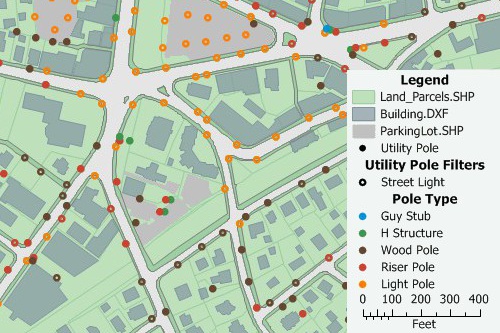
Support for GIS and CAD file formats and GPS
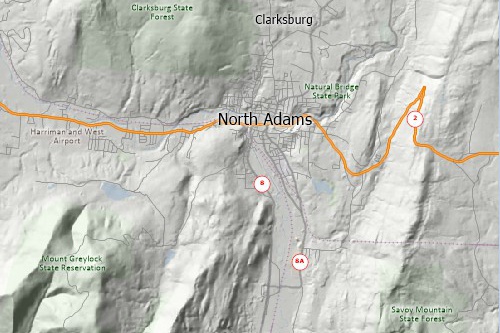
Support for MrSID, GeoTIFF, JPEG, online imagery, and more
Home | Products | Contact | Secure Store
 Call Us

