 |
| October 2026 |
|
A Note From Stewart Berry How AI Helps Our Users Get Answers, Data, and Maps Faster 
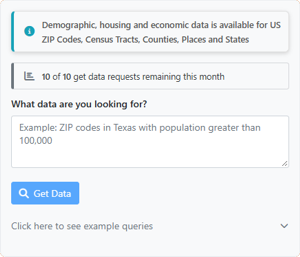
Most of the time spent in mapping software goes into two things: working with the tools, and choosing the data to use with them. AI now helps with both, and in Maptitude Online you can simply ask an AI agent to build the map for you. See Claude build balanced sales territories from a customer list, and be prepared to be mind-boggled. An AI agent running Maptitude Online, the AI-powered Data Library, and the Halloween map the agent made are all covered below. Stewart Berry |
|||||||||||||
|
Maptitude Online + AI An AI agent can now do the clicking in Maptitude Online 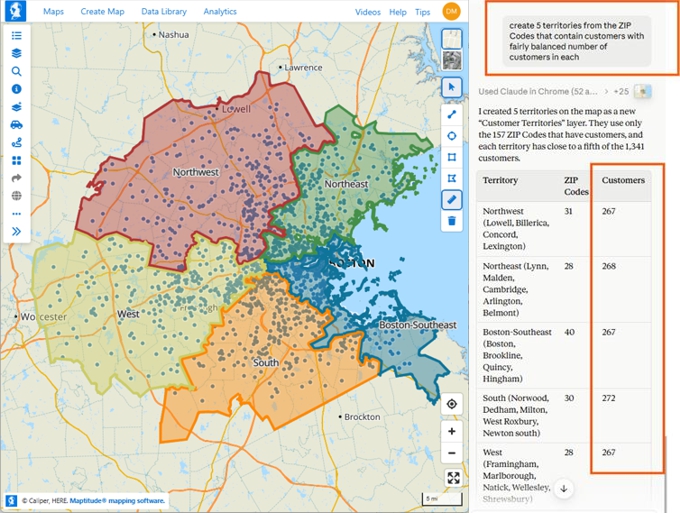
What’s the story? Browser AI agents, such as Claude in Chrome and the ChatGPT Chrome extension, can work in Maptitude Online for you. Here is what Claude in Chrome did when asked in plain English:
Work in Maptitude Desktop? Upload your map to Maptitude Online, and the AI agent can work with it there. To use a browser AI agent, you will usually need a paid plan from the AI provider, such as Anthropic for Claude or OpenAI for ChatGPT. The agent tells you what it did as it goes, so take a quick look at the map before you share it. Note: Browser AI agents are third-party tools, not part of Maptitude, and we don't guarantee their results. They can see your screen and act in your account, so review their work and follow your organization's AI policy.
|
|||||||||||||
|
|||||||||||||
|
Featured Map Spirit Halloween Stores, Mapped by an AI Agent 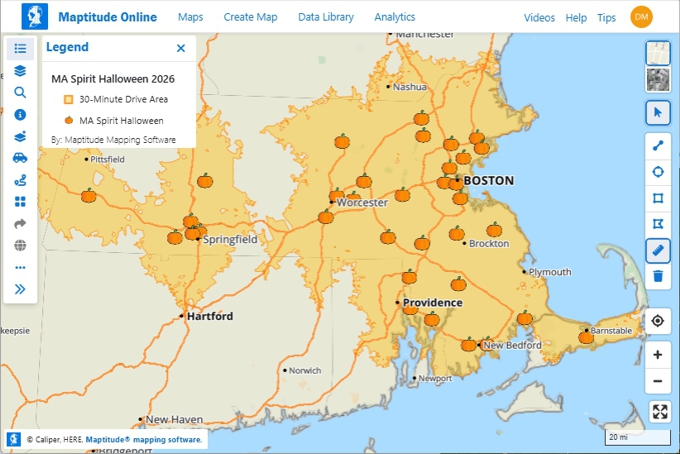
Spirit Halloween stores open for the season each fall. We asked an AI agent working in Maptitude Online to “create a map of the Spirit Halloween locations in MA.” Then we asked it to swap the blue dots for a free-to-use online pumpkin image. Claude in Chrome found one and loaded it as the icon for the store layer. Store addresses as listed by Boston.com, October 2026. Spirit Halloween is a trademark of its owner. Maptitude is not affiliated with Spirit Halloween.
|
|||||||||||||
|
From The Blog Every way AI can help you work in Maptitude This new article puts all the AI help in one place, with prompts you can copy. Ask the Maptitude Virtual Assistant a question. Ask any AI how to do a task in Maptitude. Pull data with the Data Library. Then see a browser AI agent work in Maptitude Online. The agent draws drive-time rings, plans routes to your best customers, builds balanced territories, maps demographic data, and styles maps. Maptitude Desktop users can upload their maps to Maptitude Online and use the agent there, too. Each example shows the prompt and what the agent did, plus what to check.
|
|||||||||||||
|
Awards New this month: users rank Maptitude #1 of 11 GIS products 
95% of users would recommend Maptitude. Maptitude also won Best Innovation Strategy in the Info-Tech 2026 Emotional Footprint Report. On G2, Maptitude earned 34 Fall 2026 badges, including Leader.
4.7 out of 5 stars • 150 verified reviews on G2
|
|||||||||||||
|
Free Live Training Learn the 2026 tools, live with an instructor
|
| www.MappingSoftware.com | ©2026 Caliper Corp. All Rights Reserved. |


Past Maptitude Newsletters |