This latest release of Maptitude, the award winning GIS desktop software, continues to provide easy-to-use yet powerful mapping tools. Maptitude 4.8 remains the most competitively priced, full featured GIS/mapping software available. Maptitude 4.8 provides extensive new functionality and enhancements:
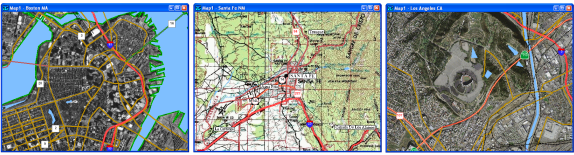
Maptitude can now download imagery for any area of the United States with the click of a button. These images are accessed from TerraServer-USA, an on-line database of high resolution USGS aerial imagery and scanned USGS topographic maps. In conjunction with Internet access, users can use the tool to download images of three types:
A distinctive feature of the tool is that the user can specify the resolution and this allows the download of high quality images over a large area. As an alternative to choosing the resolution of the image, the user can let Maptitude automatically make this choice. Once accessed, these images can be saved as layers to be used in any online or offline map.
Users can now save any table or dataview to the Microsoft Office Excel worksheet format (.XLS).
Any Maptitude map can now be opened as a map in ArcMap, one of the programs that is part of the Esri ArcGIS system of software. You can choose which layers to include in the map and can also choose to retain a selection set for each included layer.
When opened in ArcMap the map will have the same scale and projection as the original map in Maptitude. Layers are displayed with the same styles where matched, and these include themes, visibility, autoscale and selected features.
This new feature extends the extensive file export capabilities of Maptitude, reinforcing its position as a full-fledged GIS platform both as a stand-alone product and in conjunction with existing spatial systems.
With the flexible and powerful programming language (GISDK) that is included with Maptitude you can create new add-ins and applications and call GISDK functions and macros from other programs, written in another language. Maptitude now provides many new functions for developers. These include those for additional array element manipulation, bit based integer processing, determining topological neighbors of DEM points, and obtaining system information such as processor type, the number of processors and whether Terminal Services is running, as well as many more.
Click here to see features that were new to Version 4.7.
Home | Products | Contact | Secure Store
 Call Us

