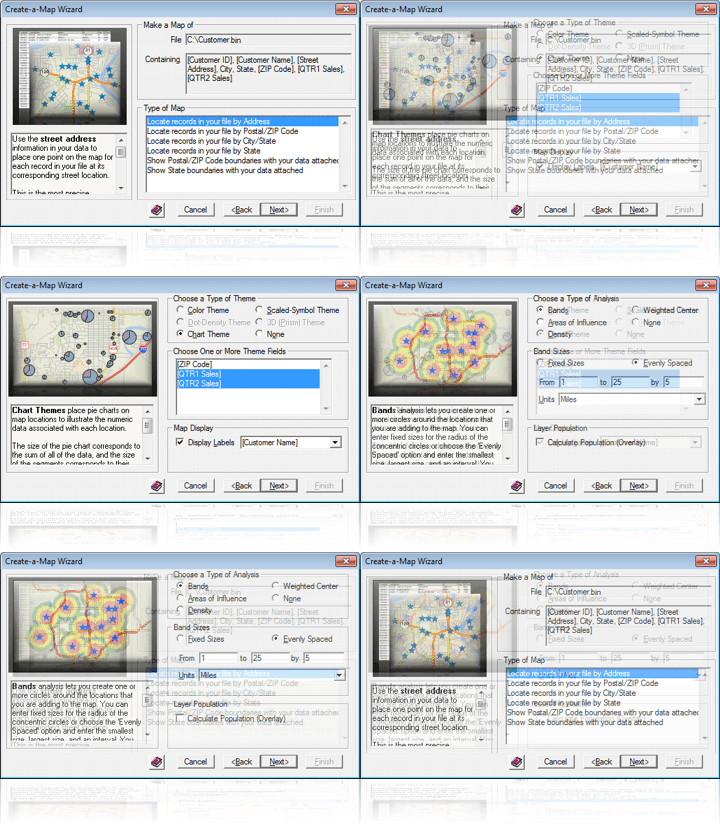
Create-a-Map Wizard is now more robust and easier to use than ever. When you map your own data, each step includes images and descriptive text for the various options so that you can understand and envision what each step will accomplish and determine what is best for your particular project.
The Create-a-Map Wizard maps display the latest geography and use the extensive style improvements of Maptitude 6.0 allowing you to quickly create professional and attractive maps.
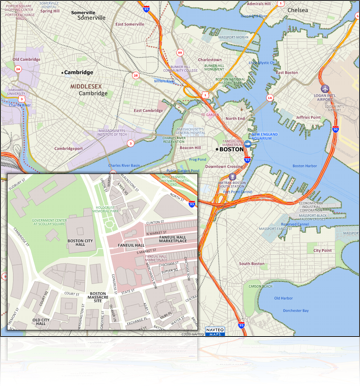
New U.S. data sets provide access to up-to-date geographic information. Maptitude now includes a 2010 NAVTEQ® map, allowing accurate address locating and street visualization, plus robust data on which to calculate shortest paths, network bands, and network partitions.
 Other new U.S. layers
from NAVTEQ® include building footprints for many urban locations,
highways, railroads, and landmarks. The Points of Interest
layer contains over 2 million named locations that range from public
facilities to commercial buildings including shops, restaurants, and
retail stores.
Other new U.S. layers
from NAVTEQ® include building footprints for many urban locations,
highways, railroads, and landmarks. The Points of Interest
layer contains over 2 million named locations that range from public
facilities to commercial buildings including shops, restaurants, and
retail stores.
Maptitude ships with the latest quarter of ZIP Code® updates, ensuring that you are using the latest data. The 5-digit ZIP Code boundaries are a nationwide area database with ZIP Codes for all 50 states, the District of Columbia, Puerto Rico, and the territories. There is an updated point database of ZIP Code centroids for the entire country and 3-digit ZIP Code areas. The ZIP Code area layers now extend into non-deliverable areas, providing complete coverage of the continental U.S.
All of the 2010 US Census boundaries that are included with Maptitude, plus 3- and 5-digit ZIP Code areas, contain several demographic profiles based on the data reported in the 2010 Census and the American Community Survey.
Maptitude 6.0 has one of the most sophisticated labeling engines of any mapping software on the market. A complete overhaul of label handling for Maptitude 6.0 provides significantly improved label drawing performance. The automated "Smart Alignment" feature reduces label conflicts by intelligently placing labels around, along, and inside map features, while maximizing the number of items for which a label is displayed.
You can move, call out, rotate, and change the style of individual labels. Labels can also utilize effects such as halos, shadows, multi-line coloring, and transparency.
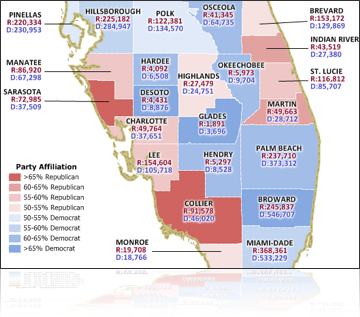
The Display Manager is an indispensable tool for working with multi-layered maps. You can directly control the style, visibility, and label settings for all of the layers, selection sets, and feature display settings in a map.
Maptitude 6.0 improves on the Display Manager by providing:
The visual capabilities of Maptitude 6.0 are considerably enhanced through the use of the latest Windows graphics framework. The benefits in the interface are widespread and encompass everything from displaying and printing maps, to exporting graphics. Building on these new capabilities, Maptitude supports many enhanced map styling and output features including:
It is now easier than ever to create high-quality maps and incorporate them into other documents and even to modify them with vector-based graphics software.
 Territory Tools
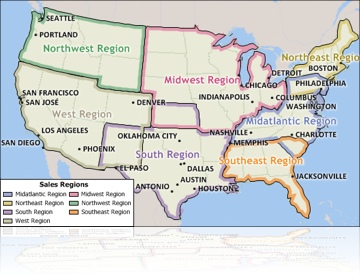
In Maptitude 6.0 it is now possible to create overlapping territories or territories based on streets.
There is a new Wizard for importing your state, county, or ZIP Code data directly into a new territory layer. The tool can also create your districts based on selection sets. Further, the districts you create can be non-topological and overlap in as many places as required, and can be visualized using a new edge-based color theme.
Your territories can be stored natively in Maptitude or in formats including Shapefile, Oracle Spatial, or SQL Server Spatial. These districts can also be manipulated, or created from scratch, using the new non-topological editing capabilities.
The new street-based territory creation tool provides advanced zone creation capabilities. You can create districts around locations based on the time or distance it takes to travel along roads. Such districts can be weighted by the size of the facility, the number of clients, or the amount of revenue, ensuring that the most successful locations proportionately dominate smaller ones.
Maptitude has a robust suite of tools for locating point data on a map (often called geocoding or pin-mapping). This functionality is included with every copy of Maptitude, and does not have any limits on the number of records that can be located. Several improvements have further refined these tools, not the least of which is better U.S. address and postal match rates based on the latest 2010 NAVTEQ map address and Caliper ZIP Code data.
Maptitude is a powerful relational database in its own right. This functionality is now much stronger because of new capabilities for non-aggregate joins. In addition, to better manage large tables such as the demographic datasets shipped with the product, filter buttons are included at almost all instances where you are required to choose a field.
Maptitude 6.0 extends its comprehensive support for geographic and tabular data by adding the following file types:
Listed here are a few more of the many enhancements in Maptitude 6.0. For a complete overview of the new features, please download the New Features Brochure:
Imagery: Accessing and visualizing image layers is a core aspect of the new capabilities provided with Maptitude 6.0. Maptitude now supports several open and international standards and handles auxiliary layer information.
Drawing: There is a new toolbar that groups the new and existing freehand drawing tools into a single location in the interface.
Help: Maptitude continues to offer numerous ways to get you started with the software. There is a brand-new extended tutorial to familiarize you with the most common features in Maptitude, along with new and revised 60-second tutorials, and training videos. The 60-second tutorials and training videos are also now included in the online help.
System: Maptitude 6.0 supports the latest Windows operating systems (including Windows 7), file types, and common design elements.
Projections/Datums: Support for European datums (Germany, France, Spain, and Switzerland) has been expanded, as has the ability to convert between other international datums.
Geographic Information System Developer's Kit (GISDK): The GISDK includes many new functions, including vector handling commands, improved progress bar calls, and Microsoft .NET Framework integration.
Click here to see features new to version 5.0.
Home | Products | Contact | Secure Store
 Call Us

