Maptitude Help / Filters, Queries, and Selection Sets
Filters, Queries, and Selection Sets
Maptitude provides many tools for asking and answering questions about the features in a map and the data in a dataview. These filter tools answer three types of queries:
• Location questions: “Which customers live within five miles of a store?”
• Attribute questions: “Which ZIP Codes have a median household income over $75,000?”
• Combination questions: “Which parcels are over 1/4 acre and located within 1/3 mile of a school?”
Maptitude stores the filtered answers to your questions in a selection set, and illustrates the answer by highlighting features in the selection set on the map and in the dataview as shown here:
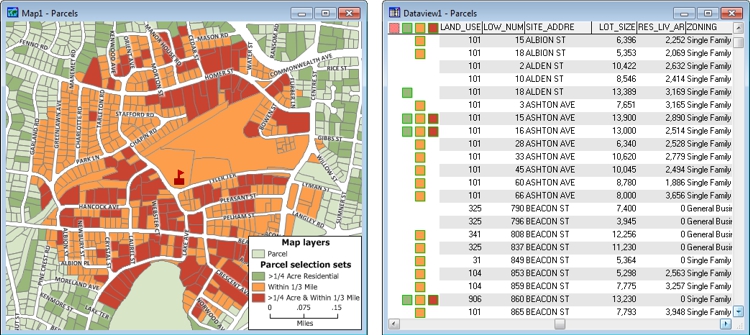
 |
For a video tutorial see: (Internet connection required) |
Topics in this section:
- Asking Questions
- Selection Set Basics
- Selecting Features with the Selection Tools
- Selecting Features by Location
- Selecting Features Based on Attributes
- Selecting Features in a Map Window
- Creating Selection Sets from a Theme
- Selecting Features Based on Adjacency
- Copying, Combining, and Transposing Selection Sets
- Showing Selection Sets on a Map
- Showing Selection Sets in a Dataview
- Creating New Files from Selection Sets
©2026 Caliper Corporation