



Author: Stewart Berry
5 November 2025
Free mapping software has come a long way, offering powerful Geographic Information System (GIS) capabilities without the hefty price tag. In 2025, there are numerous free GIS tools available, some of which can even rival expensive commercial platforms in functionality. These tools enable everyone from students and hobbyists to professionals on a budget to create maps, analyze spatial data, and visualize geographic information.
However, with so many options, choosing the right free mapping software can be challenging. Before deciding, it’s important to consider what features each tool offers, as well as its advantages and limitations. To help you make an informed choice, we’ve compiled a list of the top 10 free GIS mapping software tools for 2025, highlighting key features, pros, and cons of each.
Choosing a free GIS program means balancing functionality, ease of use, and community support. Each of the following tools provides unique capabilities for mapping and spatial analysis without direct costs. Here are the ten best free mapping software options in 2025, along with their highlights, positives, and negatives:
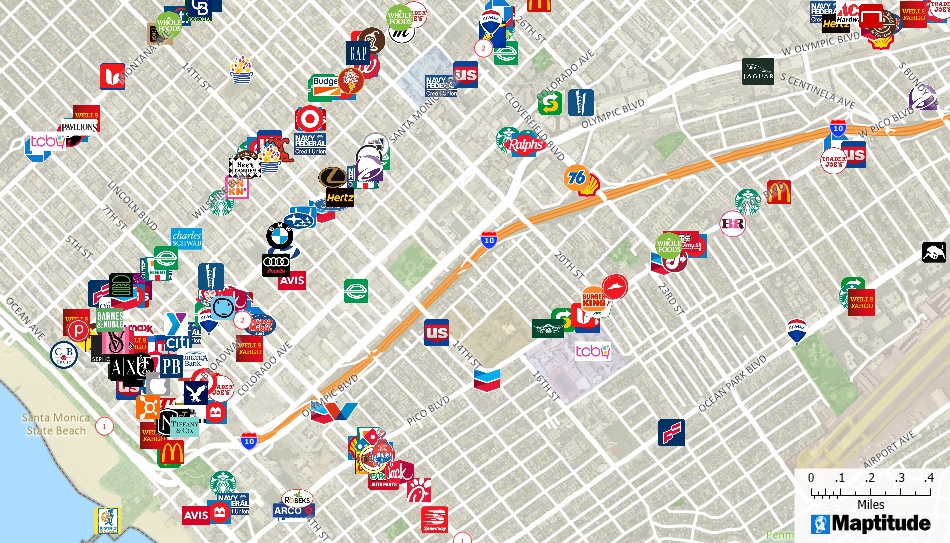
Image © Caliper Corporation. Used with permission from the official Maptitude website.
In 2025, Maptitude added major updates to territory management, data sharing, visualizations, and logistics analytics.
Overview: A full-featured professional GIS that's free for students and educators, and available as a fully functional free trial for others. It includes mapping, routing, territory creation, and spatial analysis tools with rich built-in datasets.
Pros:
Cons:
Ideal for:
Professionals or organizations needing a complete, data-rich mapping and analysis suite with a free trial option.
Detail:
Maptitude is a full-featured professional GIS and mapping software that is free for students and educators. For everyone else, while commercial, Maptitude has the lowest price on the market and offers a fully functional free trial period. It’s designed for businesses and users who need powerful mapping, spatial analysis, and data visualization tools.
In 2025, Maptitude introduced significant updates, including enhancements to territory management, data sharing, visualizations, and logistics analytics: making it one of the fastest and most intuitive mapping applications available. A standout benefit of Maptitude is that it comes bundled with extensive built-in data (such as demographics, traffic counts, and business locations) right out of the box. This means you can start creating meaningful maps and analyses immediately, without hunting for base data. The software provides an all-in-one solution with features for mapping, unlimited geocoding, routing of as many stops as you want, territory mapping, and more, all accessible through an easy-to-use interface. There are no extra charges for credits, with access to all features of the software at no additional cost.
Because of its comprehensive capabilities and user-friendly design, Maptitude is often regarded as the top choice for professionals who need reliable results quickly. And importantly for this list, the Maptitude free trial gives you full access to these premium features at no cost, allowing you to evaluate its capabilities before committing.
 |
“If you're still not sure how easy Maptitude is to learn, take advantage of the free trial. Within an hour of install you will be performing trade area analysis and producing maps that will impress your clients or boss.”
|
 |
“I work with Maptitude on a daily basis for mobility and transport data analyses. Maptitude in its ease of use is undoubtedly the most powerful and feature-rich GIS. Thematic maps are truly unique in terms of graphic capabilities and data representation, highly appreciated by customers. With a low cost combined with an excellent training program and support service, Maptitude is an added value for my business!”
|

|
“Maptitude contains nearly all of the functionality of other GIS software without nearly as many headaches.”
|

QGIS screenshot. Wikimedia Commons.
The 2025 QGIS 3.x release introduced new plugins and improved data format support.
Overview: A leading open-source GIS offering comprehensive map creation, editing, 3D visualization, and analysis tools for Windows, Mac, and Linux.
Pros:
Cons:
Ideal for:
GIS users seeking a powerful, extensible, and community-supported mapping platform.
Detail:
QGIS (Quantum GIS) is arguably the most popular open-source mapping software and has become a cornerstone of the free GIS ecosystem. Now in its 3.x series, QGIS is loaded with professional-grade features for map creation, data editing, geospatial analysis, and cartographic design. It runs on Windows, Mac, and Linux, making it accessible to virtually all users. QGIS’s strength lies in its extensibility and community support: there are hundreds of plugins available to add specialized functionality, from geoprocessing tools to routing and remote sensing.
Recent updates in 2025 have further improved QGIS’s versatility. For example, new plugins and better support for various data formats were introduced, enhancing its functionality and performance. QGIS is one of the few free tools that can truly compete with commercial GIS suites like Esri’s ArcGIS Pro in terms of breadth of features. It also offers advanced capabilities such as 3D visualization, spatial database connectivity, and an integrated Python API for automation and customization.

"GRASS GIS screenshot (SRTM void filling)." Wikimedia Commons
Originally developed by the U.S. Army Corps of Engineers, GRASS remains a trusted analytical GIS used by major research agencies.
Overview: A mature, open-source GIS providing 350+ modules for raster, vector, and terrain analysis that is ideal for environmental and scientific modeling.
Pros:
Cons:
Ideal for:
Researchers and analysts performing scientific, environmental, or terrain-based modeling.
Detail:
GRASS GIS (Geographic Resources Analysis Support System) is one of the oldest open-source GIS projects, originally developed by the U.S. Army Corps of Engineers and now maintained under the Open Source Geospatial Foundation. GRASS is known for its powerful geospatial analysis and image processing capabilities. It provides over 350 proven modules for raster and vector data manipulation, spatial modeling, terrain analysis, and statistics. This makes GRASS a favorite in academia and among environmental science agencies like NASA, NOAA, and USDA who have used GRASS for its reliability in analytical workflows. The software has an intuitive (though somewhat dated-looking) GUI, but many users also take advantage of its scripting interface for automation. GRASS GIS is excellent for tasks like land cover analysis, hydrological modeling, and satellite image processing. It can be used as a standalone application or in conjunction with QGIS (which can call GRASS tools via a plugin).

"Whitebox GAT screenshot." Wikimedia Commons
Created in 2009, Whitebox GAT offers 410+ tools and remains a top choice for hydrological and LiDAR data analysis.
Overview: An open-source geospatial analysis platform focused on terrain, hydrology, and laser-scanning data processing.
Pros:
Cons:
Ideal for:
Environmental scientists and analysts needing advanced hydrology or LiDAR capabilities.
Detail:
Whitebox GAT (Geospatial Analysis Toolbox) is a relatively young open-source GIS (first released in 2009) that has gained a strong reputation in specialized areas of geospatial analysis. It is a Swiss-army knife for geospatial data processing, with over 410 tools for clipping, converting, analyzing, and extracting information from spatial data. Whitebox is particularly renowned for its hydrological analysis and LiDAR data processing capabilities. In fact, it evolved out of a hydrology-focused project (Terrain Analysis System) and excels at tasks like watershed delineation, flow path modeling, and processing laser scanning (LiDAR) datasets. For example, Whitebox’s LiDAR toolbox offers handy tools (such as converting LAS point clouds to shapefiles) that GIS analysts find extremely useful. The interface of Whitebox GAT is clean and geared towards analytical workflows. It’s actively maintained and available as a library (Whitebox Tools) that can be used in Python or other environments, which extends its versatility.

"GeoDa interface." Wikimedia Commons (free license per file page).
Developed at the University of Chicago, GeoDa simplifies spatial data exploration and statistical modeling.
Overview: A free, easy-to-learn spatial statistics tool used in education and research to explore geographic relationships and clusters.
Pros:
Cons:
Ideal for:
Students and researchers exploring spatial relationships or teaching geographic data analysis.
Detail:
GeoDa is a free, user-friendly software tool designed to introduce people to spatial data analysis. Developed originally by researchers at the University of Chicago, GeoDa is not a full-range GIS for map production or complex geoprocessing; instead, it specializes in techniques for exploring data geographically and performing statistical analyses. GeoDa comes with a gentle learning curve and even includes sample datasets so new users can practice and learn with real data. It offers a range of statistical tools, from simple descriptive statistics and box plots to advanced methods like regression analysis and cluster detection, all within a spatial context. Many universities (such as Harvard, MIT, and Cornell) have used GeoDa in teaching to help students grasp the fundamentals of spatial analysis. If your main interest is analyzing patterns, relationships, or trends in location-based data (for example, looking at geographic correlations in socio-economic data or disease incidences), GeoDa provides an accessible platform to do so.

"OpenStreetMap homepage" © OpenStreetMap contributors, ODbL. Via Wikimedia Commons
In 2025, OSM data coverage and accuracy improved further thanks to continued global community contributions.
Overview: A collaborative, open-data map of the world that anyone can edit or use freely, often integrated with GIS applications.
Pros:
Cons:
Ideal for:
Users seeking free, editable map data for custom mapping or open-data projects.
Detail:
OpenStreetMap (OSM) is a bit different from the other tools on this list: it’s not a single software package, but rather a free, open-source, community-driven mapping platform and geospatial database. Often called “the Wikipedia of maps,” OSM provides detailed, user-contributed maps of the entire world. Millions of volunteers globally contribute to OpenStreetMap by adding and updating features like roads, buildings, parks, and more. The result is a rich, up-to-date map dataset that anyone can use freely.
For 2025, OSM has continued to grow with significant contributions, making its data more accurate and comprehensive than ever. You can interact with OpenStreetMap via its website (for basic viewing and editing) or through various third-party applications and GIS software that leverage OSM data. Many free mapping tools (including some on this list such as Maptitude) allow you to import OSM base maps or data. Using OSM, you can also create custom maps for web or print, or perform analyses if you extract the data. It’s especially valuable for projects that require up-to-date local geographic information without licensing fees.

"uDig screenshot." Wikimedia Commons (CC BY-SA: attribution & share-alike).
uDig emphasizes simplicity and supports online GIS protocols like WMS and WFS across major platforms.
Overview: A lightweight, open-source desktop GIS offering an approachable environment for viewing, styling, and basic spatial analysis.
Pros:
Cons:
Ideal for:
New GIS users needing straightforward tools for viewing and light mapping.
Detail:
uDig (User-friendly Desktop Internet GIS) is an open-source GIS application aimed at providing a straightforward, lightweight mapping experience. As its name suggests, uDig emphasizes a user-friendly interface and has strong support for internet GIS protocols. It runs on Windows, Mac, and Linux. The acronym “uDig” actually hints at its design: u for user-friendly, D for desktop (cross-platform), I for internet-oriented (it easily consumes web map services like WMS/WFS), and G for GIS-ready for basic analysis. In practice, uDig offers a clean and simple environment where you can load various data sources (shapefiles, PostGIS databases, WMS layers, etc.), style maps, and perform modest analysis. It uses the GeoTools rendering engine and the Eclipse Rich Client Platform for its interface. uDig is often praised for being approachable, especially for those who don’t need the full complexity of QGIS. It’s a good option for basic mapping projects or as a viewer for GIS data.

"gvSIG screenshot." Wikimedia Commons (CC BY 2.5 / GFDL / CC BY-SA 3.0)
Originating from Spain, gvSIG includes 2D/3D visualization, CAD tools, and gvSIG Mobile for Android.
Overview: An open-source GIS with advanced visualization, editing, and field-data collection capabilities.
Pros:
Cons:
Ideal for:
GIS professionals needing 3D, CAD, or mobile data collection in an open-source environment.
Detail:
gvSIG is a professional-grade open-source GIS originating from Spain. It offers a broad set of GIS capabilities, including 2D and 3D visualization, and even a mobile GIS application for field data collection. gvSIG has often been highlighted as an underrated alternative in the free GIS arena, as it packs quite a few advanced features. For example, gvSIG includes a robust set of CAD-like editing tools (via its OpenCAD Tools extension) that allow for precise drawing and editing of spatial data. You can snap, split, and modify geometries in ways similar to CAD software. It also provides a table interface called the NavTable that lets you scroll through attribute tables record by record in a user-friendly way. The 3D capabilities enable viewing and navigating terrains and city models, adding an extra dimension to analyses. Moreover, gvSIG Mobile is available for Android, which is quite useful for GIS data collection and viewing on the go. The gvSIG project has a strong international user base and is known for hosting an annual conference.

"MapWindow GIS screenshot." Wikimedia Commons (free screenshot of FOSS: see file page license)
MapWindow 5, the current version, is a .NET-based Windows GIS offering core tools and plugin flexibility.
Overview: A free, open-source desktop GIS providing essential mapping, editing, and analysis features with extendable plugins.
Pros:
Cons:
Ideal for:
Windows users needing a lightweight GIS with extendable analytical tools.
Detail:
MapWindow GIS is a free and open-source desktop GIS that is particularly popular among Windows users. (As the name implies, it was originally built for Windows; the current MapWindow 5 is a .NET-based application.) MapWindow was once a proprietary product that became open-source through a U.S. EPA initiative, and it has since evolved into a capable lightweight GIS platform. The latest version, MapWindow 5, provides a user-friendly interface for viewing and editing spatial data, and it covers about “90% of what GIS users need” for everyday mapping tasks. You can perform basics like adding data layers, styling maps, identifying features, and printing layouts. MapWindow also shines in its extensibility: it has a plugin architecture and has incorporated specialized tools such as TauDEM (for automated watershed delineation and hydrological analysis) and HydroDesktop (for discovering and managing water data). These and other plugins (like DotSpatial for developers) allow users to add specific functionalities as needed, making MapWindow a flexible option for those who might want to customize or extend their GIS.

"SAGA GIS screenshot." Wikimedia Commons (GPL / free screenshot: see file page)
Initially designed for terrain analysis, SAGA GIS continues to evolve as a core geoscientific GIS platform.
Overview: A free, open-source system optimized for terrain, hydrology, and environmental modeling, often used alongside QGIS.
Pros:
Cons:
Ideal for:
Scientists and GIS professionals focused on geospatial modeling, terrain, or climate data analysis.
Detail:
SAGA GIS (System for Automated Geoscientific Analyses) is a free, open-source GIS that has gained popularity especially in the environmental science and geoscience communities. As the name indicates, SAGA was initially developed with a focus on terrain and geospatial analysis: tasks like digital elevation model (DEM) processing, hydrological modeling, and climate data analysis. It provides a fast and comprehensive set of geoscientific methods, and over the years it has expanded into a more general GIS tool.
SAGA’s interface allows multiple windows (maps, histograms, scatterplots, etc.) for simultaneous analysis views, and it offers both a GUI and an API, which makes it scriptable for power users. Unique algorithms in SAGA include things like its own topographic wetness index computation, terrain ruggedness measures, and other specialized raster analysis tools. Many users employ SAGA in conjunction with other GIS software: for example, QGIS can call SAGA algorithms through its processing toolbox, effectively using SAGA as a behind-the-scenes engine for heavy analysis. SAGA is known to be quick and efficient in processing, and it continues to be updated by a community of researchers and developers.
Not all free GIS tools are equal. Evaluating features carefully will help you choose software that fits your data, goals, and workflow. These are the essential factors to consider and how our number one choice Maptitude compares as a complete professional alternative.
Free GIS tools can be powerful, but the right one depends on your goals, data, and experience level. Here is how they compare and why many users eventually move to Maptitude for a complete professional solution.
If you are new to GIS, look for simplicity:
These are excellent starting points, but their capabilities are limited compared to professional tools such as Maptitude, which provides the same simplicity with far greater analytical depth.
For all around mapmaking and analysis:
These tools are suitable for users who enjoy exploring plugins and managing data manually. For those who want a single reliable system that simply works, Maptitude combines map design, data editing, and analysis in one seamless environment without the need for plugins or scripting.
Researchers and data scientists often prefer:
These are powerful analysis platforms but not ideal for presentation or business use. You may also mix tools for best results, for example process LiDAR in Whitebox and finish cartography in QGIS. Maptitude excels at vector data handling with polished visualizations and complete data packages so you can move effortlessly from raw data to professional results.
For collaborative or open data mapping
These free tools serve NGOs and civic mappers well but require more setup and manual data work. Maptitude includes detailed worldwide data such as streets, demographics, and business listings ready for immediate use with no configuration required.
Free projects vary in consistency:
For ongoing performance, dedicated support, and guaranteed compatibility, Maptitude delivers a commercially maintained system with continuous development, technical assistance, and regular data updates that keep your work secure and reliable.
Free GIS tools are excellent for learning and experimentation. Yet when you need greater power, deeper data integration, or professional presentation, Maptitude provides everything in one complete mapping solution.
You can try Maptitude at no cost through a free trial or a personal demo. The trial gives full access to every feature, including thematic mapping, drive time analysis, routing, and territory management, all within an intuitive interface. Many teams rely on Maptitude for market analysis, site selection, and transportation planning.
Students and educators can also request a free one-year educational license, making Maptitude ideal for research, teaching, and academic projects.
Try Maptitude for free today and experience how its comprehensive tools enhance spatial analysis, planning, and decision making. Whether you are managing a business expansion, analyzing markets, or conducting research, Maptitude gives you everything you need to create accurate and meaningful maps with confidence.
Free Trial Request a Demo Buy Now



Home | Products | Contact | Secure Store
 Call Us

