Drive Time Radius Maps & Analysis – Calculate Travel Time with Maptitude

Travel time is the most realistic way of describing market areas and access to services. A franchise may want to define their territories based on the time required to reach their customers. Emergency services may want to map their response time coverage for an area. The drive-time zones tool in Maptitude supports these types of analysis based on the creation of realistic catchment areas, and with a single click can create a professional demographic report.
Free Trial Request a Demo

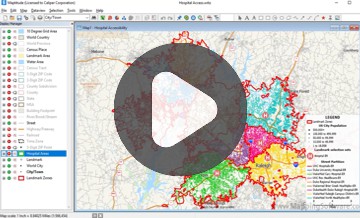
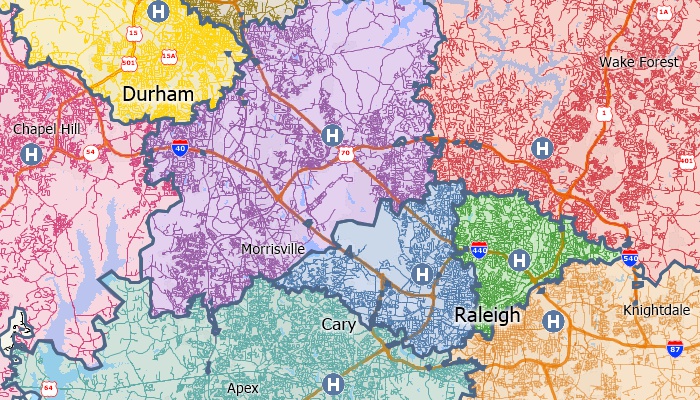
Maptitude map of territories around hospitals based on drive-time

The territories in this map are based on the drive-time to the nearest hospital

Use Maptitude to create drive-time rings and determine which areas can be accessed within a particular drive-time or drive-distance. You can also calculate the market characteristics and demographics around your locations, and estimate the duration of services such as repair or delivery calls. You will also be able to better describe the convenience of your locations in terms of time rather than as a crude straight line measurement. For a facility, you can better identify potential customers within five minutes rather than within two miles. Takeout delivery businesses can quickly determine those destinations within their drive-time trade/service areas.
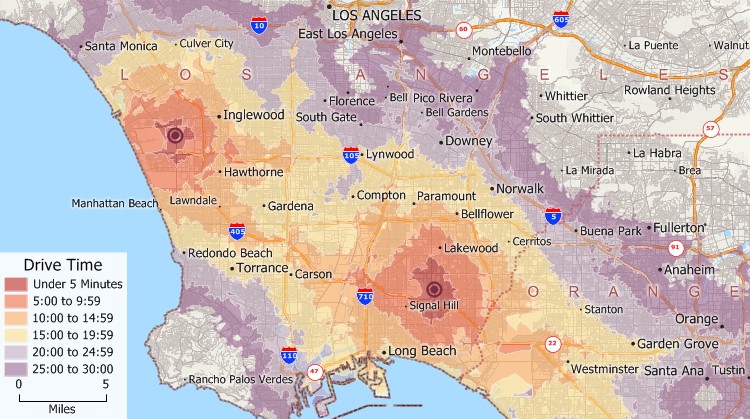
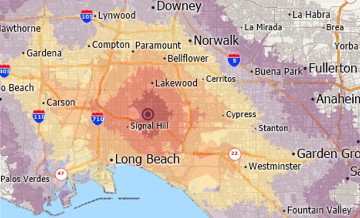
Maptitude map of drive-time rings around stores

Drive-time rings in 5-minute intervals from two locations in greater Los Angeles

Free Trial Request a Demo

On this page:

Why Choose Maptitude for Drive Time Mapping

Whether you're managing franchise territories, optimizing delivery zones, or analyzing customer access to services, Maptitude gives you the insights needed to make informed, location-based decisions.

Drive Time Mapping Features

  • Accurate Drive-Time Zones: Generate realistic catchment areas using actual road networks and speed limits—not just straight-line distances.
  • Demographic and Market Analysis: Analyze population, income, and other key demographics within your drive-time zones.
  • Route and Service Planning: Estimate travel times for deliveries, service calls, or emergency response.
  • Location Convenience Analysis: Identify the true accessibility of your locations based on time, helping you better understand customer behavior.
  • Business Applications: Perfect for franchises, healthcare providers, logistics companies, and any organization that depends on location data.

With Maptitude, you can visualize and understand your market in terms of travel time, not just geography, ensuring better planning, improved service, and more effective outreach.

Free Trial Request a Demo

Use Cases for Drive-Time Radius Mapping

Maptitude supports a wide variety of drive-time mapping applications across industries by turning location data into clear strategies by showing who you can reach and how quickly you can get there. Common use cases include:

  • Franchise Development: Define exclusive territories based on customers reachable within specific drive-time zones—ensuring no overlap and maximum coverage.
  • Retail Site Selection: Identify underserved trade areas and evaluate store locations based on real-world customer accessibility, demographics, and travel time.
  • Logistics & Delivery Planning: Create realistic service areas and optimize delivery routes to reduce costs and improve turnaround times.
  • Emergency Response Coverage: Map and assess response zones from fire stations, hospitals, and law enforcement facilities to improve safety and reduce delays.
  • Healthcare Accessibility: Evaluate how far patients travel to reach medical services and uncover regional gaps in healthcare availability.
  • Field Service Dispatch: Assign technicians based on real-time proximity to job sites, improving service efficiency and customer satisfaction.
  • School District Planning: Design bus routes and school boundaries using accurate drive-time data to improve operational efficiency and safety.
  • Event Planning & Marketing: Reach potential attendees within defined travel-time zones for venues, pop-up shops, or marketing campaigns.

How to Create Travel Time Maps with Maptitude

With Maptitude, you can build detailed, insightful, and accurate drive-time maps in just a few clicks, with no GIS expertise required. Follow these steps to get started:

  1. Choose Your Location(s): Select one or more origin points, such as stores, offices, hospitals, or service hubs.
  2. Set Drive-Time Parameters: Choose travel time intervals (e.g., 5, 10, 15, or 30 minutes) or opt for drive-distance zones instead.
  3. Generate Drive-Time Rings or Zones: Maptitude calculates realistic reach areas using real-world road networks, speed limits, and traffic data.
  4. Overlay Geographic and Market Data: Add demographic layers, customer addresses, competitors, or business metrics for deeper insight.
  5. Customize Your Map: Style your drive-time zones with branded colors, labels, and boundy styles.
  6. Export and Share: Save your maps in various formats (PNG, PDF, GeoJSON, etc.), or include them in reports, presentations, or territory plans.

With Maptitude, you can create travel-time catchment areas in minutes, covering ZIP Codes, counties, and local regions, backed by high-precision analytics used by professionals worldwide.

Free Trial Request a Demo

Testimonials: How Organizations Use Maptitude for Drive Time Mapping

Selecting the right drive time mapping software can be challenging. Fortunately, Maptitude stands out as the top choice for organizations needing drive time analysis, radius mapping, and travel time insights. See how businesses and professionals successfully leverage Maptitude for smarter location-based decisions:

Kellye Martin

“I have access to traffic counts, local businesses, demographic information, drive times, and aerial imagery, all at the tips of my fingers. The program is easy to use, as well.”

Kellye Martin
Coast Realty Associates
Providence, Rhode Island
Louis-Andre Dehaye

“Maptitude has all kinds of nice features. Routing and drive-time radius are by far the greatest.”

Louis-André Dehaye
Sobeys
Montreal, Quebec
David Wuenschell

“Best Mapping software available. Exceeded our expectations. Provides clear maps with plenty of customization to tailor our maps to fit our clients' needs. Excellent drive-time mapping and very simple customer database plotting.”

David Wuenschell
Tribal Knowledge Marketing
Chicago, Illinois

Try an Interactive Drive-Time Map

This interactive drive-time map lets you see the median income for U.S. ZIP Codes and proximity to major U.S. airports.

Create your own driveing time maps! Try the full-featured version of Maptitude with a 1-month risk-free trial. No credit card is required.

Get Started with Maptitude Drive-Time Maps

Learn more about Maptitude mapping software to see how you and your team can benefit from driving time mapping!

Free Trial Request a Demo

Maptitude Mapping Software Logo
G2 ReviewsCheck out our G2 Reviews
4.7/5 of 141 reviews
4.7 stars

Related Articles

Find Us 1172 Beacon St., Suite 300
Newton MA 02461 USA

Home  |  Products  |  Contact  |  Secure Store

Copyright © Caliper Corporation