



Author:
Stewart Berry
26 November 2025

When it comes to transportation and logistics, using the best free route planning software is key to saving time, fuel, and operational costs. Today’s route optimization tools and free route planners with unlimited stops have transformed how businesses and individuals plan multi-stop journeys. Whether you’re managing deliveries, planning sales routes, or organizing road trips, the right route planning software can make all the difference.
Many applications make claims of being free, while also having unlimited stops. A quick look at their pricing and documentation shows that none live up to these claims. Maptitude is the only product that comes even close, with a 30-day free trial, and the most flexible routing and stop limits that do not incur additional costs.
| Product | Stops Per Route | Total Stops | Geocoding Limits/Costs |
|---|---|---|---|
| Maptitude | 1,000 per route | Unlimited routes | No limits, no fees |
| Google Maps | 10 | No specific limit (10 per route) | API quotas apply |
| HERE WeGo | Multiple stops supported | No specific limit | Free app, but commercial API has limits/costs |
| OpenStreetMap | Varies by integration | Unlimited | Max 1 req/sec, systematic use forbidden |
| Circuit | 10 (free), Unlimited (paid) | Unlimited routes | Included in paid plans (uses commercial APIs) |
| RouteXL | 20 (free), up to 200 (paid) | Unlimited routes | Free tier limited/unreliable, paid uses premium APIs |
| Bing Maps | 25 | 25 per route | API usage limits and costs apply |
| Route4Me | 10 (mobile free), Unlimited (paid) | Unlimited (paid) | Included in paid plans (usage limits exist) |
| OptimoRoute | No per-route limit | HARD CAP: 700 (Lite) or 1000 (Pro) stops total across ALL routes | Included in paid plans |
| Mapbox | 12 (Optimization API v1) | Depends on API tier | Pay per geocode after free tier exhausted |
| FarEye | Varies (enterprise) | Enterprise-level | Enterprise pricing (undisclosed) |
| Waze | Not optimized for multi-stop | N/A | No geocoding API |
| Badger Maps | Up to 120 per route | Varies by plan (has limits) | Must pay for geocoding/data services |
| Maptive | 73 stops (25 locations) | Limited by plan | Uses Google API (10/sec, subject to quotas/billing) |
Notes:
Professional route planning requires understanding capacity constraints that directly impact operations:
Stops Per Route: The maximum destinations per route varies significantly across platforms. Google Maps limits routes to 10 stops, though workarounds can extend this to approximately 25 stops. RouteXL offers 20 stops on its free plan. Circuit Route Planner provides 10 stops free, with unlimited stops on paid plans starting at $20/month. MapQuest supports up to 26 stops. In contrast, Maptitude supports up to 1,000 stops per individual route.
Total Stop Capacity: Some platforms impose hard caps on total stops across all operations. OptimoRoute's Pro plan ($44-49 per driver/month when billed monthly) limits planning to 1,000 orders at once across the entire operation, not per route or per driver. This architectural limitation can constrain growing businesses regardless of fleet size.
Free vs. Paid Options: Free route planners serve personal use but impose restrictions that limit professional applications. Google Maps (10 stops), RouteXL (20 stops free), and Circuit (10 stops free) require paid upgrades for business operations. Many "freemium" platforms advertise free tiers but impose restrictions on geocoding, multi-vehicle support, export options, and daily route caps that make sustained business use impractical.
Address geocoding (converting addresses to map coordinates) carries different restrictions and costs:
Single-Route vs. Fleet Optimization: Consumer navigation apps like Google Maps and Waze handle individual routes only. Professional operations require simultaneous optimization across multiple vehicles, drivers, and depots while balancing workloads, respecting time windows, and accounting for vehicle capacities.
Cloud Solutions with Fleet Features: Route4Me, OptimoRoute, Circuit for Teams, and Routific offer multi-vehicle optimization but charge per driver or per vehicle, causing costs to escalate with fleet size.
Unlimited Fleet Management: Maptitude can optimize unlimited routes across unlimited vehicles simultaneously with no per-driver fees, balancing workloads by time, distance, or capacity while managing multiple depots and vehicle types.
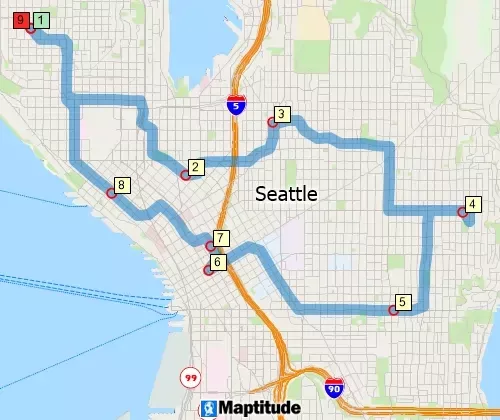
Single route to multiple stops
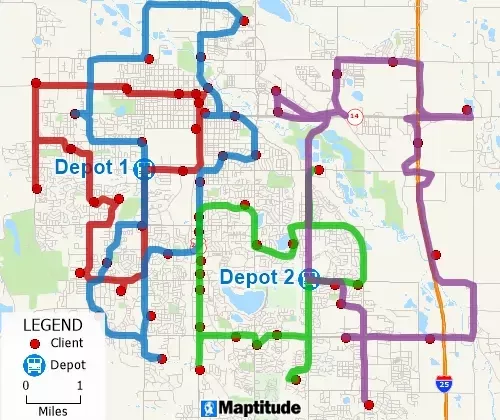
Multiple-vehicle routes respecting vehicle, depot, and store limits
Online/Cloud-Based Solutions:
Offline Capabilities:
Trucks and large vehicles need routes that account for:
Professional solutions like Maptitude, OptimoRoute, and Route4Me offer these capabilities, while consumer apps and basic route planners do not.
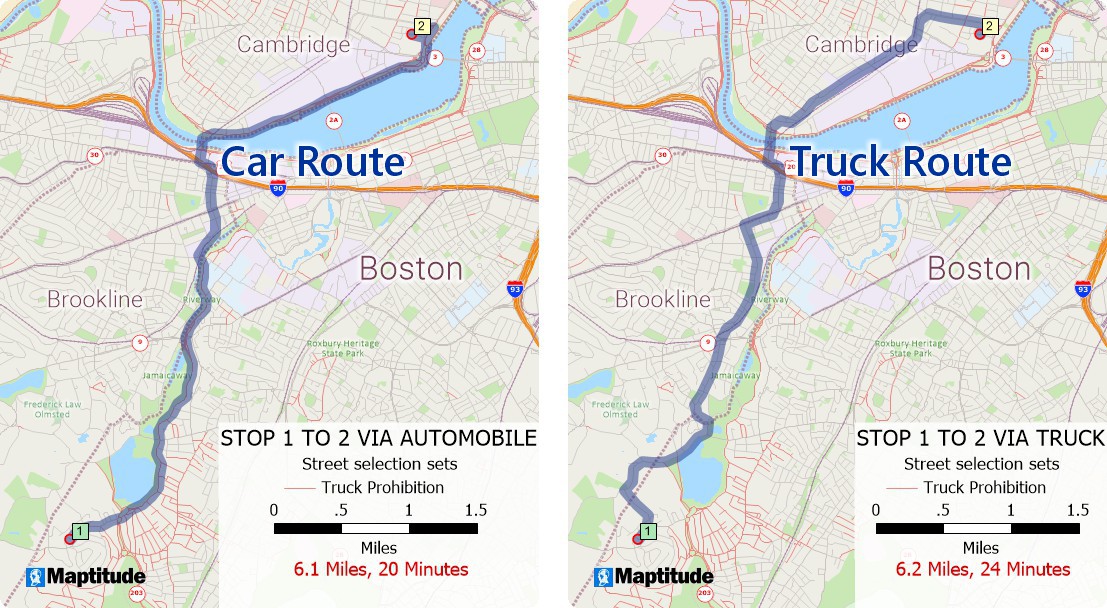
Professional delivery requires:
Free tools and basic planners typically ignore these constraints, generating routes that may be geographically logical but operationally impractical.
Basic Sequencing: Many tools simply arrange stops in geographic order without true optimization.
Professional Optimization: Advanced systems consider traffic patterns, time windows, vehicle capacity, driver schedules, road restrictions, and fuel costs to generate truly efficient routes. The difference between basic sequencing and professional optimization can mean 20-40% more stops completed per day.
Predictable Pricing Models:
Cloud-based solutions often charge per geocode, route calculation, and map tile request. These API fees scale with usage and can total thousands annually. Offline solutions eliminate these recurring costs entirely.
Time Savings:
Fuel Cost Reduction:
Usage-Based Limitations:
Unlimited Growth Potential:
Cloud Solutions:
Local/Offline Solutions:
Cloud Dependency Risks:
Offline Advantage:
Advanced capabilities like commercial vehicle routing, time window management, and multi-depot optimization transform route planning from a basic mapping exercise into a strategic operational advantage. Professional tools help businesses:
For businesses requiring professional routing capabilities, the right software delivers measurable ROI through:
The cost difference between solutions becomes secondary when comparing total capabilities and long-term value. The $695/year flat-rate Maptitude solution with unlimited capacity often delivers superior ROI compared to per-user solutions costing several thousand dollars annually with artificial limitations.
Looking for a top-notch route optimizer? Look no further than Maptitude! Packed with handy features like distance calculators, radius tools, and other analytics, Maptitude is your go-to solution for slashing both time and costs by reducing the number of miles driven and the amount of fuel consumed.
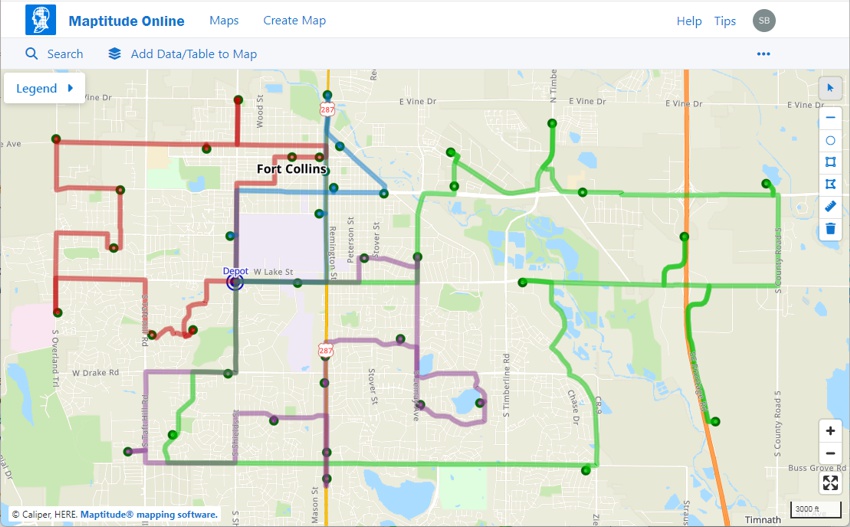
Maptitude is primarily a paid tool, but its 30-day free trial allows users to access its advanced route optimization features, including unlimited stops, multi-depot routing, and traffic considerations. The 2024 updates introduced variable time window handling and Maptitude Online for cloud-based collaboration, reinforcing its position as the best option for businesses.

|
“Using Maptitude to work out the closest members of staff to each store we visit has been incredibly helpful in reducing the travel done by our merchandisers, leading to positive environmental and financial results.”
|
The Maptitude route planner and route optimizer are tailor-made for balancing routes, whether you're managing one vehicle or a whole fleet. It considers crucial factors like historical traffic, time windows, and vehicle capacity to ensure optimal efficiency. Plus, it goes beyond the basics, offering advanced options that outshine simpler tools like Google Maps. Here's what sets it apart:
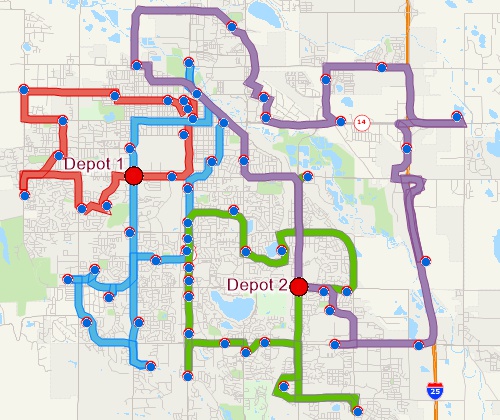
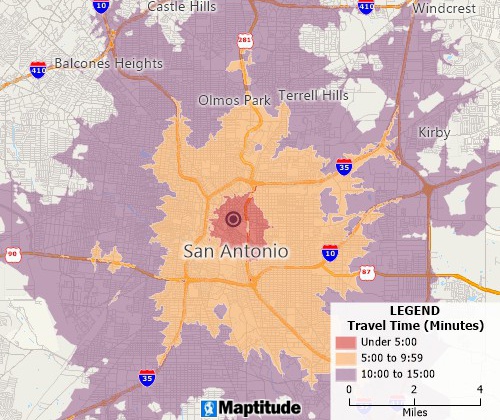
Maptitude considers factors like estimated traffic conditions, delivery windows, and vehicle capacities.
Can be run completely offline, ensuring privacy, connectivity, and minimizing ongoing costs.
Can map an impressive 1000 stops per route.
Can plot/geocode unlimited numbers of addresses with no additional fees.
Multiple optimization options: Optimize routes for factors like distance, time, weight, capacity, fuel costs, and vehicle types.
Multivehicle scheduling: Can simultaneously optimize unlimited numbers of routes with no additional fees.
Can simultaneously optimize multiple origins/depots with multiple vehicle fleets.
User-friendly interface: Has an intuitive Wizard-driven interface with step-by-step instructions.
Provides a 1-month free trial period, with live human and USA-based support.
Optimizes routes for the most efficient trip.
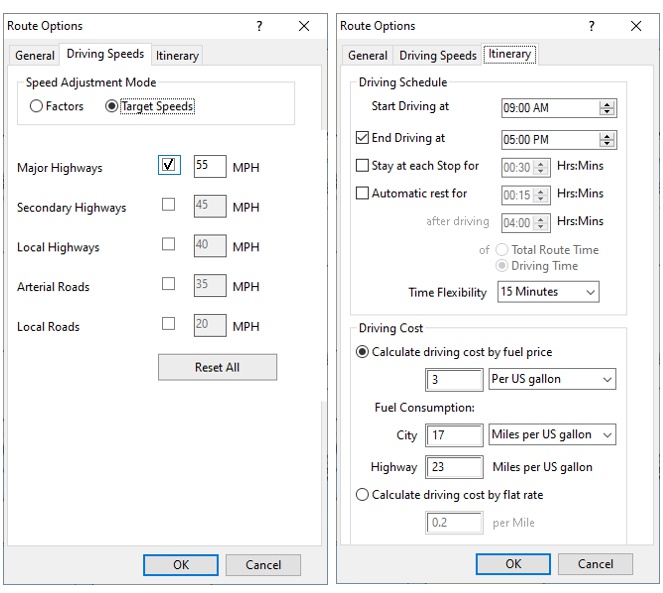
Allows for modification of driving speeds by road type.
Allows for control of schedules, breaks, rests, and costs.
Allows you to compare routes with those calculated in other services such as Google Maps, Bing Maps, and HERE.
Provides comprehensive points-of-interest data such as businesses with logos
Uses commercial grade HERE Maps data.
Provides turn-by-turn direction reports.
Allows choice of map background, including aerial and satellite imagery.
The no-code routing tools can be used immediately and provide the full functionality available for optimizing routes, allowing anyone to perform sophisticated route planning quickly and easily.
The SDK allows you to fully customize how routing is performed when you need integration with your own or other software applications.
Additional features: Maptitude includes a range of features beyond routing, including sales territory management, market analysis, and demographics, enhancing overall efficiency and productivity.

|
“We have found Maptitude to be a really useful piece of software. It allows us to quickly and easily represent various data geographically, and the ease of functionality and ability to layer data makes it really user friendly. It has, among other things, helped us develop our sector-leading delivery service and understand areas that require focus from our sales teams.”
|
Shortest Paths and Routes
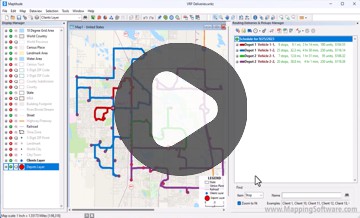
Fleet Routing and Logistics
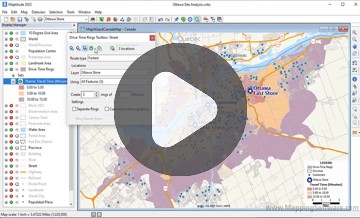
Drive-Time Rings
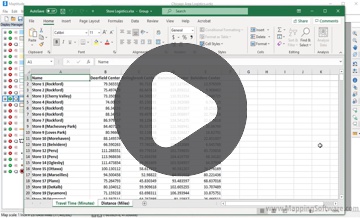
Travel Time Tables
Why It's #1: Professional-grade tools, even during the trial period, make it the most versatile on the list
Google Maps offers intuitive route planning with real-time traffic data and multiple route options. While limited to 10 stops per route, its usability and integration with other Google services make it a go-to tool for basic routing. The 2024 updates introduced sustainable routing and immersive views for improved planning.
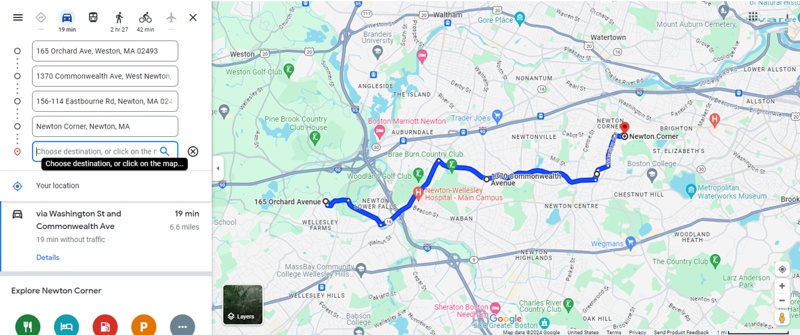
Here's a breakdown of the pros and cons of using Google Maps as a route planner:
Google Maps is a versatile route planning tool that offers a variety of benefits for travelers and commuters. However, it is important to be aware of the limitations of the tool and to take steps to mitigate the risks, such as using offline maps and being mindful of your data usage.
Why It's #2: Accessible and easy to use, but limited stop counts keep it from the top spot
HERE WeGo is a free and unlimited route planner app that offers turn-by-turn navigation and the ability to download offline maps. Developed by HERE Technologies, it is designed for use on both iOS and Android devices.
HERE WeGo is a popular alternative to Google Maps and Apple Maps, as it competes with them in terms of accuracy, speed, and user experience. According to a Medium article, HERE WeGo has over 100 million downloads and 4.4 stars on the Google Play Store. The app is also available on iOS, Windows, and Amazon devices, as well as on the web. HERE WeGo is especially useful for travelers, as it covers over 200 countries, and supports multiple languages. The app also allows users to book taxis, car rentals, and bike shares directly from the app, making it a convenient travel companion.
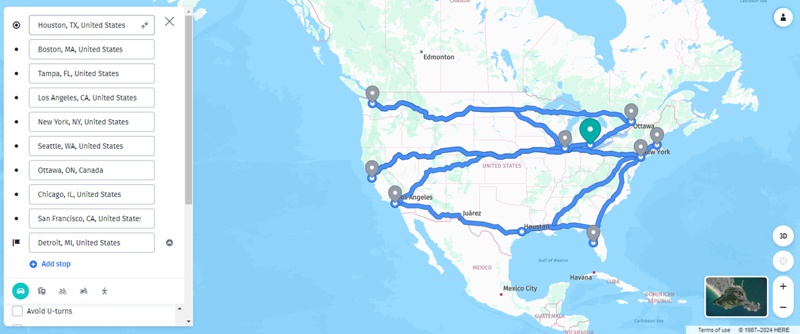
Using HERE WeGo as a route planner or optimizer comes with its own set of advantages and disadvantages:
HERE WeGo excels in providing free multi-stop routing and offline navigation, making it ideal for users without consistent internet access. Its 2024 updates improved offline functionality and public transportation data.
Why It's #3: Offline functionality gives it a unique advantage for travelers and small businesses
OpenStreetMap (OSM) is an open-source platform that supports free multi-stop routing through third-party integrations. Its 2024 updates improved map accuracy and added compatibility with routing-focused applications. OpenStreetMap (OSM) stands out as an open-source project that offers a collaborative world map created and maintained by individuals. It's freely available for use under an open license, empowering users with data capable of handling multiple stops.
As an alternative to proprietary map databases, OpenStreetMap is both affordable and flexible, with a permissive licensing model. Being a community-driven project rather than a commercial endeavor, it provides users with freedom in utilizing and storing street data. The OSM community's growth and continuous data updates provide extensive coverage of the road network especially in urban areas.
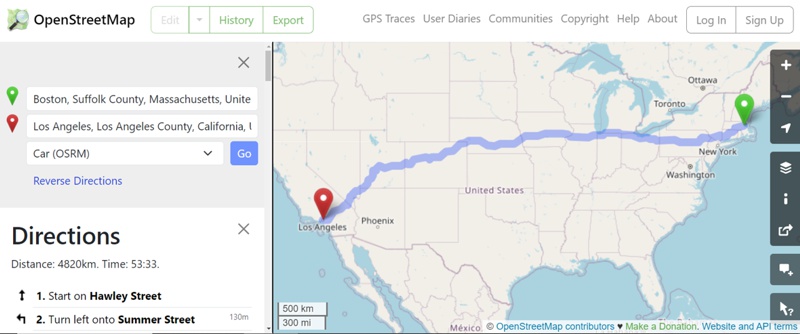
Here are some considerations to keep in mind when using OpenStreetMap as a route planner or optimizer:
Why It's #4: A flexible tool for developers and tech-savvy users needing custom routing solutions
Circuit is a provider of route optimization software, offering features tailored to meet the needs of businesses for last mile delivery. Here are the pros and cons to using Circuit as a route planner or optimizer:
Why It's #5: Its ease of use and focus on delivery routes make it highly competitive
RouteXL offers free route planning for up to 20 stops, with a focus on optimizing routes to minimize travel time and distance. It remains one of the most accessible tools for small-scale users.
Why It's #6: Ideal for users with moderate routing needs and no budget for premium tools
Bing Maps provides reliable routing and integrates seamlessly with Microsoft tools. Its 2024 updates included improved geospatial data processing and Azure integration, enhancing its appeal for businesses in the Microsoft ecosystem.
Bing Maps offers the flexibility to add up to 25 destinations or stops to your itinerary, allowing you to plan trips by walking, biking, taking public transportation, or driving. Additionally, you can print and save your routes to your computer, and easily share them with others.
As a route planner and navigation program, Bing Maps provides driving directions, real-time traffic updates, and access to aerial and satellite photography. Although it doesn't have dedicated mobile apps for Android (there isn't a dedicated Bing Maps app, but the Bing search app has similar map search and driving directions functions) or iOS, it offers an SDK for developers to create mapping applications.
While Bing Maps lacks features specifically tailored for commercial users, such as inventory tracking or driver GPS tracking, it does offer waypoint optimization via the SDK. This feature allows you to input up to 25 waypoints and optimizes their order to minimize travel time or distance. This can be particularly beneficial for businesses needing to create optimized routes for multiple addresses.
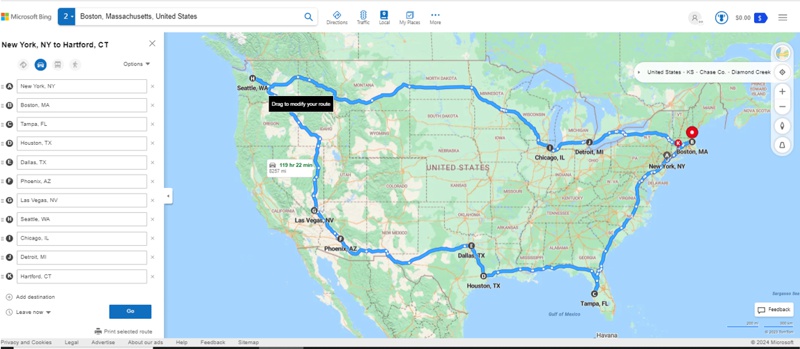
Here are the pros and cons to using Bing Maps as a route planner or optimizer:
Why It's #7: Best for Microsoft users, but its complexity for casual users keeps it mid-ranked
Route4Me’s free version is limited but allows unlimited stops during its trial period. The 2024 updates added real-time re-routing and better bulk address import features, improving its usability for small businesses. Their route optimization software enables you to plan routes with hundreds or thousands of addresses. Route4Me's routing engine (HyperMatrix™) uses open-source OpenStreetMap data, but also leverages Google Maps to improve the OSM data's accuracy and ability to optimize.
While Route4Me offers numerous benefits, it's essential to consider both its advantages and limitations when using it as a route optimizer:
Why It's #8: A great entry-level tool for businesses exploring route optimization
OptimoRoute provides a free trial for its advanced route planning features, including time window optimization and delivery scheduling. Its focus on scalability makes it an excellent choice for growing businesses.
OptimoRoute is a cloud-based route planning and optimization software offering a range of features. It appears that OptimoRoute refers to stops as “Orders” with different maximums per paid plan, currently being: Lite at 700; Pro at 1000; and Custom in the thousands. Some OptimoRoute pros and cons are listed below:
Why It's #9: Flexible and scalable, ideal for businesses needing advanced delivery planning
The Mapbox Directions API supports routing for cars, riding bicycles, and walking. Requested routes can include as many as 25 stops.
The Mapbox Optimization API allows you to include up to 12 locations (waypoints or stops) in a single route calculation. These locations can represent various destinations or points of interest along the route. Both the start and end points count toward this limit, as well as any intermediate waypoints. Therefore, you can select up to 9 additional points beyond the start and end locations. If you need to optimize a route with more than 12 stops, you must request an increase from Mapbox by reaching out to them. Keep in mind that exceeding the free tier might incur additional costs.
Mapbox’s 2024 updates improved its 3D visualization tools and faster map rendering, making it more appealing for developers creating custom routing applications.
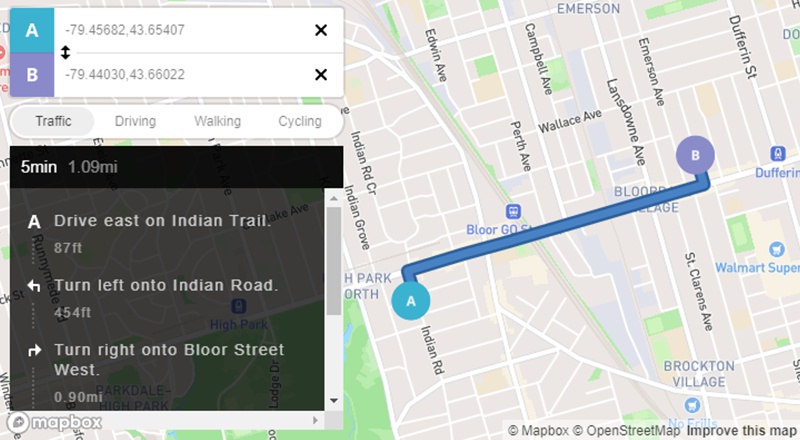
Here are the pros and cons to using Mapbox as a route planner or optimizer:
Why It's #10: Best suited for developers, but not as user-friendly for general routing needs
FarEye focuses on delivery management and provides route optimization during its free trial. Its 2024 updates improved analytics and proof-of-delivery tools, making it suitable for larger delivery operations.
Fareye's route planning tools empower businesses to optimize delivery routes for efficiency, offering real-time updates, proof-of-delivery features, and customizable workflows, but may be costlier for high-volume users. Here is an assessment of the strengths and limitations of FarEye as a route planner or optimizer:
Why It's #11: Best for businesses prioritizing delivery analytics and operational insights
Waze is a popular free navigation app with live traffic updates and driver-contributed alerts. While not designed for complex multi-stop routing, its real-time traffic insights make it a valuable tool for personal navigation.
Why It's #12: Great for individual users needing live traffic updates, but limited for business routing
Carto focuses primarily on geospatial analysis and location intelligence, offering tools for visualizing and analyzing spatial data rather than practical multi-stop route optimization. Its features are tailored more for data-driven decision-making rather than logistics or delivery planning, which made it less relevant for this list.
Carto, a cloud-based platform provides routing based on 3rd party data. The Carto API supports routing services via TomTom, Mapbox, and HERE. These provide turn by turn directions and a choice of mode of transport to see differences in routing for pedestrians, cyclists, or vehicles.
The Carto routing module in their Analytics Toolbox for BigQuery can generate routes based on time or distance for one or several origins and destinations and relies on the OpenStreetMap road network that is publicly available through Carto's Data Observatory (for which a subscription is required).
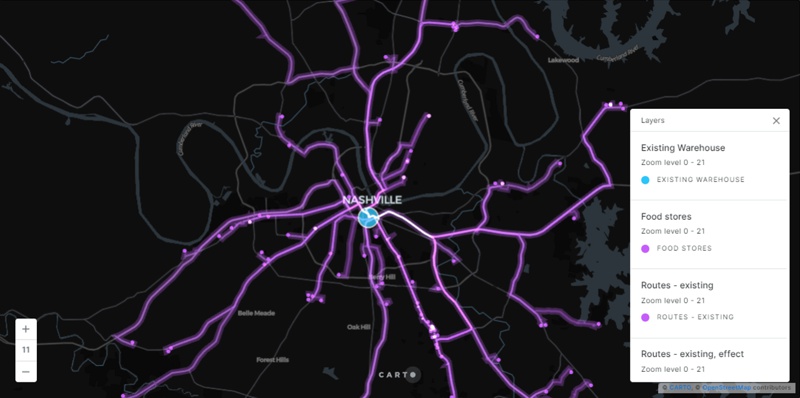
Here are the pros and cons to using CARTO as a route planner:
Maptive offers basic mapping and routing features but lacks advanced capabilities like time window management, real-time re-routing, or delivery-specific tools. Its simplicity and limited feature set make it less competitive compared to more robust free or trial-based tools.
While Upper provides strong route optimization features, such as handling up to 500 stops and proof of delivery, it is restricted to a 7-day free trial. This limited trial duration doesn’t align well with the criteria for a "free route planner" list, where tools need to offer long-term free use or broader trial accessibility.
Upper allows for 250, 500, and 500+ stops at once based on the paid pricing plan you are on. While Upper offers numerous features, it's essential to weigh both its pros and cons when considering it for routing:
As we step into 2025, free route planners with unlimited stops continue to provide essential tools for businesses and individuals seeking to optimize logistics and travel. This year’s advancements emphasize greater accessibility, sustainability, and user-focused features, from the professional-grade capabilities of Maptitude to Circuit’s delivery-specific tools and Google Maps’ real-time navigation. Each platform on this list caters to unique needs, ensuring users can find the right solution—whether for personal use, small businesses, or large-scale delivery operations. With ongoing innovations, these tools make efficient route planning more accessible than ever, empowering users to save time, reduce costs, and improve overall productivity.

|
“Maptitude is helping our organization plan our field service territories and control our travel and response time.”
|
Maptitude stands out for its balance of user-friendliness, powerful features, and data-driven insights. Whether you're a business development professional seeking informed decisions, a logistics analyst uncovering improved efficiencies, or a salesperson planning the best route to visit clients, Maptitude is your best bet for professional route optimization.
Ready to experience the power of route planning? Dive into Maptitude and discover improved efficiencies with time and cost savings.
Learn more about Maptitude Mapping Software can help your business with your route planning needs!
Schedule a Free Personalized Demo

 Check out our G2 Reviews

Home | Products | Contact | Secure Store
 Call Us


.png)