Microsoft's built-in Windows Maps app is deprecated and being removed from Windows. Microsoft officially announced that the Maps app will be pulled from the Microsoft Store by July 2025, with a final update rendering it completely nonfunctional. After that cutoff, users can no longer reinstall or use the app, and Windows 11 (from version 24H2 onward) will no longer include Maps by default. If you've been relying on the Windows 10/11 Maps app for offline navigation or simple mapping tasks, it's time to plan for a replacement. Microsoft directs users to the Bing Maps web service as an alternative, but Bing Maps requires an internet connection and offers only basic consumer features.
For those needing a more powerful, online- or offline-capable, and feature-rich mapping solution, Maptitude is the leading choice. Maptitude is a full-featured GIS mapping software that fills the void left by the retired Windows Maps app, making it the best Microsoft Maps app alternative for 2025 and beyond.
The Windows Maps app (originally introduced in Windows 10 and carried into Windows 11) provided basic map viewing and navigation using Bing Maps data. However, it lacked advanced tools for business or analytical use, and over time even its core functionality waned (for example, offline maps support was quietly removed prior to the app's prior to the app's deprecation). With the app now discontinued, continuing to use it isn't an option, and its limitations make it ill-suited for modern location-based decision-making. Upgrade to Maptitude to get the latest maps, robust geospatial features, and an offline, ad-free mapping experience for your Windows PC.
Microsoft's decision to discontinue the Windows Maps app has left many users searching for a capable alternative. The removal of the app in 2025 creates a void for those who used it for viewing maps or getting directions on their PC. Maptitude has emerged as the ideal replacement, offering a rich set of features that not only cover what the Windows Maps app could do, but go far beyond.
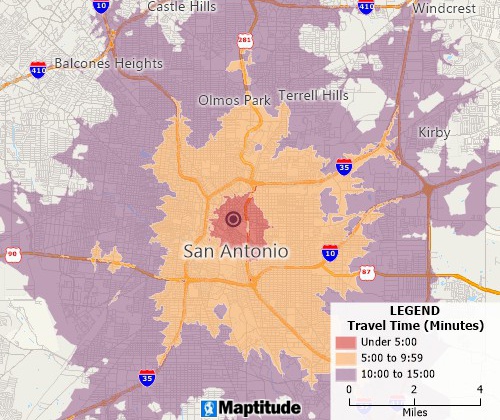
Analyze your data on maps
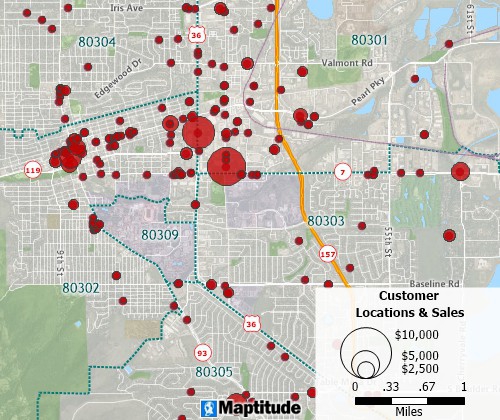
Visualize your data with unlimited offline geocoding
Offline Mapping & Data Access: One of the biggest drawbacks of losing the Windows Maps app is the loss of offline maps. Maptitude solves this by providing fully offline mapping: the software and its detailed maps can be used without any internet connection. You can perform unlimited address geocoding, routing, and get turn-by-turn directions entirely offline. (By contrast, the Windows Maps app relied on online Bing Maps services and had its offline functionality removed toward the end.) With Maptitude, you'll never be stranded without maps due to lack of internet, and you won't have to download separate map packages in a system settings menu because everything you need is built in.
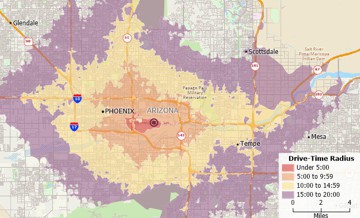
Advanced Features and Analysis: The Windows 10/11 Maps app was designed as a simple consumer tool: it allowed basic point-to-point directions, 3D city views, and saved favorites, but offered no business mapping or analytical capabilities. Maptitude, on the other hand, is a professional-grade mapping application. It lets you visualize and analyze your own data on maps, something impossible in the default Maps app. You can map customer locations from an Excel file, create heat maps and demographic thematic maps, draw and manage territories, generate drive-time zones around locations, and much more. These spatial analysis tools in Maptitude help reveal geographic patterns and insights (e.g. finding underserved areas or optimal site locations) that the basic Maps app could never provide. In short, Maptitude transforms mapping from a simple navigation aid into a powerful decision-making platform.
Unlimited Geocoding & Routing: The built-in Maps app allowed you to look up addresses or get directions, but one at a time because it wasn't meant for batch geocoding or complex routing. Maptitude imposes no such limits. You can geocode an unlimited number of addresses (pin mapping) and perform complex route planning with multiple stops, optimized for efficiency. There are no usage caps or extra fees for geocoding large datasets, unlike some online services that may require subscriptions or have credit limits. This makes Maptitude ideal if you have a list of locations (customers, stores, etc.) you want to map or if you need to plan routes for a fleet of vehicles. Everything is done locally on your PC, ensuring speed and privacy.
Data Integration and Customization: With Maptitude you can bring your own data to the map. Whether it's sales data by ZIP Code, a list of addresses, or spatial data like shapefiles, Maptitude allows you to integrate and visualize it all. The Windows Maps app offered no way to import external data layers: it only showed Microsoft's predefined map content. In Maptitude, you can overlay your data on the map, style it as needed, and even link to external databases for dynamic updates. The software also lets you fully customize map appearance (colors, symbols, labels, etc.) and create presentation-quality outputs. Essentially, you're in complete control of what the map displays in stark contrast to the one-size-fits-all approach of the old Maps app.
Up-to-Date Maps and Demographics: Microsoft's Maps app pulled its road maps from the Bing Maps service, which Microsoft will continue to update on the web. However, the app itself will receive no further updates or support after its deprecation. In fact, if you still have it installed, it will stop functioning once Microsoft issues the disabling update in mid-2025. By switching to Maptitude, you ensure that your maps stay current. Maptitude is updated annually with new map data. It comes with the latest streets, administrative boundaries, and even demographic data (e.g. population, income, business counts) included for the country of your choice. Rather than relying on an app that's frozen in time, you'll be using current data for any mapping or territory planning. Maptitude includes demographic and ZIP Code datasets that inform your market analysis or site selection with capabilities the basic Windows Maps never had.
Reliability and Support: The Windows Maps app was a free system component, and as such, it didn't come with dedicated support or guarantees for power users. Microsoft's focus has shifted, leaving Maps app users with no path forward except the web. By contrast, Maptitude is a supported commercial software with a dedicated development and support team. It runs on modern Windows, with regular enhancements. If you encountered limitations or bugs in the old Maps app, you were largely on your own. With Maptitude, you have a reliable partner for your mapping needs and assistance if you need help doing something. This reliability is critical for business use or any mission-critical mapping tasks.
Bottom line: Maptitude steps in as the most comprehensive alternative to the defunct Microsoft Maps app. It covers the basics (interactive maps, search, directions, etc.) and adds a wealth of advanced features that empower you to do more with maps. Whether you used the Windows Maps app casually or as part of a workflow, you'll find that Maptitude not only replaces what you lost but opens up new possibilities for analysis and insight that were never before possible with Microsoft's built-in tool.

|
“After investing time in learning I can complete whatever I need. I have never found anything it is not capable of doing. I learn something everytime I use it. MS Visio did not do everything I needed it to do. It was a lower level program that used data for display but no analysis tools existed.”
|
Let's directly compare some key capabilities of Maptitude and the old Windows 10/11 Maps app to understand the improvements:
Winner: Maptitude. If you need reliable offline maps (for traveling in areas with poor internet, or secure environments), Maptitude is the clear choice.
Winner: Maptitude. You get up-to-date data that you can rely on for professional use, and you can extend it with your own or third-party data as needed.
Winner: Maptitude. For anything beyond casual use, the Maptitude routing capabilities are far more powerful.
Winner: Maptitude. It brings professional mapping and GIS capabilities to your desktop, far exceeding the limited functionality of the old app.
Winner: Maptitude.
Winner: Maptitude. If privacy, data security, or an ad-free environment are priorities, a local solution like Maptitude is far superior to relying on web maps. (As an example, schools and enterprises valued the old Maps app for being ad-free. Maptitude can serve the same role while providing much greater functionality.)
Winner: Maptitude. By choosing a dedicated product with a clear roadmap, you ensure your mapping solution won't disappear unexpectedly.
In summary, Maptitude outclasses the former Windows Maps app in every meaningful category for mapping capabilities. What was a convenient free tool for basic needs has now evolved (via Bing Maps on the web) into a limited online service. Maptitude offers a full-fledged, offline, and powerful mapping environment for Windows that can replace and greatly expand upon what you used to do with the Microsoft Maps app.
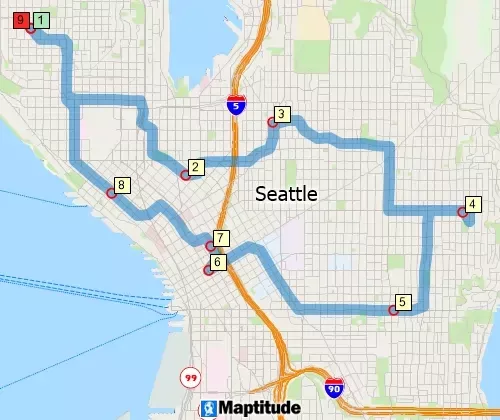
Microsoft Maps Replacement for Routing
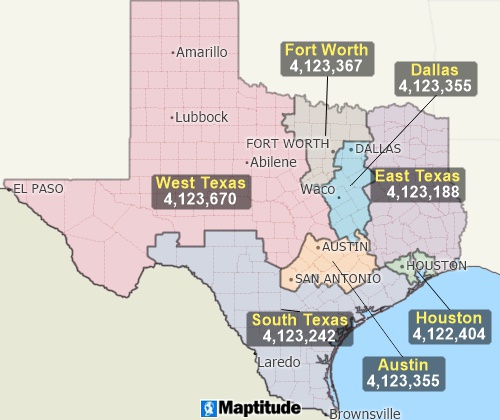
Territory Alternative to Microsoft Maps
In today's landscape, there are plenty of web mapping options, but few give you the value and control of a dedicated desktop solution like Maptitude. While the Windows Maps app was free, its deprecation highlights a key point: relying on limited or “free” tools can incur hidden costs, whether it's loss of functionality, lack of support, or privacy trade-offs. Here's how Maptitude stands out as the smart choice for businesses and power users needing mapping on Windows:
All these benefits make Maptitude a high-value, low-risk choice for your mapping needs. While the loss of the free Windows Maps app might have been inconvenient, it opens the door to a far superior solution. By investing in Maptitude, you equip yourself with an advanced mapping platform that offers unparalleled functionality, without the downsides of web-dependent tools. It's a true upgrade, not just a stopgap replacement.
The retirement of MapPoint left many businesses scrambling for a new mapping solution. Fortunately, Maptitude has emerged as the clear choice for former MapPoint users, offering a seamless transition and a wealth of additional features. Here's what some satisfied users have to say:

|
“I was in a bind when MS retired MapPoint. I discovered Maptitude in 2009 and have been using the software since then. Once you take time to use the various features, it becomes a joy to use when evaluating different market conditions/situations. I do enjoy using this software.”
|
 |
“Easy to use and speedy to map, comparable for ease of use to the discontinued MapPoint but offers lots of stronger features. The Video tutorials are a really good resource.”
|
 |
“Ease of moving territories, obtaining census data, and plotting territories to that data. Beautiful interface and several ways to customize the product and exports. The ability to pull in my older MapPoint files and data was a huge plus!”
|

|
“I believe that Caliper's Maptitude continues to provide more GIS-related features and more flexibility in defining and presenting data and map layers than MapPoint does.”
|
These testimonials highlight the key reasons why Maptitude is the preferred choice for former MapPoint users:
Whether you're looking for a seamless transition from MapPoint or simply seeking a powerful and affordable mapping solution, Maptitude is the perfect choice. With its user-friendly interface, extensive features, and exceptional value, Maptitude empowers businesses to unlock the full potential of map-based analysis and visualization.

Microsoft officially deprecated the Windows Maps app as of April 2025 and has ceased active development on it. The app is slated for removal from the Microsoft Store by July 2025, after which an update will make the app completely nonfunctional on all devices. In practical terms, this means the Maps app is being retired and it will no longer receive updates or support, and you won't be able to use it after mid-2025. Any attempt to open it after the final “kill” update will likely result in it not launching or showing a notice that it's no longer supported.
In summary: The Maps app that came with Windows 10 and Windows 11 is being shut down by Microsoft. This removal is part of Microsoft's broader strategy to trim down legacy apps in Windows and push users towards web-based services. If you try to find the Maps app on the Microsoft Store after July 2025, it will not be available for download. And if it's already on your PC, it will stop working once Microsoft issues the disabling update.
Microsoft has not given a very detailed public explanation for the removal. The official note simply states that the app is deprecated and points users to the Bing Maps website. However, industry observers have some likely reasons. The Windows Maps app was essentially a holdover from the Windows Phone era, originally built to support Microsoft's mobile efforts which have long since been abandoned. Over time, the userbase for the desktop Maps app remained small (“nobody was really using it” was a common sentiment), and maintaining a separate mapping application didn't make strategic sense for Microsoft. Instead, they are focusing on Bing Maps (web) and Azure Maps (enterprise) for mapping needs.
In short, the Maps app had become an anachronism as an outdated piece of software from a prior strategy. As one report put it, the Maps app was “a remnant from the Windows Phone and Windows 10 Mobile era” and an “increasingly anachronistic holdover”. Microsoft likely determined that the cost of updating and supporting the app outweighed its benefits, especially when robust alternatives exist (e.g. everyone can just use a browser for maps). By removing it, they streamline Windows and avoid duplicating efforts, while pushing users towards their cloud-based mapping services (which can be updated more easily and monetized via enterprise licenses).
No, not anymore. As of Windows 11 version 24H2 (the 2024 Fall Update) and onward, the Maps app is no longer included with Windows by default. If you had an earlier version of Windows 11 or Windows 10, you might have still seen the Maps app pre-installed, but going forward new installations won't have it. Furthermore, after July 2025 you cannot install or use the app at all, even on older versions of Windows, because it will have been removed from the Store and rendered nonfunctional by Microsoft.
Up until the cutoff date, existing users technically can still use the app (with whatever functionality it currently has), but no new features are coming, and its map data may not update. After the end-of-life date, even if you somehow keep the app, it will not work for its intended purpose. Microsoft has essentially ended support for it, meaning if you run into problems, there is no help available from Microsoft.
Microsoft's recommendation is to use Bing Maps in your web browser as the replacement for the Maps app. By visiting bing.com/maps, you can access a mapping service that provides similar basic functions: you can search for addresses/places, get driving directions, view aerial imagery, and even see street views (through Microsoft's Streetside where available). Bing Maps in the browser has been improved over the years and is accessible on any device with internet. This is the closest thing to an “official” replacement.
However, Bing Maps (or other online maps like Google Maps) might not fully meet your needs, especially if you require offline access, custom data mapping, or advanced analytics. If you found the Windows Maps app useful in scenarios where internet wasn't available or need to do more than just point-to-point directions, you will want a more powerful alternative.
Maptitude is an excellent choice as an alternative to the Windows Maps app. It serves as a desktop replacement for those who need mapping capabilities independent of a web browser. With Maptitude, you can do everything the old Maps app did (find locations, get directions, etc.) and a lot more, all on your PC without needing continuous internet access. It's especially suited for business users, educators, or power users who used the Maps app for things like planning routes, teaching business geography, or embedding maps in other projects, and now need a new solution. Unlike Bing Maps, which requires an internet connection and doesn't allow much customization, Maptitude gives you a rich mapping environment locally. For example, a school that used the ad-free Windows Maps app in a computer lab could switch to Maptitude to maintain an offline, ad-free mapping tool, gaining the ability to map their own data for class projects in the process. Similarly, a field service team that used the offline Windows Maps on laptops can move to Maptitude to get updated offline maps and more advanced route planning.
In summary: For casual use, the Bing Maps website suffices as a replacement. For advanced or offline use, Maptitude is the recommended replacement, providing full-fledged mapping software capabilities on Windows.
Only for a limited time (depending on when you read this). Microsoft has stated that until July 2025, if you remove/uninstall the Maps app, you could re-download it from the Microsoft Store but after July 2025 you will not be able to install it again from the Store. Once it's removed from the Store, that's it; even if you had it before, there will be no official way to get it back. Additionally, the final Store update in 2025 will effectively “kill” the app's functionality, so keeping it installed without that update won't be a viable long-term solution (and could pose security risks as well).
As of now, if your device still has the Maps app and you haven't updated it past the kill-date, it might open and work with limited capabilities. But it's running on borrowed time. There's no supported download or installation path for the Maps app beyond its deprecation. Microsoft has not open-sourced it or handed it off to anyone; it's simply gone.
For anyone thinking of alternatives to download, you could consider downloading a third-party maps app or data. Some people use open-source projects like OpenStreetMap (with third-party viewers) for basic map needs, but those require some technical setup. Maptitude offers a convenient download/installation (available from the Maptitude website) for a complete mapping solution. Once installed, Maptitude doesn't need the Store or any additional downloads to function, and all necessary map data can be installed from the get-go (for example, the full U.S. or other country data package). This makes it an easy one-time download to replace what the Windows Maps app used to provide over time via internet.
The Windows Maps app did have a couple of consumer-oriented features, like 3D city views (via Microsoft's 3D city data) and Cortana integration, that Maptitude does not replicate in the same way. For instance, if you enjoyed the “flyover” 3D visuals of cities or the street-level panoramic imagery (Streetside) in the Maps app, those are specific to Bing Maps. Maptitude is focused on mapping, GIS analysis, and visualization of data rather than 3D renderings of cityscapes. However, Maptitude does allow 3D theming of your own data (e.g. extruding data points into 3D spikes on a map) and has some 3D mapping views for certain functions, but it's not a 3D globe or simulation of the real world in the way the Maps app's city mode was.
Apart from that, almost every feature the Windows Maps app had is available in Maptitude, often in a much more powerful form. For example:
In essence, Maptitude covers the core mapping needs and adds many capabilities the Maps app never had (mapping your own data, performing analysis, etc.), but it isn't aimed at replicating the flashy 3D tours or live-traffic navigation that you might get from a dedicated navigation app. Many users of the Maps app won't miss those niche features or can supplement Maptitude with a quick visit to Bing/Google Maps for those specific purposes.
If you've never used professional mapping software before, you might wonder about the learning curve. The good news is that Maptitude is designed to be user-friendly, even for those without GIS experience. Many former Microsoft MapPoint users (a discontinued product similar in concept to the Maps app, but for business) have successfully and happily transitioned to Maptitude. They often report that Maptitude is “easy to use” and that “everything you need comes in the box”, with a surprisingly gentle learning curve for such a powerful tool.
To break it down:
In short: Transitioning to Maptitude is quite manageable. You'll gain a lot of functionality, and the software is built with business users in mind, not just GIS experts. Many users have found that after moving to Maptitude, they can accomplish tasks more easily than they expected, especially things that were impossible in the old app. And with the deprecation of the Maps app, making the switch sooner rather than later will ensure you continue to enjoy mapping on your terms without interruption.
By embracing Maptitude as your Microsoft Maps app alternative, you'll be equipped with a modern, powerful mapping solution that keeps you in control. The discontinuation of Windows's built-in Maps app need not be a setback. Instead, it's an opportunity to upgrade your mapping capabilities and take advantage of tools that can drive better decisions and insights for your projects or business. Maptitude has already become the go-to replacement for thousands of former Microsoft mapping software users, and it stands ready to serve your needs as well.
Businesses and users who have made the switch to Maptitude are impressed by its capabilities and value. Here are a couple of testimonials from users who have relied on Maptitude for their mapping needs:
 |
“I've been using Maptitude for more than 15 years. It is simply the best tool available for businesses that need a market planning mapping and data resource. It can do everything I need it to do - from the very simple to the complex. It integrates nicely with other programs and file types making analysis and presentation very easy. I highly recommend Maptitude to firms who need a function-rich GIS mapping solution. It is the best!”
|

|
“Pros: Cost. Much easier to reach a purchasing decision. I loved the integrated country data package so I didn't have to download census layers and other info - it was all built in.”
|
These real-world users highlight how Maptitude delivers extensive functionality (“from very simple to complex” tasks) and comes with data included, all at a reasonable cost. Such feedback echoes the experience of many who have adopted Maptitude as a replacement for discontinued Microsoft mapping products. The consensus is that Maptitude brings an “amazing amount of functionality for the price,” with an easy learning curve and everything you need included in one package.
If you were left wondering what to do after the Windows Maps app, hopefully you now have your answer. Maptitude not only replaces the Maps app, it provides a far superior mapping experience that can grow with you. Rather than being limited by Microsoft's changing support decisions, you can take control of your mapping with a solution that emphasizes longevity, privacy, and powerful features. Try Maptitude for yourself (free trial available) and see how it can meet your needs in this new post-Maps-app era.
Feature equivalent to MapPoint and supports MapPoint files
Imports MapPoint PTM files
Unlimited layers/geocoding/routing
Radius and drive-time tools
Demographics
Routing tools
Complete control over speeds by road type
Export to Excel
Link and update data
Copy drawing items between maps
Territories



Home | Products | Contact | Secure Store
 Call Us

