Mapping Software and GIS Glossary


Territory workload reports allow you to visually compare whether your territories have too little or too much workload. Each territory's workload is compared to a benchmark value. The benchmark value can be wither the average across all territories or a custom balancing value that is the target workload that you want every territory to have.
Territory workload reports are useful for optimizing your territories for both efficiency and your strategic needs. Ultimately, this leads to fairer territory assignments, reducing overwork and underwork, boosting sales rep morale, and enhancing overall productivity.
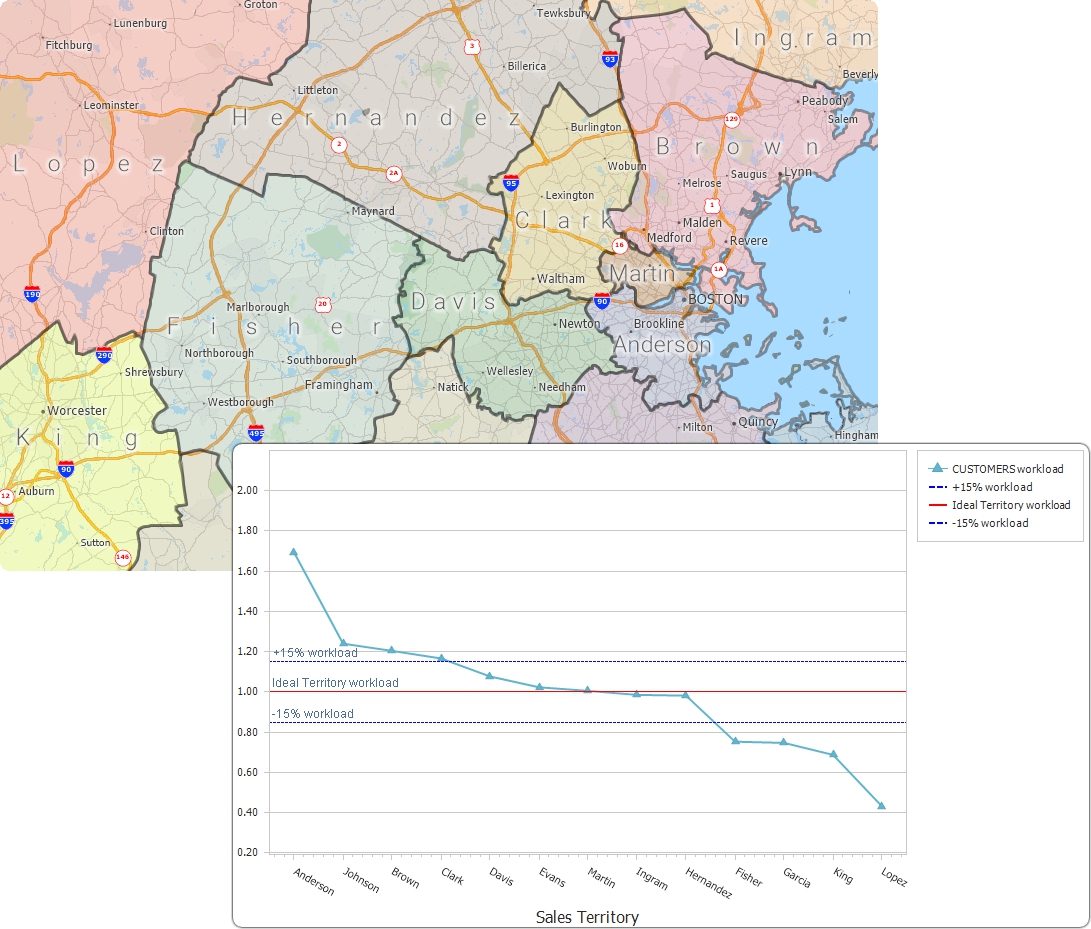
A map of territories and a territory report of the customer workload among the territories
Maptitude Mapping Software gives you all of the tools, maps, and data you need to analyze and understand how geography affects you and your business. Use the Maptitude Workload Report to see whether each territory in your map has too little or too much workload. Simply choose the Hierarchy Level (for example, Territory or District) and pick the Workload Field (such as Population). Maptitude then compares each territory's workload to an ideal value (workload average or custom balancing value) and plots it on a chart. The chart also shows +/– 15% lines around the ideal workload, making it easy to spot which territories fall outside the acceptable range. This helps you identify imbalances so you can adjust boundaries or resources as needed, ensuring that every territory has the right workload for maximum efficiency.
Learn More Free Trial Free for Students/Teachers


Home | Products | Contact | Secure Store
 Call Us

