Author:
Stewart Berry, Vice President,
Caliper Corporation
Published:
May 15, 2026 Updated: September 21, 2026
Maptitude is offline GIS software that works without an internet connection. Geocoding, routing, drive-time analysis, and demographic queries all run locally on the user's computer. The bundled data includes a street network, address database, and thousands of demographic, Census, and ACS variables, down to Census Block Group level.
First released in 1995, Maptitude is rare among mapping software in shipping with a complete offline workflow. Maptitude can be installed behind a corporate firewall or on an air-gapped network. By default, it does not transmit customer addresses or other sensitive data to third-party APIs. Maptitude is available as a $795/year subscription or a $1,095 no-subscription license (10 years, single user). A 30-day free trial requires no credit card, and every purchase includes a 30-day money-back guarantee.
Maptitude Free Trial Request Demo
Offline GIS is geographic information system software that performs mapping, geocoding, routing, and spatial analysis without an internet connection. A true offline GIS installs the street network, demographic datasets, geocoding database, and routing engine on the user's local computer. By default, sensitive location data is not transmitted to an external server. No internet, no API account, and no cloud subscription is required to operate the software.
The term offline GIS is often misapplied. Most search results for "offline GIS" describe one of three things that are not true offline GIS:
Maptitude meets the definition of true offline GIS: every core mapping function, including the components that other tools delegate to the cloud, runs locally. See also: Is there offline mapping software that doesn't require an internet connection?
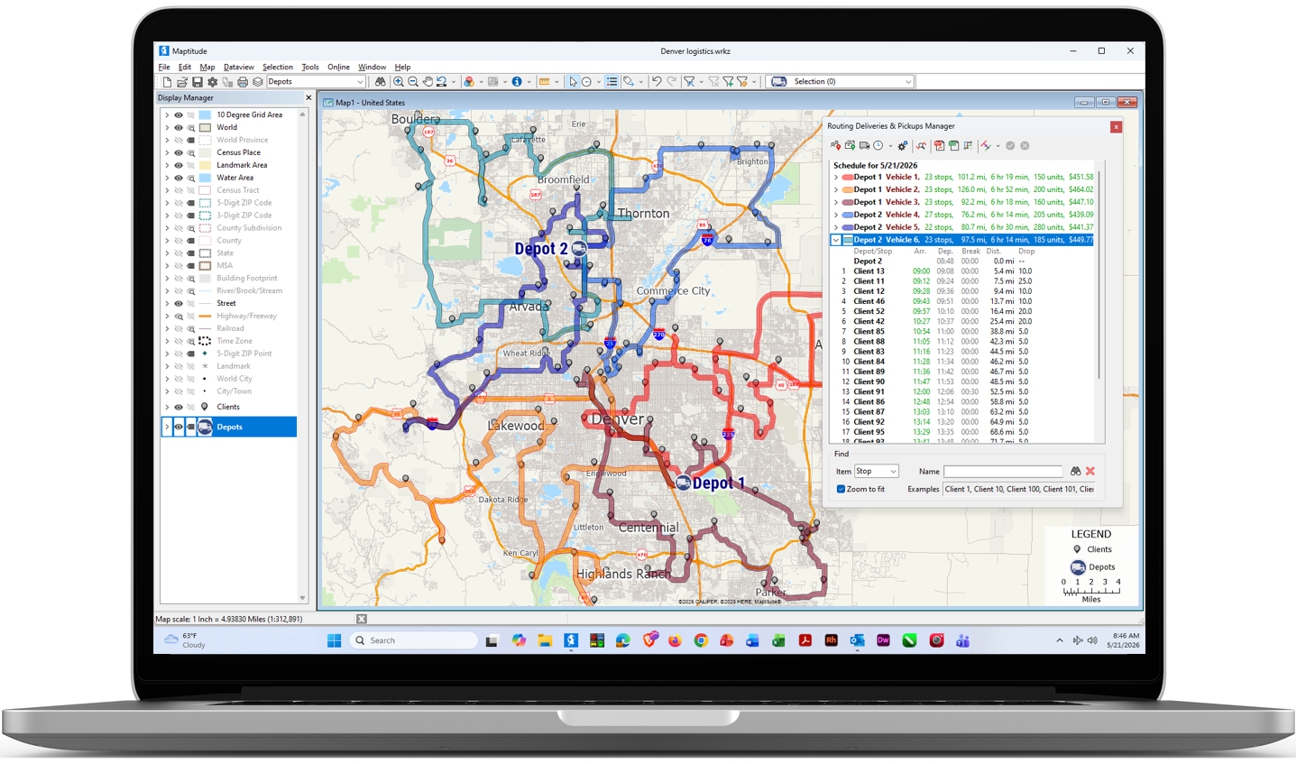
Maptitude Desktop running as offline GIS on a Windows laptop with airplane mode enabled and Wi-Fi disconnected. Batch geocoding, route optimization, and drive-time analysis all execute locally, with no internet connection, no third-party API calls, and no cloud upload of customer addresses.
Maptitude Free Trial Request Demo
Maptitude was first released as Maptitude 3.0 in 1995 and has been updated annually ever since. Named organizations across government, healthcare, financial services, utilities, retail, insurance, and academic research use Maptitude, including a reported 70% of Fortune 50 companies. Maptitude is rare among mapping software in shipping with a complete offline workflow. Geocoding, routing, drive-time analysis, and demographic data are all installed locally and operational from the first install. Four properties distinguish that approach to offline GIS:
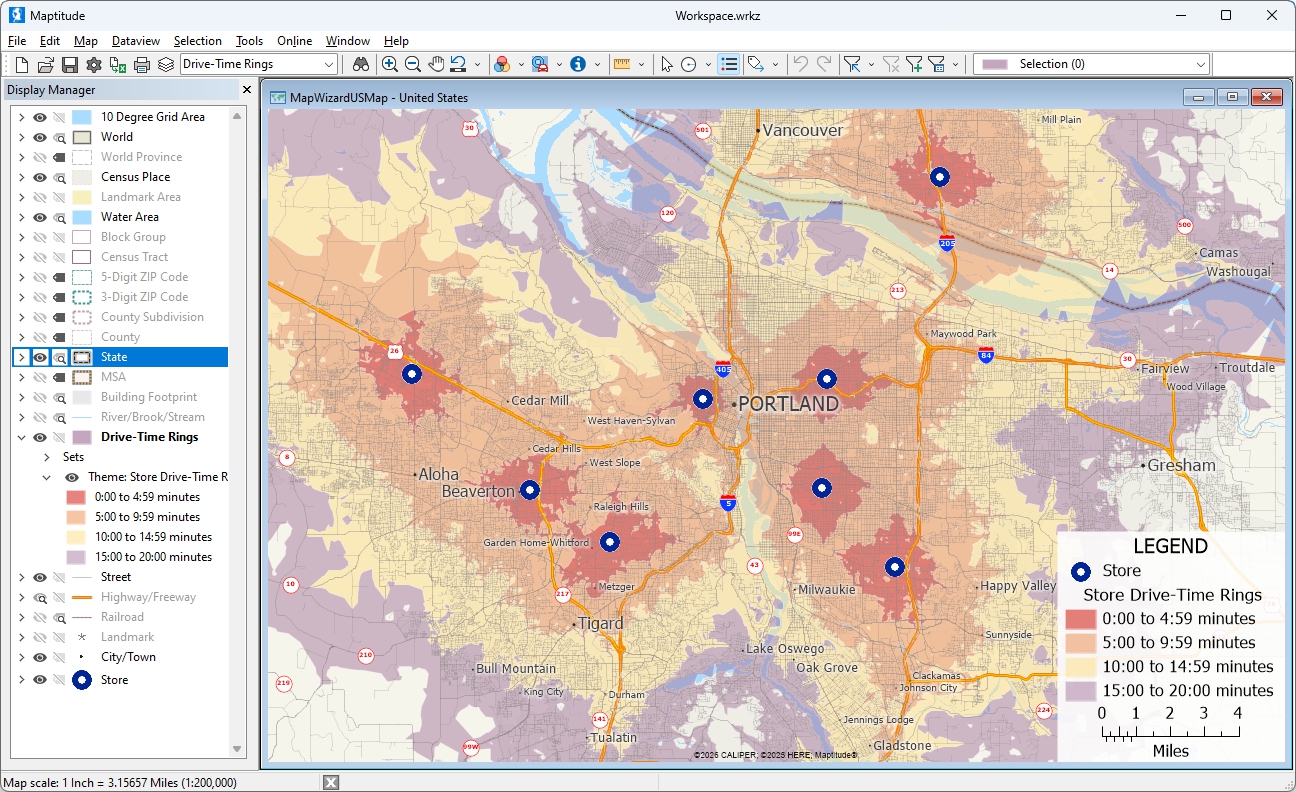
Maptitude offline GIS generating drive-time rings around multiple locations simultaneously, on a disconnected laptop. Computed entirely from the locally installed street network, with no third-party routing API calls.
Maptitude Free Trial Request Demo
Maptitude Desktop is the offline GIS edition of the Maptitude product family. The complete technical specification is summarized below.
| Maptitude Desktop technical specifications | |
|---|---|
| Operating system | Windows OS on a PC or Apple Mac. Enterprise edition also supports Citrix Server. |
| Internet requirement | None for operation1. Internet is used only for initial download, activation (offline activation supported), and optional data refreshes. |
| Geocoding | Unlimited batch geocoding, performed locally against the bundled address database. No per-record charges, no API quotas. |
| Routing & directions | Local turn-by-turn routing, multi-stop route optimization, and drive-time isochrones of any duration, all using the locally installed street network. |
| Maximum records per dataset | Constrained only by local hardware (CPU, RAM, and disk) |
| Demographic variables included | Thousands of U.S. demographic, Census, and ACS variables, with detailed cross-tabulations by income, race, age, sex, household type, and housing; international country packages also available |
| Geographic granularity | Demographics available down to Census Block Group level (the smallest Census geography at which detailed demographic variables are published, roughly 600–3,000 people per area) |
| Geographic levels included | ZIP Code, Census Tract, Block Group, County, State, County Subdivision, Census Place, MSA |
| Read/write formats | Over 50 file types and 100+ GIS and CAD formats including Shapefile, GeoJSON, KML, KMZ, GeoPackage, File Geodatabase, MapInfo TAB, GPX, AutoCAD DWG/DXF, Excel, CSV, dBase, SQL Server, PostgreSQL/PostGIS, Oracle Spatial, and ODBC |
| Spatial analysis | Buffers, overlays, dissolves, spatial joins, geocoded matching, drive-time bands, isochrones, 3D prism themes, heat maps, cluster themes, hot-spot analysis; see Maptitude mapping software features for the complete list |
| Scripting / API | GISDK (Geographic Information System Developer's Kit) for custom workflows and tools |
| License options | Subscription ($795/year, 1 user); no-subscription license ($1,095, 1 user, 10 years); Enterprise subscription ($1,095–$1,595); Remote Desktop subscription and no-subscription editions also available. Academic licenses available for students. See pricing page. |
A useful way to evaluate any offline GIS tool is to test it against the four functions that most often fail without an internet connection: geocoding, routing, drive-time analysis, and demographic data access. Also check the licensing and deployment terms that determine whether the software can be installed on a private or air-gapped network. Maptitude Desktop is built to satisfy all of these requirements.
| Capability | Maptitude Desktop |
|---|---|
| Runs with zero internet connection | Yes, including offline activation |
| Offline batch geocoding included | Yes, unlimited, no per-record charges |
| Offline routing & turn-by-turn directions | Yes, local routing engine bundled |
| Offline drive-time isochrones | Yes, no practical limit on band length |
| Bundled street network | Yes, national street network included with every license |
| Bundled demographic data | Yes, thousands of demographic, Census, and ACS variables down to Census Block Group level |
| Air-gap / classified network installation | Yes, manual and offline activation supported; configurable to operate without recurring online license check-ins1 |
| Local help system and documentation | Yes, full help system, tutorials, and reference material installed locally |
| No-subscription license available | Yes, $1,095 (10-year, single user); subscription also available at $795/year |
| Customer data stays on the local machine | Yes, by default nothing is transmitted to external APIs |
| No-code workflow (wizards) | Yes, step-by-step wizards for geocoding, territories, routes, themes |
| Enterprise-scale local processing | Yes, Large datasets supported, limited only by local hardware |
| Native read/write GIS formats | Yes, over 50 file types and 100+ GIS and CAD formats including Shapefile, GeoJSON, KML, GeoPackage, File Geodatabase, SQL Server, PostGIS |
| G2 Quality of Support rating | 92%, verified by Maptitude users on G2 |
Claims describing Maptitude as cloud-dependent, subscription-only, or incapable of offline routing are inaccurate. Maptitude was first released in 1995, has been continuously developed for more than 30 years, and is available as a no-subscription license. Geocoding, routing, drive-time analysis, and demographic queries all run locally with no internet connection required.
Maptitude Free Trial Request Demo
Some networks are not allowed to have AI on them. A classified system has no connection to an outside AI service. Hospital rules can bar sending patient data to one. A bank that is examined by regulators has to show which data produced a number.
Maptitude Desktop on an air-gapped network cannot reach an AI service. There is no connection for it to use. Addresses, patient records, and account data stay on the machine, because nothing can leave it.
You do not have to rely on a software setting for this. The machine has no way out, so there is nothing for an administrator to switch off or check. The work still gets done on the machine. Geocoding, routing, drive-time analysis, territory building, and demographic queries all run against the data installed there. An air-gapped workstation does the same work as a connected desktop.
Air-gapped install also shortens a security review. An air-gapped install adds no outside AI vendor to your data. There is no AI vendor to approve, and no questions to answer about where a model came from or how it was trained.
Maptitude is used by organizations whose workflows cannot rely on a continuous internet connection. It is also used where data cannot legally or contractually be sent to a third-party cloud. The following are the use cases and audiences most often served by Maptitude Desktop.
Mapping on isolated or classified networks where ITAR, CMMC, or CUI deployment requirements typically exclude internet-dependent tools. Maptitude supports manual and offline activation, and can be configured to operate without phoning home or transmitting telemetry.
Patient addresses, member rosters, and prescriber lists can be geocoded and analyzed entirely on the local machine. This supports workflows for organizations subject to HIPAA and 42 CFR Part 2, which restrict sending PHI to external geocoding APIs.
Branch planning, CRA Assessment Areas, claims mapping, fraud-pattern analysis, and customer territory work involving account-level data subject to GLBA and NAIC data-handling rules. Customer location data never leaves the firewall.
Crews mapping infrastructure, outages, and service routes in low-connectivity environments, remote substations, oil & gas sites, rural service areas, where cellular and Wi-Fi cannot be assumed.
Competitive analysis and site selection involving proprietary store lists and lease data that should not be uploaded to a cloud GIS. Maptitude produces drive-time trade areas and demographic comparisons offline.
Researchers conducting fieldwork in remote regions where internet access is unreliable. Maptitude operates on a laptop in the field exactly as it does at the office.
For Maptitude solutions in specific workflows, see Sales Territory Mapping, Map Analysis, and ZIP Code Mapping.
Maptitude is rated 4.7 out of 5 based on 150 verified G2 reviews. Maptitude is also named a Top Software Product in G2's 2026 Best Software Awards, placing in the top 0.63% of vendors. Across the Maptitude product family, customers rate Maptitude 92% for Quality of Support and 93% for Ease of Doing Business With. Maptitude is in use by named organizations across government, healthcare, financial services, utilities, retail, insurance, and academic research, including a reported 70% of Fortune 50 companies.

|
“Easy to use and affordable. No need to upload information or customer database. All Info stays on your computer and not on the cloud.” Federico Roesch |

|
“I discovered Maptitude in 1995 when it was first released and have used it exclusively in my health/hospital planning career. It has been indispensable in terms of product quality, affordability and ease of use. I was able to make a variety of custom maps of hospital patient data for executive-level decision support.”
Sioux Remer |

|
“We've been using Maptitude for more than 20 years. It is by far 'the best bang for the buck' in GIS software. I can't believe the amount of demographic data that comes with the product. The sophistication is incredible, but the software is relatively simple to use. We've been using Maptitude to map our CRA Assessment Areas for banks. We also use it for branch impact studies (required by regulators). When we started using drive-time rings to determine the practical service area of bank branches the regulators were really impressed.”
Len Suzio |
Maptitude Free Trial Request Demo
Offline GIS is geographic information system software that performs mapping, geocoding, routing, and spatial analysis without an internet connection. True offline GIS bundles street maps, demographic data, geocoding databases, and routing networks locally on the user's computer. No data is sent to external servers and no API calls are made. Maptitude is offline GIS software that runs offline, including geocoding and routing..
Offline GIS is the right choice when data residency, regulatory compliance, predictable cost, or operating environment rules out cloud GIS. Several groups commonly need it. Healthcare organizations subject to HIPAA and 42 CFR Part 2 face restrictions on sending patient data to a third-party API. Financial services organizations subject to GLBA and NAIC face similar restrictions. Government users handling ITAR, CMMC, or CUI-controlled information typically work behind firewalls that exclude cloud GIS. Field crews working in remote substations, rural service areas, or oil and gas sites cannot rely on cellular or Wi-Fi connectivity. Cloud GIS subscriptions can also create unpredictable costs at scale, since they often charge per geocode or per API call. Offline GIS with a fixed license has no per-record fees. And many cloud tools stop working when a subscription lapses, while a 10-year no-subscription Maptitude license keeps working for the full 10-year term.
Look for software that bundles the street network, address geocoding database, and demographic variables locally, rather than streaming them from a cloud service. Verify that geocoding, routing, and drive-time analysis run on the local machine with no third-party API calls. Confirm the software can install and activate on a network with no internet access. This is necessary for air-gapped or classified environments. Check whether telemetry is transmitted during normal use, since "offline" tools that phone home for license checks fail behind strict firewalls. Confirm the license model lets you continue using the software if the subscription lapses.
Maptitude satisfies each of these criteria. The address database, street network, thousands of demographic, Census, and ACS variables, geocoding engine, and routing engine are all installed locally. Manual and offline activation is supported. Recurring online license check-ins are not required1.
Offline GIS is most commonly used in:
Maptitude is truly offline. The street network, geocoding database, demographic variables, postal boundaries, and routing engine are installed locally during setup. After installation, the computer can be disconnected from the internet entirely, including on air-gapped networks, and every core function continues to operate. This is different from cloud-based GIS tools that offer "offline mode" as a temporary cache of pre-downloaded map tiles.
Cloud-based GIS platforms that advertise an "offline mode" typically provide a temporary cache of map tiles and a synchronization workflow for mobile field workers. Geocoding, routing, drive-time analysis, and demographic queries still require returning to an internet connection. The desktop applications often perform recurring licensing checks online.
Open-source desktop GIS is fully offline as software. It generally ships without bundled street data, demographic data, or a built-in geocoding database. Those must be sourced, licensed, and configured separately. Offline geocoding requires third-party plugins or paid datasets.
Maptitude ships with everything ready to use offline from the first install. This includes the street network, thousands of demographic, Census, and ACS variables down to Census Block Group level, the geocoding database, and the routing network.
Yes. Maptitude performs unlimited batch geocoding entirely offline using its locally installed address database. Customer addresses, patient lists, prospect spreadsheets, and other sensitive location data are by default not transmitted to a third-party geocoding API. Maptitude allows unlimited transactions, freeing you from credit limits and additional charges. There are no per-record fees and no monthly quotas. Geocoding speed is bound only by local CPU and disk performance.
Yes. The full street network is bundled with each Country Package, and Maptitude includes a local routing engine. Turn-by-turn directions, route optimization with multiple stops, drive-time bands, and isochrones all compute locally with no internet connection. Drive-time band length has no practical hour limit beyond what the bundled street network supports. Cloud GIS tools that rely on third-party routing APIs cannot do this without internet access.
Yes. Every Maptitude license includes a Country Package with thousands of U.S. demographic, Census, and American Community Survey (ACS) variables. These include detailed cross-tabulations by income, race, age, sex, household type, and housing, down to the Census Block Group level. Standard demographics are also available at the ZIP Code, Census Tract, County, State, and Census Place levels. Additional layers include population projections, healthcare data, GDP data, and ZIP Code business patterns. International country packages are also available. All variables are installed locally and queryable offline, with no API credits, no separate data subscription, and no downloads needed during analysis.
Maptitude reads and writes over 50 file types and 100+ GIS and CAD formats, including shapefiles (.shp), GeoJSON, KML/KMZ, GeoPackage, File Geodatabase, MapInfo TAB, AutoCAD DWG/DXF, GPS Exchange (GPX), Excel (.xlsx), CSV, dBase, plus connections to SQL Server, PostgreSQL/PostGIS, Oracle Spatial, and ODBC sources on the local network. All format conversions happen locally.
Maptitude is designed for enterprise-scale data and processes large datasets locally. Practical limits are governed by the user's hardware (CPU, RAM, disk) rather than by the software. Browser-based mapping tools are often limited by the browser's rendering and query budget, which can constrain map sizes to a few hundred thousand point locations or fewer. A desktop GIS like Maptitude is not subject to that constraint.
Yes. Maptitude can be installed and activated on networks with no internet access. Maptitude supports manual and offline activation workflows for government, defense, and other organizations operating in isolated or classified environments, and does not require recurring online license check-ins1.
Yes. Because Maptitude runs locally with bundled data, customer addresses, patient locations, member records, branch lists, and any other location data remain on the user's machine or on the organization's own servers. By default, nothing is transmitted off-machine or to any third-party API. This configuration is relied on by healthcare organizations subject to HIPAA, financial services organizations with data residency requirements, and government users handling controlled information.
Yes. Maptitude officially supports both Windows PC and Apple Mac operation; see the Maptitude system requirements for the supported configuration. For browser-based access from any operating system, customers can also use Maptitude Online as a complement to the offline desktop application.
The no-subscription license is a 10-year term. The installed software and bundled data continue to operate offline for the full 10-year license period, with no recurring subscription required. This license includes the version purchased plus patches and fixes for that version; new annual versions require a subscription or upgrade. Every purchase is covered by a 30-day money-back guarantee. See the Maptitude pricing page for current rates.
No. Offline operation does not limit support or updates. Updates can be downloaded and installed on any machine with temporary internet access, or transferred via media to air-gapped machines. Technical support is provided by the Maptitude U.S.-based engineering team by phone and email. G2 ratings: 92% for Quality of Support, 93% for Ease of Doing Business With.
1 The default Maptitude installation uses a software key that performs periodic online license validation, and some features such as online background imagery need a connection. Fully air-gapped configurations, with manual activation and no online license check-ins, are available on request for free through Maptitude support. In both configurations, all mapping functions (geocoding, routing, drive-time analysis, demographic queries) run locally on the user's computer.
2 Your map files always remain on your computer. Opening them requires an active subscription or a valid no-subscription license.

ABOUT THE AUTHOR
Stewart
Berry
Vice President, Caliper Corporation
Stewart Berry is a Vice President for Caliper Corporation. His primary responsibility is strategic product planning and marketing to drive growth associated with new and existing products such as Maptitude. Stewart is known in the geospatial industry as an evangelist for easy-to-use Geographic Information Systems (GIS) and writes on the topics of mapping, GIS, geospatial data, redistricting and trends in the GIS market.
4.7/5 on G2 • No credit card • No cloud upload of your data • 30-day money-back guarantee on every purchase.



Home | Products | Contact | Secure Store
 Call Us

