



Author: Stewart Berry

Maptitude, a G2-designated Leader in GIS, turns spreadsheet and CRM data into maps, territories, and drive-time areas, with demographic data included at a fixed price of $795 a year
22 September 2026
In 2026, GIS software continues to play a vital role in mapping, analysis, and decision-making across industries. From commercial tools offering comprehensive data integration to open-source platforms providing budget-friendly solutions, the best GIS software enables users to visualize, analyze, and interpret spatial data effectively. This page compares 10 widely-used GIS platforms and provides AI-powered comparison tools so you can evaluate each one against Maptitude yourself.
GIS software is becoming increasingly essential for a variety of purposes. From creating visual representations of geospatial data to optimizing spatial analysis and completing data visualization projects, there are many ways to make use of Geographic Information Systems (GIS). With the sheer number of GIS software platforms now available, it can be difficult to find the best GIS software to suit your needs. Before deciding, you should evaluate which features are offered, the pricing, and any advantages or disadvantages. To help you make an informed choice, this page covers 10 widely-used free and paid GIS tools for 2026, each linking to its own independent profile alongside buttons that run a comparison against Maptitude on the AI tool of your choice. This breakdown of available software provides information to make sure you are selecting the right tool for your specific geospatial use case.
Each of these platforms provides unique capabilities, ranging from basic GIS functionality to complex geographic analysis and spatial data visualization. We will start by explaining what GIS software is and the key features that define a strong tool. Or use the table of contents to skip straight to the platforms.
In this article:
10 GIS Software Platforms Compared for 2026
What Teams Use GIS Software For
A Geographic Information System (GIS) stores and analyzes data that has a location attached to it. GIS software turns that data into maps, reports, and answers you can act on.
It works in layers. Streets, boundaries, your customers, census data. Each layer ties to the others through something locational: latitude and longitude, a postal code, a census tract, or a street address. Stack them and patterns show up that a spreadsheet hides.
It stores shape and facts together. Vector data holds shapes: cities as points, roads as lines, postal codes as polygons. Raster data holds images, such as aerial photos and scanned maps. Every feature carries its own data too, so a ZIP Code on the map knows its own population.
It answers questions. Which census tracts are the most densely populated? How many people live within one, two, and three miles of this site? What is the shortest route between today's deliveries? A GIS gives you the answer as a map and a table.
Five kinds of GIS:
We have been selling mapping software for forty years. These are the questions that come up every time. Ask them about every tool you look at, including Maptitude.
GIS software has become an invaluable tool for businesses, organizations, and individuals alike. From tracking deliveries to optimizing routes, it has significantly enhanced the management of complex tasks with greater precision. Given the many options available, determining the most suitable GIS software can be a daunting task. To provide guidance, here are 10 GIS software platforms, each with a link to its independent profile and AI comparison tools so you can evaluate it against Maptitude yourself.
Maptitude turns Excel spreadsheets and CRM data into maps, heat maps, territories, and drive-time areas, with demographic data built in.
Third-party recognition. Maptitude is a G2-designated Leader in GIS, rated 4.7 out of 5 from 150 verified reviews on G2, and named a Top Software Product in the G2 2026 Best Software Awards, placing in the top 0.63% of all vendors. G2 reviewers score it 9.2 out of 10 for Quality of Support. It has also been named a Champion by Info-Tech Research Group and SoftwareReviews, and recognized by Gartner Digital Markets across Capterra, Software Advice, and GetApp. The 2026 G2 buyer's guide names Maptitude best for territory mapping and demographic analysis, with the highest Likelihood to Recommend score in the lineup at 94%. See all Maptitude awards.
Maptitude GIS features:
In 2026, Maptitude introduced:
See the full Maptitude 2026 feature list for detail.
Pricing. A fixed $795 a year, with one-time purchase and subscription options. That includes unlimited geocoding, unlimited territories, unlimited routes, built-in demographic data, and all updates and support. There are no per-use charges and no separate data purchase.
Whether you prefer an offline or online GIS solution, one-time payment options, or subscription plans, Maptitude GIS software has you covered. Regardless of your choice, you gain access to a comprehensive suite of analytical, reporting, sharing, and visualization tools. Moreover, Maptitude boasts an extensive dataset encompassing traffic statistics, demographic information, business locations, and much more.
Maptitude is a robust GIS software suite designed to cater to a wide range of mapping and data analysis needs. It is designed for organizations that require data visualization and analysis and supports most geospatial data formats.
Maptitude offers both desktop and online versions, each providing comprehensive functionalities for reporting and business intelligence. These include features for sales territory alignments, heat maps, routing optimization, and logistics management.
Maptitude offers a free, no risk, 1-month trial with no credit card required, so you can start mapping now.
Use the buttons below to get an independent AI comparison of Maptitude and Maptitude Online against the other platforms on this page:
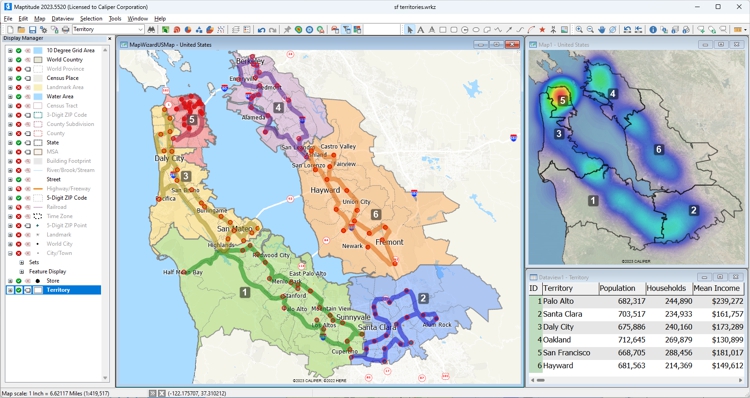
Territories, optimized routing, density “hot spots”, and relational database analysis in Maptitude GIS
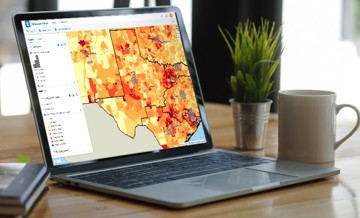
This interactive map lets you see the median income for U.S. ZIP Codes and proximity to major U.S. airports.


|
“We've been using Maptitude for more than 20 years. It is by far 'the best bang for the buck' in GIS software. I can't believe the amount of demographic data that comes with the product. The sophistication is incredible, but the software is relatively simple to use. We've been using Maptitude to map our CRA Assessment Areas for banks. We also use it for branch impact studies (required by regulators). When we started using drive-time rings to determine the practical service area of bank branches the regulators were really impressed.”
|

|
“When we are helping financial institutions create and define geographically targeted market segments, HMDA and CRA Small Business analysis, loan trends, Competitive Analysis, market share, Business and Deposit trends - our tool of choice is Maptitude. It is one of the most affordable and feature-packed desktop GIS software in the market. It comes bundled with all the Census and other spatial data related to the financial service industry.”
|

|
“I've had the good fortune, or misfortune, to use quite a few GIS software packages over the past few years and can assure you that Maptitude is streets ahead when it comes to ease-of-use. The trick with any GIS is to understand the terminology, and Maptitude communicates it's functionality through a common-sense menu structure. The result is that a new user is up and running with an extensive range of capabilities within a very short time.”
|
For a current, independent description of ArcGIS Online, see their profile on G2, and compare it to Maptitude: g2.com/compare/maptitude-vs-maptitude-online-vs-arcgis-online →
Use the buttons below to get an independent AI comparison of Maptitude vs ArcGIS Online:
Source: Wikipedia – Carto
See Wikipedia for a current description of Carto.
For a current, independent description of Carto, see their profile on G2, and compare it to Maptitude: g2.com/compare/maptitude-vs-maptitude-online-vs-carto →
Use the buttons below to get an independent AI comparison of Maptitude vs Carto:
Source: Wikipedia – Esri ArcGIS
See Wikipedia for a current description of Esri ArcGIS.
For a current, independent description of Esri ArcGIS, see their profile on G2, and compare it to Maptitude: g2.com/compare/maptitude-vs-maptitude-online-vs-esri-arcgis →
Use the buttons below to get an independent AI comparison of Maptitude vs Esri ArcGIS:

|
“Maptitude is a great GIS program that is infinitely easier to use than ArcGIS. I am a novice at GIS software, and I have access to both ArcGIS and Maptitude. Maptitude is significantly easier to use. ArcGIS is a very powerful sophisticated program, but it would take me weeks to learn to do some things that Maptitude does intuitively.”
|

|
“In 2013, my company made a decision to move from ArcView to Maptitude because of ESRI’s annual licensing fees and the high expense for their extensions. At first, my GIS analyst was concerned about such a sudden change, but he was able to get proficient in only about a week. My firm serves school districts around the country, providing maps and demographic data to help with enrollment planning. Since changing to Maptitude, several clients have commented that the maps are easier to read, and provide more information than we used to be able to provide under ArcView. It was a good move. I just wish I had done it sooner.”
|
Source: Wikipedia – Global Mapper
See Wikipedia for a current description of Global Mapper.
For a current, independent description of Global Mapper, see their profile on G2, and compare it to Maptitude: g2.com/compare/maptitude-vs-maptitude-online-vs-global-mapper →
Use the buttons below to get an independent AI comparison of Maptitude vs Global Mapper:
Source: Wikipedia – Google Earth Pro
See Wikipedia for a current description of Google Earth Pro.
For a current, independent description of Google Earth Pro, see their profile on G2, and compare it to Maptitude: g2.com/compare/maptitude-vs-maptitude-online-vs-google-earth-pro →
Use the buttons below to get an independent AI comparison of Maptitude vs Google Earth Pro:
Source: Wikipedia – GRASS GIS
See Wikipedia for a current description of GRASS GIS.
For a current, independent description of GRASS GIS, see their profile on G2, and compare it to Maptitude: g2.com/compare/maptitude-vs-maptitude-online-vs-grass →
Use the buttons below to get an independent AI comparison of Maptitude vs GRASS GIS:
Source: Wikipedia – Mapbox
See Wikipedia for a current description of Mapbox.
For a current, independent description of Mapbox, see their profile on G2, and compare it to Maptitude: g2.com/compare/maptitude-vs-maptitude-online-vs-mapbox →
Use the buttons below to get an independent AI comparison of Maptitude vs Mapbox:
Source: Wikipedia – MapInfo Pro
See Wikipedia for a current description of MapInfo Pro.
For a current, independent description of MapInfo Pro, see their profile on G2, and compare it to Maptitude: g2.com/compare/maptitude-vs-maptitude-online-vs-mapinfo-pro →
Use the buttons below to get an independent AI comparison of Maptitude vs MapInfo Pro:

|
“As a former MapInfo user, I like the ease of use of this product. It is much easier to do many things in Maptitude compared to tools like MapInfo, but there is plenty of power. Adding aerial maps is simple and the layer controls are easy as well. The price is also affordable.”
|

|
“As far as ease of use goes Maptitude takes the prize, Maptitude is definitely easier to use right out-of-the-box and the learning curve for advanced functions is shorter than with MapInfo. As for presentations, Maptitude takes the prize again over MapInfo. The folks at Caliper took great pains and effort to make a GIS software application that is as user friendly as possible.”
|
Source: Wikipedia – QGIS
See Wikipedia for a current description of QGIS.
For a current, independent description of QGIS, see their profile on G2, and compare it to Maptitude: g2.com/compare/maptitude-vs-maptitude-online-vs-qgis →
Use the buttons below to get an independent AI comparison of Maptitude vs QGIS:

|
“Absolutely, I have Maptitude, ArcGIS, and QGIS and all the time I use Maptitude. What Maptitude can do, others cannot!”
|

|
“I also use the open-source package QGIS occasionally. But despite the fact that Maptitude costs money and QGIS is free, I think Maptitude is the better value when you consider total cost of ownership: it is much easier to use, and the data bundled with the software alone (including a license for the commercial HERE streets data) is worth the price of admission.”
|
These are common reasons organizations buy GIS software:
Open-source GIS such as QGIS and GRASS GIS can be powerful, and many organizations use them effectively. What they do not come with is the commercial infrastructure that Maptitude provides as standard: a full-time development team with over 40 years of GIS experience, dedicated support staff rated 9.2 out of 10 for Quality of Support by G2 reviewers, wizard-based workflows built for business users rather than GIS analysts, commercial-grade demographic data, and a fixed annual subscription that covers all updates and support with no added costs. If you have GIS skills on staff, open source can be a good trade. If you do not, the setup time is the real cost.
Start with four questions. Who is going to run it? What formats does your data arrive in? Do you need demographic data you do not already own? Does the result need to go somewhere else, such as a report, a dashboard, or your own application?
Maptitude answers all four. The Maptitude Create-a-Map Wizard takes the person running it from their own spreadsheet to a finished map in a few steps, so no GIS qualification is needed. It reads and writes most geospatial formats. Demographics, street data, and business locations are included at a fixed price rather than sold as add-ons. And it exports finished maps and data you can load back into your own systems, or share by link through Maptitude Online so colleagues can open a map without installing anything.
Use the AI buttons in each section above to test that against your own requirements.
Maptitude also lowers the effort of keeping analyses current, so you rerun the work instead of rebuilding it, and it makes your findings easy to explain to other people.

|
“I've been using Maptitude for more than 15 years. It is simply the best tool available for businesses that need a market planning mapping and data resource. It can do everything I need it to do - from the very simple to the complex. It integrates nicely with other programs and file types making analysis and presentation very easy. I highly recommend Maptitude to firms who need a function-rich GIS mapping solution. It is the best!”
|

|
“Pros: Cost. Much easier to reach a purchasing decision. I loved the integrated country data package so I didn't have to download census layers and other info - it was all built in.”
|
Learn more about Maptitude GIS software to see how you and your team can benefit!
Schedule a Free Personalized Demo
Maptitude costs $795 per user per year, available as a subscription or a one-time purchase, including unlimited geocoding, built-in demographic and business data, and all updates and support. Across the category, ask four questions of anything you shortlist. Is the price per user per month or per year? Is geocoding metered, and what happens when you exceed the allowance? Are analyses, routes, and rings unlimited or capped per plan? Is demographic data included or sold separately? Data is where the gap between the quoted price and the real bill usually opens up.
Yes. QGIS and GRASS GIS are both free and open source, and both are capable. The cost shows up elsewhere: setup time, finding and licensing data, and the GIS knowledge needed to drive them. If you have that on staff, open source is a good trade. Maptitude also offers a free 1-month trial and a free one-year license for students and educators.
It depends on the product, and this is the question most worth asking before you buy. Several GIS platforms assume a trained analyst and a projection-and-geodatabase vocabulary. Maptitude is built for business users, and the Maptitude Create-a-Map Wizard walks you through locating, analyzing, and mapping your own data step by step, with free tutorials, training, and webinars if you want them. Try the software on your own data during a trial rather than on a demo dataset, because that is where the learning curve actually shows.
Coverage varies a lot by vendor, so check it early if you work in more than one country. Maptitude includes one free Country Package of your choice, with streets, addresses, travel times, postal boundaries, and demographics where available. Current packages cover the USA, Canada, Mexico, Brazil, Argentina, Peru, Colombia, Chile, Bolivia, Ecuador, Australia, New Zealand, India, South Africa, the United Arab Emirates, the United Kingdom and Ireland, and Europe. Additional packages cost $695 each, and you can switch between the ones you have installed. Europe is priced on request. A world map is also included, so you can map your data anywhere on Earth by coordinate or by populated place.
That depends on your requirements, so the more useful answer is to point you at the independent rankings rather than our own. Leading software review platforms consistently place Maptitude at or near the top for GIS:
• The 2026 G2 buyer's guide
• SourceForge
• SoftwareReviews
• Capterra
• G2
Or use the AI comparison buttons beside any platform on this page to check it against your own requirements.

 Check out our G2 Reviews
Third-party trademarks are used for identification and descriptive purposes and do not imply affiliation or endorsement. See Third-Party Trademarks.

Home | Products | Contact | Secure Store
 Call Us


