
Author: Stewart Berry, Vice President Product Management, Maptitude
Last updated 20 May 2026
Quick answer: Maptitude Online is the closest direct alternative to Maptitude Desktop, offering browser-based access with the same demographic data, support, and core mapping tools. It is also distinctive among web-based mapping platforms for its generous data and usage ceilings: 900+ demographic variables and unlimited geocoding at a fixed annual price, plus an AI-Powered Data Library, which queries those demographic variables in plain English, and real-time collaborative editing. Several other web-based options are listed alphabetically below: Carto, Esri ArcGIS Online, eSpatial, Google Maps Platform, Mapbox, MapBusinessOnline, Mapline, and MapMe.
Maptitude Online Free Trial Request Demo
Maptitude Desktop is a full-featured GIS application that installs on Windows. It covers the full range of mapping work, from quick visualization to advanced analysis. There are still reasons someone evaluating Maptitude Desktop might also want to look at a web-based mapping platform:
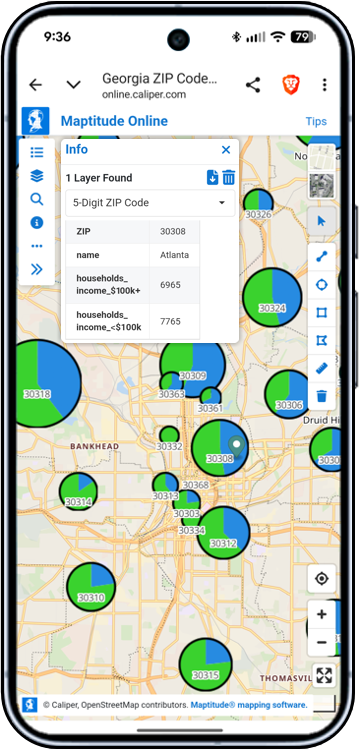
Maptitude Online works on iOS and Android in a mobile browser, with no app required. Teams can view maps, inspect data tables, geocode locations, use analysis tools, select features, and navigate shared maps from a phone or tablet.
Maptitude Online is the web-based version of Maptitude. It's a separate product from Maptitude Desktop, with a feature set built for browser use and sharing. It is the simplest way to add browser-based mapping for any user, with the same demographic data, support team, and core mapping tools as Maptitude Desktop.
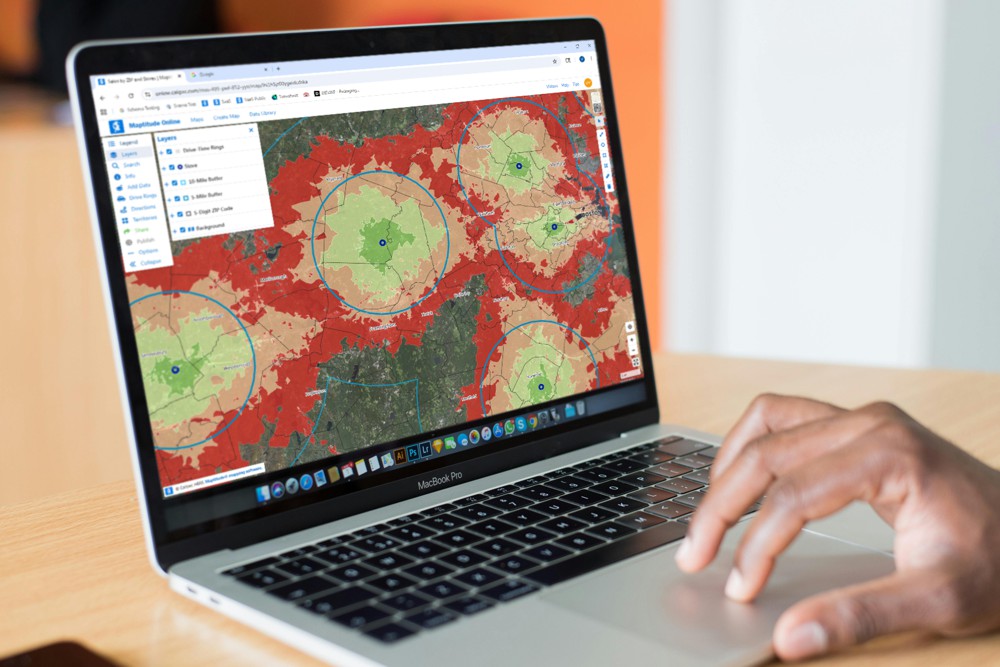
Maptitude Online brings 70+ built-in mapping tools to Mac users through a web browser, including drive-time rings, distance rings, demographic mapping, spreadsheet mapping, geocoding, and territory analysis at one fixed annual price.
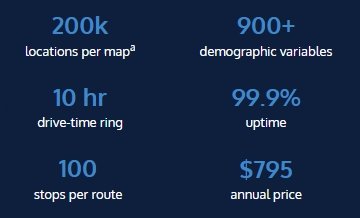
| Pricing | $795/year, fixed |
| Platform | Web (any modern browser; Windows, macOS, Linux, iOS, Android) |
| Built-in mapping tools | 70+ |
| Locations per map | Up to 200,000a |
| Demographic variables included | 900+ |
| AI-powered data library | Yes: plain-English queries |
| Real-time collaborative editing | Yes |
| Geocoding | Unlimited* |
| Route optimization | Unlimited routes,* up to 100 stops per route |
| Drive-time rings | Unlimited,* up to 10 hours travel time |
| Uptime | 99.9% (last 12 months) |
| G2 rating | 4.7/5 across 150 verified G2 reviews (Maptitude) |
| Free trial | 30 days, no credit card required |
* Unlimited up to 20GB storage per account.
a For maximum responsiveness, cluster themes are recommended, especially for single layers that approach the maximum features per map (e.g., a single layer of 200,000 locations).
Maptitude is a G2-designated Leader in GIS, rated 4.7/5 across 150 verified G2 reviews, and named a Top Software Product in G2's 2026 Best Software Awards (top 0.63% of all vendors). These are third-party recognitions, not self-published rankings.

|
“Where it really stands out is in sharing results, interactive maps can be easily distributed to stakeholders, making it a valuable tool for communicating with community leaders, prospects, and partners. Overall, it's a practical and accessible solution for economic development teams looking to move from data to insight and presentation more efficiently.”
|
For a current, independent description of Maptitude Online, see their profile on G2, and compare to Maptitude Desktop. Use the buttons below to get an independent, objective AI comparison of Maptitude vs Maptitude Online:
Maptitude Online Free Trial Request Demo
The choice doesn't have to be either/or. Many Maptitude Desktop users add Maptitude Online rather than switching. The two products are built to work together:
For teams whose Desktop user wants to keep the full analytical toolset while adding a sharing layer or making maps reachable from outside Windows, running both is usually a better fit than replacing one with the other.
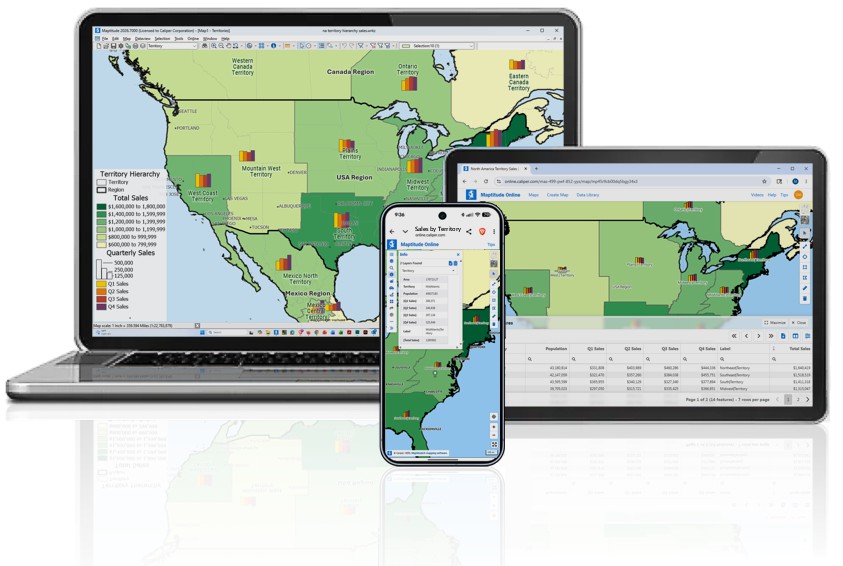
Build maps, territories, routes, and drive-time analyses in desktop Maptitude, then publish them directly to Maptitude Online as stable shared URLs that anyone can open on a laptop, tablet, or phone.

|
“I really enjoy that Maptitude Online lets us easily share maps with our clients or for public viewing on our website. Our clients have always wanted to leverage mapping tools, but most of our clients don't have mapping experience and many of the available platforms are complex and time-consuming to learn. Maptitude Online's ‘Publish’ feature solves this by allowing us to easily share interactive maps that clients can immediately use. They can explore and extract insights from the maps without needing to understand how to build maps or import datasets. The feedback has been overwhelmingly positive – clients genuinely enjoy using the Maptitude Online maps and find them easy to use and valuable.”
|
Below, alphabetically, are several other web-based mapping platforms. For each, we link to a third-party source (Wikipedia or G2) for an independent description, and provide AI comparison buttons so you can get an outside evaluation of how Maptitude Desktop compares.
Source: Wikipedia – Carto ↻ live
See Wikipedia for a current description of Carto.
For a current, independent description of Carto, see their profile on G2, and compare to Maptitude. Use the buttons below to get an independent, objective AI comparison of Maptitude vs Carto:
Source: Wikipedia – ArcGIS ↻ live
See Wikipedia for a current description of ArcGIS Online.
For a current, independent description of ArcGIS Online, see their profile on G2, and compare to Maptitude. Use the buttons below to get an independent, objective AI comparison of Maptitude vs ArcGIS Online:
For a current, independent description of eSpatial, see their profile on G2, and compare to Maptitude. Use the buttons below to get an independent, objective AI comparison of Maptitude vs eSpatial:
Source: Wikipedia – Google Maps ↻ live
See Wikipedia for a current description of Google Maps.
For a current, independent description of Google Maps Platform, see their profile on G2, and compare to Maptitude. Use the buttons below to get an independent, objective AI comparison of Maptitude vs Google Maps Platform:
Source: Wikipedia – Mapbox ↻ live
See Wikipedia for a current description of Mapbox.
For a current, independent description of Mapbox, see their profile on G2, and compare to Maptitude. Use the buttons below to get an independent, objective AI comparison of Maptitude vs Mapbox:
For a current, independent description of MapBusinessOnline, see their profile on G2, and compare to Maptitude. Use the buttons below to get an independent, objective AI comparison of Maptitude vs MapBusinessOnline:
For a current, independent description of Mapline, see their profile on G2, and compare to Maptitude. Use the buttons below to get an independent, objective AI comparison of Maptitude vs Mapline:
For a current, independent description of MapMe, see their profile on G2, and compare to Maptitude. Use the buttons below to get an independent, objective AI comparison of Maptitude vs MapMe:
Some work is genuinely better suited to the desktop product. If any of these describe what you need to do, stick with Maptitude Desktop:
For details, see the Maptitude Desktop overview and start a free trial.
Both products share the same demographic data, support team, and product roadmap. Try either for free, or compare them side by side before you decide.
Maptitude Online Free Trial Desktop Maptitude Free Trial Request Demo
Maptitude Online and Maptitude Desktop are two separate products with different feature sets built for different working styles. For someone evaluating Maptitude Desktop who specifically needs browser access, easier sharing, or a way for non-technical colleagues to view maps, Maptitude Online is a direct alternative on those points.
Maptitude Desktop is a Windows program you install on your computer, built for full spatial analysis, advanced map design, and working offline. Maptitude Online runs in a browser and is built for sharing and easier access. Both include the same demographic data and are supported by the same team. For a feature-by-feature comparison, see the Maptitude Online features page and the Maptitude Desktop features page.

Home | Products | Contact | Secure Store
 Call Us

