Maptitude 2026: New Features Overview
Maptitude 2026 is a major release of Caliper Corporation's
popular Geographic Information System (GIS) and mapping software.
The 2026 version provides the most up-to-date and accurate data
available.
Maptitude 2026 provides the business value you expect when
investing in mapping software. Maptitude includes the latest
streets, postal data, and demographics. Maptitude 2026 is the
fastest and most intuitive professional mapping application, with
significant enhancements to sales territory management, sharing,
visualizations, and logistics/operations analytics.
Key New Features of Maptitude 2026
- Keeps You Current
Includes the latest postal, map, and
October 2025 HERE® street data, 2024 ACS demographics, and new
5-year projections through 2054 down to the Block Group and ZIP Code
layers that support exploring future population from the national to
the local level.
- Faster Territory Management
Speeds up
territory creation/management/linked record updates, reorders
territories to prioritize the chosen territory, and supports
right-click bulk reassignment of areas between territories.
- More Customized Routing
Adds
four new PDF direction reports
including landscape and turn-by-turn options, a direction-of-travel
route style, the ability to avoid specific streets or street types
(e.g., ferries), and U-turn prevention in delivery routing.
- Faster Map Drawing and Navigation
Supports
near instant panning and
zooming, shows all layers faster by drawing them at the same time,
and adds new map navigation keyboard shortcuts.
- Refreshed
Interface
Provides an attractive and modern interface update that
will still be familiar to existing users, with a Simplified
Ribbon-style toolstrip, and updated buttons and icons that reflect
Microsoft Fluent Design and Segoe Fluent Icons glyphs.
- Updated Documentation
Updates all help resources for Maptitude 2026
including the 24/7 AI chat assistant, Learning Portal, new
browser-based Help, context-sensitive help, API/GISDK Help, videos
and webinars, the training materials, and step-by-step tutorials.
- Cutting Edge Features for Online Sharing and
Software-as-a-Service (SaaS)
Adds an
AI-driven "Get Data" wizard
that generates maps and demographic data simply from a free-form
search query. Adds a routing and directions tool with multiple stops
for scheduling field sales rep visits, delivery route planning, and
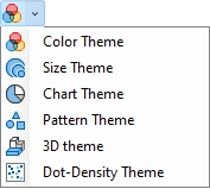
optimized routes. Adds a unique clustered pie or bar chart map
theme, lasso and shape-based territory selection, powerful database
filtering in addition to selection sets, cumulative drive-time
rings, tables and maps viewable at the same time, and support for
Google Sheets and Salesforce
Objects (coming later in 2026).
Maptitude can map your information whether you have data from
Google Maps, from a Microsoft mapping product such as MapPoint, or
from Microsoft Office. You can analyze your information using the
intuitive Maptitude 2026 mapping wizards and export your results as
attractive, preformatted Excel or PDF reports, or upload them to
Maptitude Online for public or private sharing.
Maptitude delivers easy-to-use professional mapping tools and
data at the unbeatable price of only US$795 (for desktop or
Maptitude Online.) For pricing and ordering information, please visit the
Mapping Software Store,
e-mail Maptitude Sales, or call US sales at
+1 617-527-4700.
New Data
Maptitude 2026 comes standard with one detailed Country Package
of your choice, and additional Country Packages can be purchased
separately. Each Country Package includes a wealth of data
unavailable in any other product, such as an up-to-date street layer
with addresses for pin-mapping (geocoding) and travel time
information for computing routes and drive-time rings. Features such
as building footprints for many urban locations, railways, and named
landmarks are also built into the software. The comprehensive
landmarks range from public facilities to commercial buildings
including businesses, restaurants, and retail stores, and include
addresses and phone numbers where available. Where available, postal
data and detailed demographics are shipped with the product.
As you switch between the countries you have purchased, Maptitude
will seamlessly refresh the interface with country-specific tools
such as Create-A-Map Wizard and tools for finding, pin-mapping, and
routing. New Map Libraries allow you to easily create attractive
geographic and demographic maps while locating unlimited numbers of
addresses and territory-based records.
The basic global map that is provided with every Maptitude
license enables you to view your data for anywhere on Earth, and it
allows you to map your locations by coordinate, manually, or by any
populated place (village/town/city).
United States
New U.S. datasets provide access to the most up-to-date
geographic information available. Maptitude 2026 comes with October
2025 HERE® Map Content, which allows for accurate address locating
and street visualization, in addition to robust data that you can
use to calculate directions, drive-time rings, and drive-time
territories. Speeds based on HERE Traffic Patterns are included.
Other 2025 U.S. map layers from HERE include those for buildings,
highways, railroads, and landmarks. The Points of Interest layer
contains over 3.8 million named public and business locations.
Maptitude 2026 ships with the January 2026 ZIP Code update to
ensure that you are using the latest data. The 5-digit ZIP Code
boundaries are a nationwide area database with ZIP Codes for all 50
states, the District of Columbia, Puerto Rico, and the territories.
Other standard features of Maptitude 2026 are updated 3-digit ZIP
Code areas and a point database of ZIP Code points for the entire
country. The ZIP Code area layers extend into non-deliverable areas
to provide complete coverage of the USA. The 5-digit ZIP Code areas
include updated counts of businesses by detailed industry type
(retail, finance, etc.), along with the number of employees working
in each ZIP Code, and annual payroll figures. The ZIP Codes are also
classified by their updated rural-urban commuting characteristics
and with the numbers of hospitals, hospital beds, and healthcare
providers. The HERE street layer indicates whether a street permits
cars, buses, deliveries, emergency vehicles, motorcycles,
pedestrians, taxis, through traffic, or trucks. Additionally, it
provides estimated performance metrics, such as speed (in MPH) and
travel time (in minutes) for both forward and reverse directions,
recorded during typical time periods on Wednesdays: noon
(12:00–12:14 pm), early morning (8:00–8:14 am), evening
(5:00–5:14 pm), and midnight (12:00–12:14 am).
The US Census
boundaries (e.g., Block Groups, Tracts, Places, Counties, MCDs,
MSAs, States) and the 3- and 5-digit ZIP code areas that come with
Maptitude contain some or all of several demographic
profiles from a variety of data providers. These sources include
the 2020 Census and the 2024 American Community Survey (ACS) to name
a few. This data is available for the USA, Puerto Rico, and the
Territories. These layers include daytime population, and percentage
change (2023 to 2024) in population, median income, and mean income.
The ZIP Code, Tract, County, and State layers also include updated
buying power (disposable income for 2022) figures.
Personal income
and change in personal income BEA data for 2024 are included for
States and Counties, and 2024 GDP (by total, goods, services,
government, and by 2-digit NAICS code) and change in GDP BEA data
for 2024 are included for Counties. Population projections for ZIP
Codes, Block Groups, Counties, States, and Tracts are included by
5-year increment for 2029-2054.
The Demographic Map Librarian tool
makes it easy to access a series of pre-defined thematic and shaded
maps of the updated data. There are also maps for the 2024 Tract
layer with updated banking compliance FFIEC data for 2025.
Updated United
States Data Packages
- 120th Congressional boundaries updated with the 2026 election delineations
- State Legislature boundaries updated for Michigan Senate, Mississippi House/Senate
- School District boundaries refreshed with 2025 Census boundaries and Department of Education demographics
Other Country
Packages:
Australia
- October 2025 HERE update with speeds based on noontime HERE Traffic
Patterns
- Updated HERE postal boundaries and centroids
- Updated points of interest and business locations with logos (HERE)
- Maptitude 2026 now supports the Australian Albers equal-area
projection based on the GDA2020 datum.
- 2025 Estimated
Population and 2024 Estimated Population by Age & Sex (LGAs, SA2s,
States)
- LGAs, Localities, Wards, Commonwealth Electoral
Divisions, State Assemblies, State Legislative Councils updated to
2025 boundaries
Brazil
- October 2025 HERE update with speeds
based on noontime HERE Traffic Patterns
- Updated HERE postal
boundaries and centroids
- Census boundaries updated to 2022
vintage
- 2022 Census demographics
Canada
- October 2025
HERE update with speeds based on noontime HERE Traffic Patterns
- Updated 3-character postal Forward Sortation Area (FSA)
boundaries and centroids (HERE)
- Updated 6-character postal
point layer (HERE)
- Updated 6-character postal area layer
(Caliper Created/Derived from HERE)
- Updated points of
interest and business locations with logos (HERE)
- Federal
Election Districts refreshed to 2023 ridings
- July 2025
population estimates for Provinces/CD/CSD
- Dissemination
Areas, Aggregated Dissemination Areas, Census Subdivisions, Census
Consolidated Subdivisions, Census Divisions, Provinces, Census FSAs
simplified for better territory performance
United Kingdom and
Ireland
- October 2025 HERE update with speeds based on
noontime HERE Traffic Patterns
- Updated postal boundaries for
the UK and Ireland (HERE)
- Updated postal boundaries and
postcode points for GB (Caliper)
- Updated points of interest
and business locations with logos (HERE)
- Westminster
Constituencies updated to 2023 boundaries
- Irish Dáil
Constituencies updated to 2023 boundaries
Mexico
- October 2025
HERE update with speeds based on noontime HERE Traffic Patterns
- Updated HERE postal boundaries and centroids
New Zealand
- October 2025 HERE update with speeds based on noontime HERE
Traffic Patterns
- Updated HERE postal boundaries and centroids
- Census boundaries updated to 2023 vintage
- Locality
layer update to April 2026 vintage
- 023 Census demographics
Europe (Scheduled for late 2026)
- October 2025 HERE update
with speeds based on noontime HERE Traffic Patterns
- Updated
HERE postal boundaries and centroids
- Updated points of
interest and business locations with logos (HERE)
Network Analysis, Directions, and Routing
Maptitude 2026 gives you powerful tools to model routes, to
calculate the distances and travel times between locations, and to
display and analyze service provision over the road network.
Routing & Directions Manager
The Tools>Routing & Directions>Routing & Directions
Manager now:
- Supports four new PDF reports in addition to Export
Directions to PDF (Portrait):
- Export Directions to PDF (Landscape)
- Export Turn-by-Turn Directions to PDF (Portrait)
- Export Turn-by-Turn Directions to PDF (Landscape)
- Export Text Only Directions to PDF (Portrait)
- Supports a new default route style that indicates the
direction of travel, and the ability to change the route style
under Options>General>Routing Options.
- Supports sorting your saved routes by name, under
Create or Open a Route>Display in alphabetical order.
- Supports clearing your last typed address via the
Clear button.
- Supports moving of a stop/waypoint, even if the
route/directions have not been created.
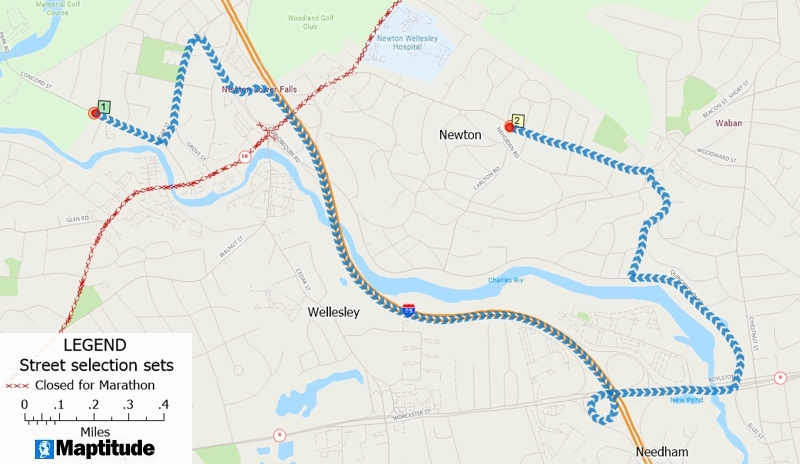
- Supports avoiding selected streets, under
Options>Exclude, such as ferries or roads where
trucks are not allowed.
- Supports avoiding streets by type, under
Options>Driving Speeds, by setting the Target
Speeds to zero for Major Highways, for example.
Drive-Time Rings
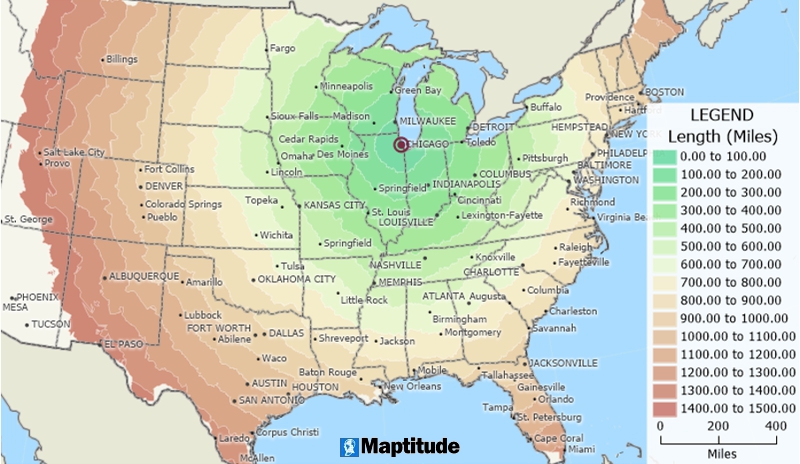
The Tools>Routing & Directions>Drive-Time Rings
Toolbar now:
- Supports avoiding selected streets, under Options>Exclude,
such as ferries or roads where trucks are not allowed.
- Has a named button with “Create” text prompt for creating
drive-time rings.
- Has no limit under
Edit>Preferences>Routing>Drive-Time Rings>Maximum Distance.
Routing Deliveries and Pickups
The Tools>Routing & Directions>Routing Deliveries & Pickups tool
now:
- Supports avoiding selected streets, under
Edit Schedules>Exclude Links, such as ferries or
roads where trucks are not allowed.
- Allow choosing the final stop, under Edit
Depots>Depots>Offload Locations Using.
- Supports preventing U-turns, under Edit
Options>Prohibit U-Turns.
New Database Functionality
New capabilities for geographic databases have been introduced.
- Allows you to change the source file location for linked
records under Map>Linked Records Settings
by clicking the ellipsis “…” button.
- Provides a line smoothing tool, for line layer features, via
Tools>Editing>Layer Editing Toolbar
for faster and more accurate geographic editing.
- Provides an archive database tool, for line layers, via
Tools>Editing>Layer Editing Toolbar to
create a backup while you make edits.
Improved Create-a-Map Wizard & Maps
Create-a-Map Wizard is now more robust and easier to use:
- Provides updated maps with the latest geography.
- Pre-loads surrounding web map layer tiles, so that panning
is nearly instant.
- Zooming with the mouse scroll wheel immediately scales the
current view to stay responsive while a full re-render completes
in the background.
- Any new pan or zoom with the mouse scroll wheel
automatically cancels and restarts the re-render, so the map
never freezes.
- All downloading and rendering of web map layers happens in
the background without interrupting your work.
- Vector layers are rendered simultaneously, so full map
redraws complete as quickly as possible.
- Provides keyboard, accessibility, shortcuts for map
navigation and font scaling (Ctrl for map zooms, or Ctrl+Shift
for font size, combined with +/-/?/0 for
larger/smaller/manual/reset actions), with panning in the
horizontal, vertical, and diagonal, via the arrow, PgUp, PgDn,
Home, and End keys, multiplied as follows: Arrow = 1/2 scope,
Ctrl+Arrow = 1/4 scope, Shift+Arrow = full scope.
- Allows you to create your own custom color palette that is
available when you next reopen Maptitude, via
Map>Layers>Style>Color>Custom.
- Removes default hover labels to reduce unnecessary pop-ups
when interacting with a map.
- Supports Cancel, Select All,
and Clear All, for hover labels, via
Map>Labels>Hover Settings for faster map
customization.
Creating Selections and Formulas
Condition building tools improvements:
- The Selection>Select by Related Values
tool now supports all mappable (i.e., joined columns) fields.
- The new Tools>Editing>Select Zero-Length Line
Segments tool scans a line layer to remove lines
that contain less than two unique shape points, helping clean up
externally sourced data.
Analysis Tools
Completely new and innovative analytics have been added to Maptitude 2026:
- The
Clustering Add-In now uses cluster IDs to label the cluster
centroids and to create the color theme on the clustered points,
making it easy to distinguish between clusters.
- Provides three new chart types for visualizing dataview
column data on a logarithmic scale, accessed by right clicking a
dataview column header and choosing Log Histogram Chart. This is
especially useful for skewed data with wide value ranges (e.g.,
population, income):
- Bar Log Histogram Chart
- rea Log Histogram Chart
- Spline Area Log Histogram Chart
Locating Data
The geocoding tools use the updated street and postal data,
making location matching results more accurate than in previous
versions of Maptitude.
Territory Tools
Insightful and beneficial sales territory management features
have been added to Maptitude 2026. The Map>New Territory
Layer Wizard and the Map>Territory Manager Toolbar
now:
- Supports faster territory creation for layers with a large
number (several thousands) of attributes/demographics.
- Supports much faster territory creation and management via
simplified boundary layers for the Canada Country Package.
- Supports much faster updating of linked territory records
via SQLite.
- Lists linked territory table file paths under
Map>Linked Records Settings.
- Moves the territory being worked on in the Territory Manager
(i.e., the territory chosen in the Edit drop-down list), to the
top of the lists under the “List” and “Changes” tabs, making it
much easier to understand proposed changes.
- Allows you to change the source file location for linked
records under Map>Linked Records Settings
by clicking the ellipsis “…” button.
- Shows the territory hierarchy in a tooltip when hovering
over a territory level in the Territory Manager, for easy
identification of, for example, the district and region that a
territory belongs to.
- Supports right-click reassignment of the areas (e.g., ZIP
Codes) in one territory to a territory the user chooses, making
bulk edits much easier.
- Offers to verify your territories if your territory layer
has not been opened in a long time, ensuring it is consistent
with the latest map data.
- Supports selection sets in the Create-a-Territory Wizard
when creating territories “From my existing area layer” and
“From my existing point layer”, allowing finer control of the
inputs for territory creation.
- Offers a default “Ignore islands separated by a body of
water” option for “Find Non-Touching Areas”, helping you focus
on likely misalignments.
New Documentation
Maptitude continues to provide numerous ways to get you started
with the software. The
online Learning Portal is continually updated, and new and
revised tutorials are incorporated into the Maptitude Help and
updated for the current version of Maptitude.
The Learning Portal Virtual Assistant answers any questions you
might have about Maptitude. Powered by artificial intelligence (AI)
and advanced language processing, the Maptitude Support Chat
provides clear and relevant responses around the clock.
The comprehensive and exhaustive
Maptitude Help (Help>Maptitude Help) and the
GISDK Help (Help>GISDK Help) are available online. The Help can
be viewed within any web browser and now has a modern frameless
browser-based interface. The Help is always kept up-to-date and has
tutorials for every aspect of the software. Also, being available
online, the steps for all Maptitude tasks are accessible to AIs,
allowing you to use your favorite AI to learn how to use the
software.
Maptitude 2026 includes a Windows Microsoft Office style question
mark icon on most windows. Clicking this will take you to the
relevant section of the Help. You can also hover over any menu item
and click F1 to access the updated Help. In addition, several
message windows in Maptitude link directly to the relevant Learning
Portal article.
System and Interface
Maptitude 2026 supports the latest Windows operating systems,
file types, and common design elements.
-
 Provides a modern
"Simplified Ribbon" style toolstrip, replacing the default floating
toolbars (selection, drawing, and navigation).
Provides a modern
"Simplified Ribbon" style toolstrip, replacing the default floating
toolbars (selection, drawing, and navigation).
- Provides a
modern and attractive user interface through updated button icons
that more closely reflect Microsoft Fluent Design System
conventions, using a simplified subset of the Microsoft Office color
palette.
- Enables four menu items on empty workspaces, as an
alternative to the Home window:
- Map>New Map
- Map>New Territory
Layer
- Map>Add Table/Spreadsheet to a Map
- Map>Demographic Map
Librarian
- Provides a “Type to filter” prompt in drop-down
lists, exposing a powerful built-in feature.
- Provides larger
font title bars for docked toolbars.
- Provides toolbar icons
in panels such as the Display Manager that now more closely match
Segoe Fluent Icons glyphs, including replacing the generic
plus/minus operators for expand/collapse and visibility toggling.
- Implements seamless dialog box refreshes when windows are
repositioned.
- Provides Pause/Resume buttons in the Download
Manager, allowing the user to check/uncheck any item, supporting
control of specific data and software downloads.
- Replaces the
previous Data Installer with a new EXE-based version that reduces
download size by approximately 50% and increases download speed,
verifies disk space before installation, registers an Add/Remove
Programs uninstall entry, and supports silent/scripted installation
for enterprise and IT deployments.
- Supports faster help
system installation by optionally skipping the files (help is now fully online) or by using compressed files.
- Supports
faster download in the Download Manager for a Maptitude program
download, by utilizing multiple threads.
New Native File Support
- Virtual Raster (*VRT), via drag-and-drop, acts as a metadata
file, describing the location and configuration of various
raster datasets (like GeoTIFF files).
Maptitude Online
Maptitude Online is both a map
sharing add-in for desktop Maptitude and a stand-alone
mapping application.
Online Sharing
As a sharing add-in, maps
and reports for any Country Package are created and uploaded using
desktop Maptitude. Once uploaded, you can use the maps with the full
functionality of the SaaS.
New capabilities are listed below.
- Increased the maximum layer size that can be uploaded to 20 in any
Maptitude Online map. Each layer has a size of 1 apart from
user-created area layers (e.g., territories, rings, and areas of
influence) that have a size of 2.
Software-as-a-Service (SaaS)
Desktop Maptitude is not required to use Maptitude Online for the
USA. Directly from your browser you can upload Excel or CSV tables, Google Sheets, and Salesforce Objects
(coming later in 2026), and map the data using the Create-a-Map-Wizard. The maps can
be shared online publicly or privately.
New capabilities added after
March 2025 are listed below (see the full release notes at
https://www.caliper.com/learning/maptitude-online-release-notes/):
Mapping and Analysis Enhancements
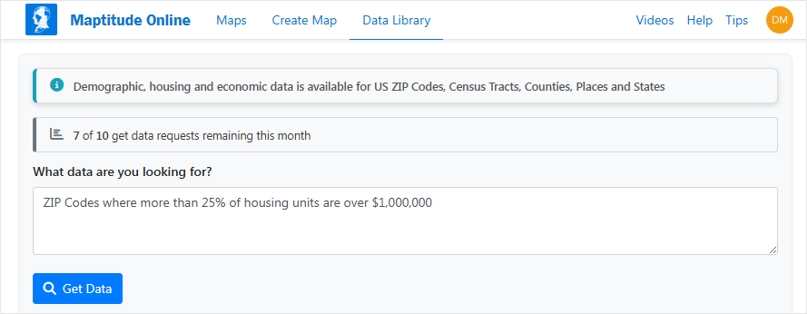
- Added a "Get Data" AI-agent
driven Wizard, that allows you to free-form type your search query
for your desired data, demographics, or map, with Maptitude Online
then automatically creating the results for you.
- Added a
routing and directions tool with multiple stops for scheduling field
sales rep visits, delivery route planning, and optimized routes.
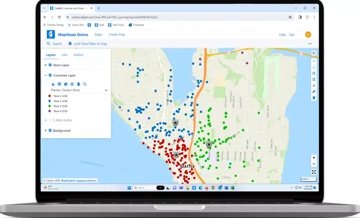
- Added a pie or bar chart choice in the Create-a-Map Wizard,
plus a new clustering option for chart themes to consolidate data in
dense areas and improve readability.
- Buffer Analysis now
supports cumulative rings, and Drive-time Ring layers can be
renamed.
- Added new filtering tools that give precise control
over subsets of data for more focused analysis.
User Interface and
Workflow Enhancements
- The dataview can be repositioned below
the map, allowing both to be worked with simultaneously.
- Maps
can be transferred between users via the Settings page, and
administrators can now unpublish all maps and prevent future
publishing for increased security control.
- A revamped
SaaS-native-style interface for windows such as those in the
Create-a-Map-Wizard.
Territory Management
- Added new territory
selection tools including lasso, rectangle, circle, and shape
selection, along with the ability to automatically assign holes and
fill holes in territories.
- Numeric user data (such as number
of locations or sales volumes) can now be used as tracking fields in
the territory tool for more meaningful balancing.
- Users can
choose to remove areas from all territories or from just one
specific territory.
Additional Enhancements
- Background layers
can now be easily shown or hidden, with a toggle between satellite
and standard background imagery.
- A "Delete User" option has
been added for easier license management.
Geographic Information System Developer's Kit (GISDK)
APIs
The GISDK APIs make it easy to add mapping functionality to any
Windows desktop application written in Python, C#, or any .NET
programming language.
Code examples and the user documentation for the Maptitude API
have been updated for Maptitude 2026 and are included under
Help>GISDK Help.
GISDK Functions
Please see the
Listing of GISDK Functions topic in the Online Help to view a
full list of GISDK functions that were added, changed, or replaced
in Maptitude 2026.



 Call Us

