10 Best Location Intelligence Software Tools: 2025 Comparison

Stewart Berry

Author: Stewart Berry
5 December 2025

Location intelligence software helps you turn addresses, coordinates, and spatial data into practical business answers: Where should we open the next store? Which routes are most efficient? Where are we overserved or under-served?

This guide compares 10 leading location intelligence platforms, ranging from full GIS systems to lightweight web tools and developer APIs, so you can quickly see which one fits your industry, data skills, and budget.

In this article:

Summary Comparison Table

Product Best for Platform Free tier? Key Limitation
Maptitude Data-rich business mapping & territories Desktop, Cloud SaaS, server, API 30-day trial; Free for students Windows-only desktop
Esri ArcGIS Enterprise-scale GIS & complex spatial analysis Desktop, SaaS, server Limited public account Licensing complexity and higher total cost
Mapbox Custom maps, navigation & search in apps Cloud APIs & SDKs Yes (usage-based) Requires dev skills; usage-based billing
CARTO Cloud data-warehouse spatial analytics Cloud SaaS + APIs 14-day trial Enterprise pricing; SQL/analytics skill required
QGIS dvanced GIS on a budget Desktop (Win/Mac/Linux) Fully free (GPL) No bundled business data; steeper learning curve
eSpatial Sales territories & routing Cloud SaaS Free trial Subscription only; focused scope
Geoblink Retail/FMCG expansion & store network strategy Cloud SaaS (enterprise) Demo/trial on request Custom enterprise pricing; retail-centric
Smappen Easy catchment areas & geomarketing Cloud SaaS Yes (limited) Data/import limits on lower plans
Google Earth Engine Planet-scale environmental & remote sensing analysis Cloud analysis platform Free non-commercial Code-heavy; commercial use requires paid Google Cloud
Maptive Google-based business maps & route planning Cloud SaaS 10-day trial Annual per-user pricing; limited advanced GIS
 

Best Location Intelligence Software

1. Maptitude: Location intelligence with built-in business data

Maptitude is a full-featured mapping software and location intelligence platform, combining a powerful Windows desktop GIS with Maptitude Online for web-based sharing and analytics.
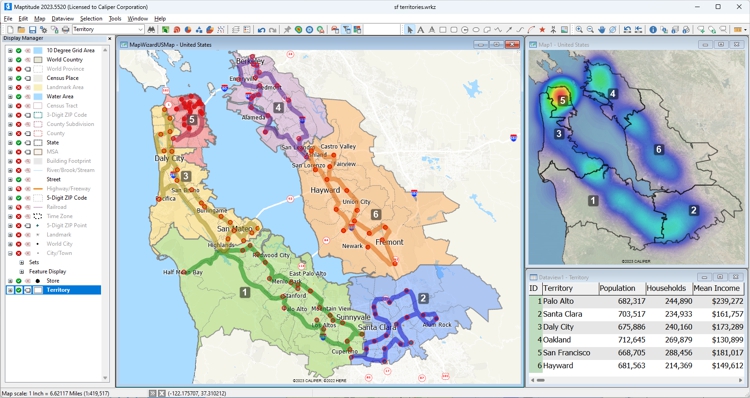
Maptitude GIS software dashboard

Key Features

  • Rich thematic mapping (heat maps, demographic maps, charts, territory maps).
  • Drive-time rings, drive-time territories, routing and logistics optimization.
  • Built-in demographic and business datasets for many countries, including U.S. Census and ACS data.
  • One free detailed country package per license, plus optional additional country packages.
  • Maptitude Online for browser-based mapping, territory management, and map sharing.

Pros

  • Data-rich out of the box: no need to assemble your own demographic datasets.
  • Supports both offline desktop analysis and online sharing with non-technical users.
  • Strong tools for sales territories, site selection, and routing in a single product.
  • Predictable license model without per-API call fees for desktop work.

Cons

  • Desktop client is Windows-only; Mac/Linux users need workarounds.
  • Native mobile apps and developer-level web APIs are less central than in Mapbox.

Best for

Organizations that want a complete location intelligence stack with built-in data for sales, logistics, and market analysis, without building or maintaining their own GIS and data pipelines.

Pricing Summary

Maptitude is sold as a commercial per-user license with a free trial; review sites list starting prices around US$695 per user per year, including one country data package, with Maptitude Online as an additional subscription.

2. Esri ArcGIS: Enterprise-grade GIS and spatial analytics

Esri ArcGIS is a comprehensive GIS platform used by governments, utilities, and enterprises worldwide. It spans ArcGIS Pro for desktop analysis, ArcGIS Online for web maps, and ArcGIS Enterprise for on-prem or cloud deployments.
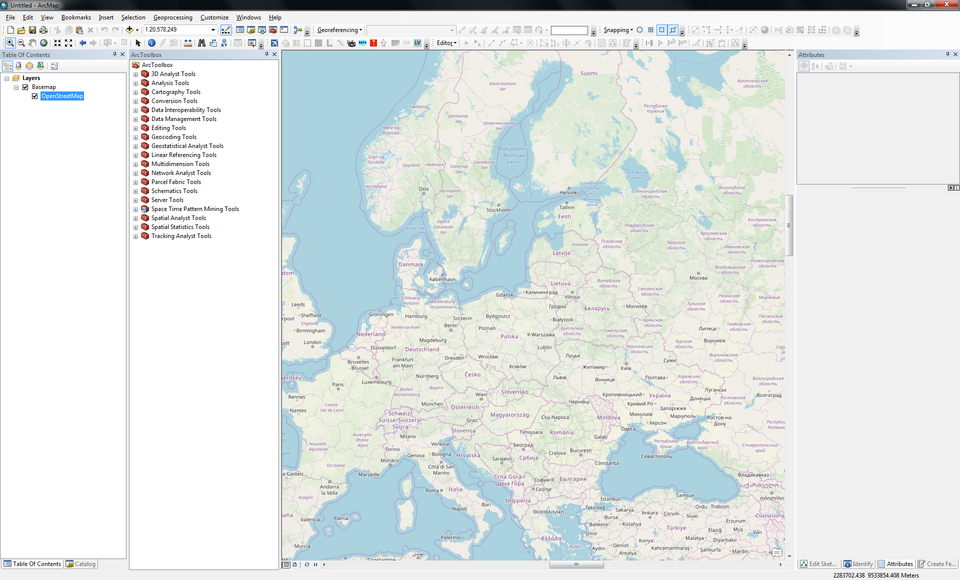
ArcGIS

Key Features

  • Advanced editing and geoprocessing tools across vector and raster data.
  • Rich 2D and 3D visualization, including scenes and globe views.
  • Esri Living Atlas and basemap gallery with global streets, imagery, and terrain.
  • Configurable web apps (Experience Builder, StoryMaps, Instant Apps).
  • Large ecosystem of extensions (Network Analyst, Business Analyst, Spatial Analyst, etc.).

Pros

  • Deepest overall GIS functionality and strong support for complex workflows.
  • Huge training, partner, and community ecosystem.
  • Flexible deployment: SaaS, on-prem, hybrid, and mobile.

Cons

  • Licensing can be complex and relatively expensive as usage and modules grow.
  • ArcGIS Online credit model makes cloud usage harder to predict.
  • Steep learning curve for non-GIS professionals.

Best for

Enterprises and public-sector organizations needing full-scale GIS, multi-department deployments, and advanced spatial modeling.

Pricing Summary

ArcGIS uses user-type and credit-based subscriptions; entry-level plans can start around a few hundred dollars per user per year, while full enterprise deployments with extensions and many users reach higher price bands.

3. Mapbox: Location platform for developers

Mapbox is a developer-first platform for custom maps, navigation, and geocoding in web and mobile apps. Instead of a point-and-click UI, you work with APIs, SDKs, and Mapbox Studio to design and deploy maps.
Mapbox

Key Features

  • JavaScript SDK and mobile SDKs (iOS, Android) for interactive maps and data overlays.
  • Custom map styles via Mapbox Studio.
  • APIs for directions, matrix routing, isochrones, and geocoding.
  • Offline maps support in mobile apps through cached regions and tile packs.

Pros

  • Very flexible for fully branded, highly interactive maps inside your own apps.
  • Generous free tier for smaller apps and prototypes (commonly cited 50k map loads per month for web, 25k MAU for mobile, and 100k geocoding requests).
  • Scales well to large user bases with global coverage.

Cons

  • No end-user business UI; requires developer resources and ongoing maintenance.
  • Usage-based billing makes budgeting important for high-traffic apps.
  • Does not bundle demographic/market data; you must source your own.

Best for

Product and engineering teams building custom mapping, routing, or tracking experiences into web or mobile applications.

Pricing Summary

Mapbox offers a free usage tier and then pay-as-you-go pricing based on map loads, active users, and API calls; you estimate costs using Mapbox's online pricing calculators.

4. CARTO: Cloud-native spatial analytics on your data warehouse

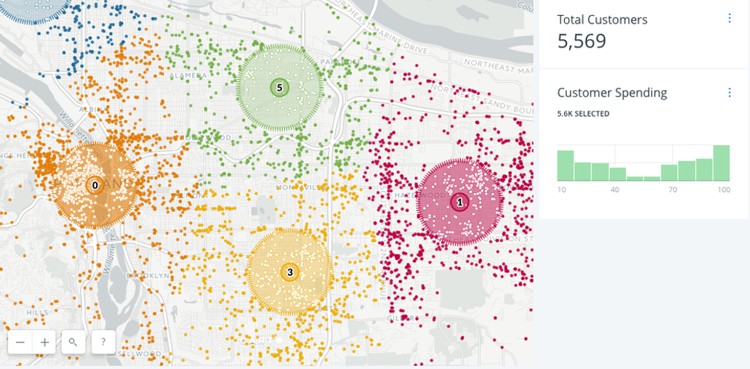
CARTO is a cloud-native location intelligence platform focused on analysts and data teams working in BigQuery, Snowflake, Databricks, and other cloud warehouses.
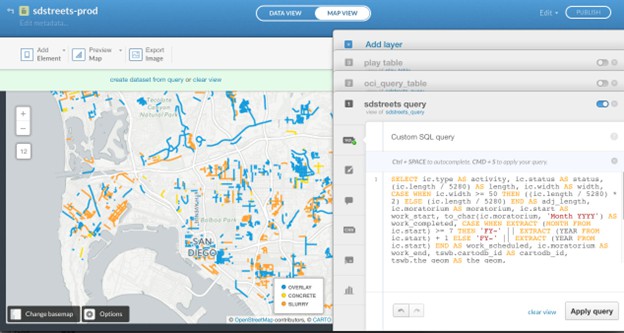
Carto

Key Features

  • Web workspace for building interactive spatial dashboards and applications.
  • Spatial SQL and analytics toolbox for clustering, routing, and spatial modeling.
  • Data Observatory for demographic, mobility, and POI datasets.
  • APIs and developer tools for embedding spatial analysis into other applications.

Pros

  • Connects directly to cloud data warehouses: no heavy ETL or data duplication.
  • Strong enrichment and analytics for logistics, mobility, and retail networks.
  • Suitable for data science workflows and automated spatial pipelines.

Cons

  • Mainly targets enterprise and data teams; not ideal for very small organizations.
  • Requires comfort with SQL and data engineering for best results.

Best for

Organizations already invested in cloud data warehouses that want to layer location intelligence and spatial analytics on top of existing datasets.

Pricing Summary

CARTO offers a 14-day fully featured free trial; ongoing pricing is custom/enterprise with quotas for usage, analysis, and storage.

5. QGIS: Open-source GIS power without license fees

QGIS is a mature, open-source desktop GIS that provides powerful mapping and analysis tools without per-user license fees.
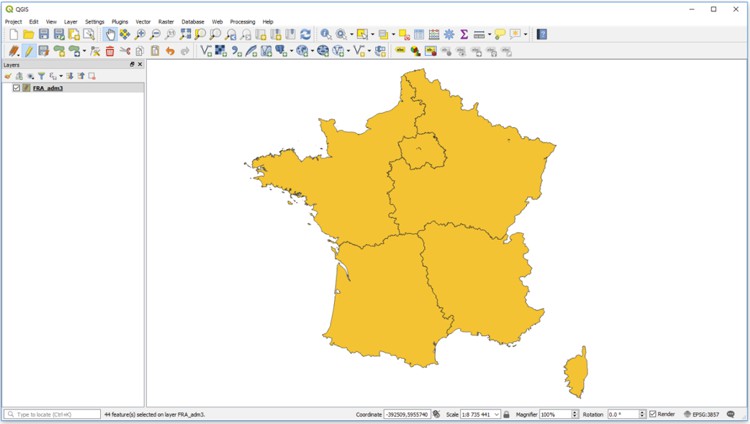
QGIS

Key Features

  • Full suite of vector and raster tools: editing, overlays, georeferencing, and geoprocessing.
  • 3D visualization and advanced cartography for map production.
  • Huge plugin ecosystem for routing, web publishing, geocoding, and more.
  • Python scripting for automation and custom tools.

Pros

  • Completely free, including for commercial use, under the GPL license.
  • Extremely flexible and extensible, especially for GIS professionals.
  • Cross-platform (Windows, macOS, Linux).

Cons

  • No bundled commercial demographic or business datasets: you supply your own.
  • Interface and breadth of options can overwhelm new users.
  • No native SaaS portal; web sharing requires separate open-source components.

Best for

Organizations with GIS expertise who want enterprise-grade GIS features without license costs or need an open-source complement to other tools.

Pricing Summary

QGIS is free and open source; costs are mainly in training, support, and data acquisition.

6. eSpatial: Territory mapping and routing for sales teams

eSpatial is a browser-based mapping tool focused on sales territory design, routing, and CRM-integrated mapping.
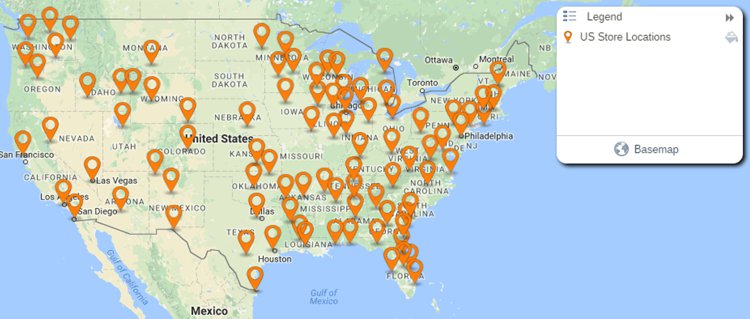
Mapbox

Key Features

  • Territory design and balancing using revenue, accounts, or workload.
  • Route optimization and scheduling for field sales or service reps.
  • Map visualizations (heat maps, clustered points, thematic maps).
  • Salesforce integration via AppExchange plus imports from other CRMs and spreadsheets.

Pros

  • Designed around sales operations workflows rather than generic GIS tasks.
  • Easy to use for non-technical users, with guided territory and route tools.
  • Good fit for Salesforce shops looking to add mapping and routing.

Cons

  • Subscription pricing only; no permanent free plan.
  • Less suitable for deep spatial analytics or custom GIS workflows.

Best for

Sales and service organizations that need territory mapping and routing tightly aligned with CRM data.

Pricing Summary

eSpatial offers a free trial and paid annual plans; public review sites show starting prices around US$1,495 per year, with higher tiers adding team and territory-manager features.

7. Geoblink: Retail location intelligence and store optimization

Geoblink (now integrated with MyTraffic) focuses on helping retailers, real-estate players, and consumer brands understand how location affects performance, expansion, and marketing.

Key Features

  • Location analytics: trade area analysis, drive-times, demographic and socio-economic profiling.
  • Market and competitor intelligence, including footfall and spending insights where available.
  • Expansion planning: ranking and scoring of candidate sites, plus sales territory optimization.
  • Dashboards and reporting oriented toward business users rather than GIS specialists.

Pros

  • Highly tuned to brick-and-mortar retail and FMCG decision-making.
  • Access to exclusive private datasets from telcos, banks, and GPS providers in addition to public data.
  • Strong visual storytelling for executives and non-technical stakeholders.

Cons

  • Custom enterprise pricing; not designed as a self-serve SMB tool.
  • Focused on retail/real estate; less applicable to generic GIS tasks or internal logistics.

Best for

Medium to large retailers, real-estate teams, and consumer brands that need data-driven expansion planning and store performance optimization.

Pricing Summary

Geoblink is sold on a quotation-based subscription model; prospects typically request a demo and receive custom pricing based on users, geography, and modules.

8. Smappen: Simple catchment analysis and geomarketing

Smappen is a browser-based location intelligence tool focused on catchment areas, drive-time maps, and basic geomarketing for non-experts.

Key Features

  • Draw radius and drive-time maps (by car, bike, or public transport) and overlay multiple catchments.
  • Create territories from ZIP codes, counties, or other administrative units.
  • Visualize population counts and business/POI data within areas.
  • Import your own customer or location data as pins, subject to plan-based limits.

Pros

  • Very easy to use: designed for franchises and business users, not GIS pros.
  • Free plan is useful for exploring catchment areas on a small scale.
  • Fast drive-time and radius calculations with intuitive visuals.

Cons

  • Lower tiers include limits on areas, POI searches, and imported pins.
  • Advanced customization and analytics are limited compared with GIS platforms.
  • Data availability and depth depends on region.

Best for

Franchises, local services, and small to mid-sized businesses needing quick catchment, territory, and basic market analysis without heavy GIS investment.

Pricing Summary

Smappen offers a free plan plus paid plans (commonly Essential and Pro) starting around US$99 per month, with higher tiers increasing data limits and analytics.

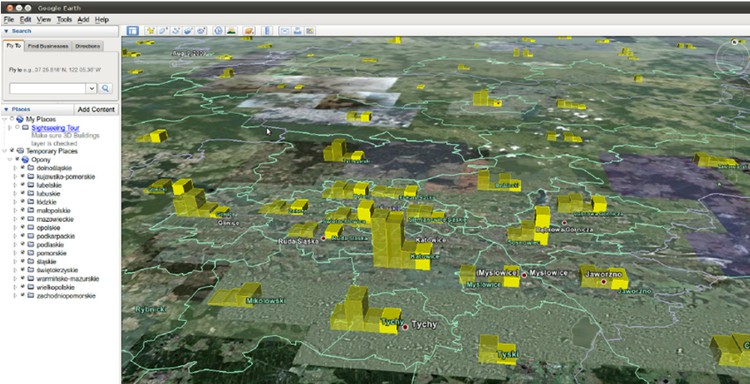
9. Google Earth Engine: Planet-scale analysis for environmental data

Google Earth Engine (GEE) is a cloud platform for analyzing decades of satellite imagery and other geospatial datasets at global scale. It's more of a scientific analysis environment than a business mapping GUI.
Mapbox

Key Features

  • Massive public data catalog: multi-decade satellite imagery, climate data, land cover, elevation, and more.
  • Code Editor in the browser plus Python and JavaScript APIs for custom algorithms.
  • Scalable parallel processing on Google Cloud infrastructure.
  • Integrations with other Google Cloud services for storage, BigQuery analytics, and deployment.

Pros

  • Unique ability to perform global-scale remote sensing and environmental analysis.
  • Free access for many academic and non-profit research use cases.
  • Deep ecosystem of geoscience examples and community resources.

Cons

  • Requires coding; there is no drag-and-drop business interface.
  • Commercial and operational government use requires a paid Google Cloud agreement and quota management.
  • Not designed for CRM/BI integration or everyday sales mapping.

Best for

Organizations that need remote sensing, environmental, or climate-risk analysis, often as part of sustainability programs or scientific research.

Pricing Summary

Earth Engine remains free for approved non-commercial research; commercial and government operations must run Earth Engine through paid Google Cloud projects, with pricing tied to compute, storage, and related services.

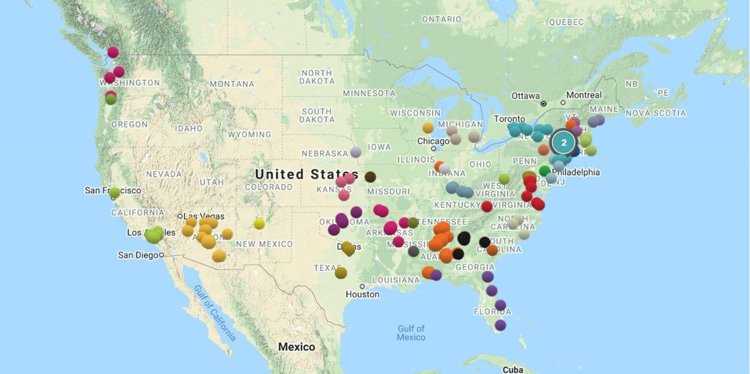
10. Maptive: Google-based business mapping and route planning

Maptive is a cloud mapping tool that converts spreadsheets into interactive Google Maps, with strong support for territories and routing.
Mapbox

Key Features

  • Bulk geocoding and plotting of locations from Excel/CSV.
  • Heat maps, clustered points, and territory maps by ZIP code, county, or custom shapes.
  • Multi-stop route planning and optimization.
  • Sharing via unique map URLs or embedded maps on websites; limited map quotas per subscription.

Pros

  • Very approachable for non-technical business users; no GIS skills required.
  • Strong for sales mapping, store locators, and simple route optimization on top of familiar Google Maps.
  • Integrates with common CRMs and SaaS tools.

Cons

  • Annual per-user pricing can be high for very small teams; map quotas may require upgrades.
  • Less capable than full GIS tools for advanced spatial analysis.
  • Some reviewers mention inconsistent support experiences.

Best for

Teams that want fast, Google-based mapping, territories, and routing from spreadsheets, without installing desktop software.

Pricing Summary

Maptive offers a 10-day free trial; review sites list Individual plans around US$1,250-1,500 per user per year and Team plans around US$2,500 per year, with each subscription including a set number of maps and user logins.

Comparison Insights

Offline vs online

  • Offline-capable desktop tools: Maptitude and QGIS run fully offline with local data; ArcGIS Pro does as well, though many organizations also use ArcGIS Online.
  • Cloud-only tools: Maptitude Online, eSpatial, Geoblink, Smappen, Maptive, CARTO, Mapbox, and Earth Engine all rely on an internet connection for normal use (though Mapbox supports offline mobile maps inside your own app).

Developer platform vs business UI

  • Developer-focused: Mapbox and Earth Engine are best suited to developers and data scientists building custom solutions, while Maptitude provides the GISDK scripting language.
  • Business-user tools: Maptitude, eSpatial, Smappen, Geoblink, and Maptive emphasize point-and-click workflows around territories, demographics, and routes.

Data strategy

  • Data-bundled platforms: Maptitude and Geoblink stand out for including rich demographic and business datasets by default.
  • Warehouse-integrated: CARTO plugs into existing data warehouses for organizations that already centralize data there.
  • Bring-your-own data: Mapbox, QGIS, Maptive, and Smappen assume you will supply your own data (though Smappen offers growing built-in datasets), while Maptitude supports a very large library of file formats for data import/export.

Budget and licensing

  • No license fees: QGIS is fully free and open source.
  • Pay-as-you-go APIs: Mapbox and Earth Engine (commercial) use usage-based billing.
  • Subscription SaaS: Maptitude Online, eSpatial, Smappen, Geoblink, Maptive, and CARTO are primarily subscription-based.
  • Per-user licenses with included data: Maptitude and ArcGIS often use per-user (or per-role) licensing with optional add-ons.

FAQ

What is the best location intelligence software for beginners?

If you want rich analysis without coding, Maptitude and Smappen are good starting points: both provide guided workflows and built-in data, with Maptitude skewing more toward business analysis and Smappen toward quick catchment planning.

Which tools support offline use?

Maptitude, QGIS, and ArcGIS Pro all support fully offline mapping and analysis with local data, making them suitable for secure or low-connectivity environments. Mapbox supports offline maps in your own mobile apps by caching tile regions, but its APIs remain cloud-based.

Which tools include demographic and business data out of the box?

Maptitude includes detailed country packages with demographics and business data (such as U.S. Census and ACS), while Geoblink bundles some public and private datasets (e.g., footfall, socio-economic indicators) for retail analytics. CARTO's Data Observatory also provides enrichment datasets, though they are usually consumed from the cloud rather than installed locally.

Which tools are best for sales territory mapping and routing?

For sales-focused use cases, Maptitude, eSpatial, Smappen, and Maptive all offer territory management and routing tools. Maptitude and eSpatial are strongest for complex territory balancing and field-sales routing, while Maptitude Online, Smappen and Maptive shine for lighter-weight territory and route planning in a pure web environment.

What should I look for when choosing location intelligence software?

Consider your primary use cases (sales, logistics, retail expansion, environmental analysis), your team's data and GIS skills, and how much you need built-in data vs. warehouse integration. Also compare deployment (offline desktop vs SaaS), licensing model (per-user vs usage-based APIs), and how easily the tool integrates with your CRM, BI, or data stack. Your outline's "Choosing the Right Location Intelligence Solution" section is a good framework: industry fit, scale, data sources, usability, customization, integration options, budget, and support ecosystem.

Conclusion

Location intelligence software ranges from full GIS platforms like Maptitude, ArcGIS, and QGIS to cloud-native analytics engines such as CARTO and Earth Engine, and business-friendly web tools like Maptitude Online, eSpatial, Smappen, Geoblink, and Maptive. The right choice depends on whether you need deep analysis, embedded maps, or quick business answers. Start by clarifying your core needs (territories, routes, site selection, network optimization) and then match them to the platform that best fits your data, skills, and deployment preferences.

Qdoba Mexican Eats

“I've been using Maptitude for more than 15 years. It is simply the best tool available for businesses that need a market planning mapping and data resource. It can do everything I need it to do - from the very simple to the complex. It integrates nicely with other programs and file types making analysis and presentation very easy. I highly recommend Maptitude to firms who need a function-rich GIS mapping solution. It is the best!”

Mike Sawyer
Market Planning, Qdoba Mexican Eats
Amazon

“Pros: Cost. Much easier to reach a purchasing decision. I loved the integrated country data package so I didn't have to download census layers and other info - it was all built in.”

Alex Martin
Sr. Program Manager, Amazon
Seattle, Washington

Next Steps

Learn more about Maptitude to see how you and your team can benefit from mapping software!

Schedule a Free Personalized Demo

Free Trial  Buy Now 


Maptitude Mapping Software Logo
G2 ReviewsCheck out our G2 Reviews
4.7/5 of 141 reviews
4.7 stars

Third-party trademarks

Related Articles

Find Us 1172 Beacon St., Suite 300
Newton MA 02461 USA

Home  |  Products  |  Contact  |  Secure Store

Copyright © Caliper Corporation