 Call Us
Data: included at no extra cost
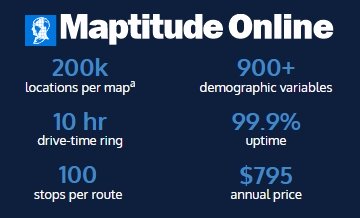
Maptitude Online includes 900+ demographic variables per layer at five geography levels, from Census and ACS to health, GDP, and business data. Many online tools sell that data separately.
Maptitude vs. Maptive
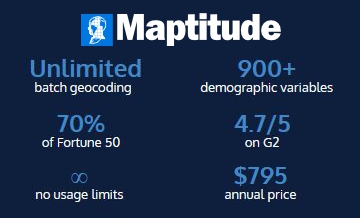
Maptitude is a powerful, easy-to-learn, and affordable alternative to Maptive. It includes 900+ demographic variables and a deep analysis toolset: 70+ tools in Maptitude Online, and 150+ in Desktop Maptitude. Both start at $795 per year, in your browser or on Windows. Maptitude Online has unlimited geocoding, territories, routes, and drive-time rings.* Unlike most online mapping tools, Maptitude does not meter your usage or charge extra for data, and it can work offline.
This page covers how Maptitude and Maptive differ, how to switch, and the proof behind the claims. For complete feature lists, see the Maptitude Online and Desktop Maptitude pages.
A short demo of Maptitude mapping software.
Maptitude Online Free Trial Request a Demo
In this article:
Comparing Maptive and Maptitude? The short version
Maptitude Online vs. other mapping tools, measure by measure
Who chooses Maptitude, and why
Maptitude is a full mapping and GIS platform. Maptitude Online runs in your browser with 70+ built-in tools, and Desktop Maptitude has 150+ on Windows. Both include 900+ demographic variables, and Maptitude holds a 4.7/5 rating from 148 G2 reviews. Here is why teams switch.
Comparison
Maptitude Online puts a full professional mapping and analysis toolkit in your browser: 70+ tools, 900+ demographic variables, and unlimited geocoding, territories, and routing,* all included for one fixed price. Here is the comparison, measure by measure: data, price, power, ease, performance, security, growth, and design.
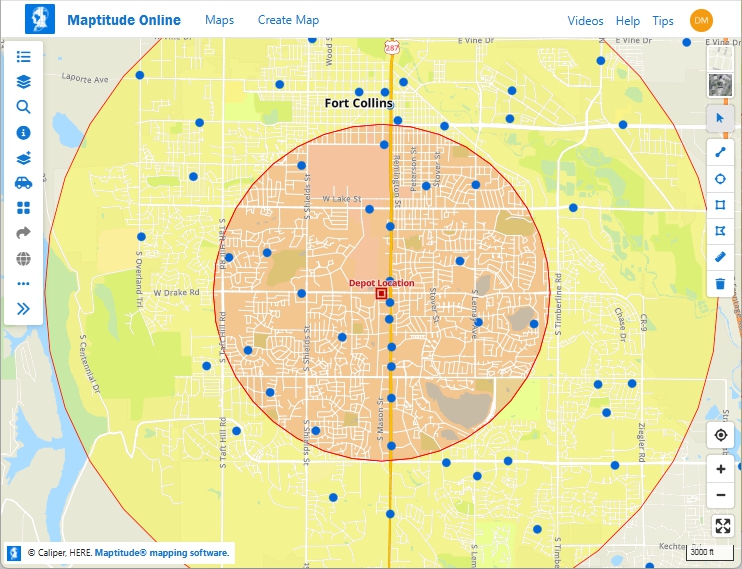
A multi-ring, concentric buffer map created in Maptitude Online
Maptitude Online includes 900+ demographic variables per layer at five geography levels, from Census and ACS to health, GDP, and business data. Many online tools sell that data separately.
Maptitude Online is a flat $795 per year, with no metering. Many online tools charge per geocode, per route, or per API call; Maptitude does not.
Maptitude Online includes 70+ mapping and analysis tools: territory balancing, drive-time rings, route optimization, heat maps, clustering, and demographic analysis. Desktop Maptitude has 150+, adding advanced site selection, vehicle routing, and professional GIS editing.
Maptitude is built for business users, not GIS specialists, and the ratings back it up: 5/5 on G2 for Maptitude Online and 93% for Ease of Doing Business With. Every task is a step-by-step wizard, and you get a 24/7 AI support assistant, free live training sessions, and phone and email support.
Maptitude Online maps up to 200,000 point locations with WebGL, with no clustering required.a
In Maptitude Online, geocoding, routing, and maps are hosted on Maptitude-managed infrastructure, so your location data is not sent to an outside service like Google, all over 256-bit SSL. Desktop Maptitude can run fully offline.1
Start with simple maps and grow into territory balancing, drive-time analysis, and routing, all within Maptitude Online. If you ever need the deepest GIS, Desktop Maptitude is there, but you never have to switch tools.
Maptitude and Maptitude Online produce clean, presentation-ready maps out of the box, with professional color schemes, labeling, and styling. Both pair that with a sleek, modern interface, refreshed in 2026 on the desktop and built for the browser in Maptitude Online.
The numbers back this up. On G2's measured dimensions, Maptitude scores 9.5/10 for data manipulation and 10.0/10 for data storage. It is named a Top Software Product in G2's 2026 Best Software Awards.
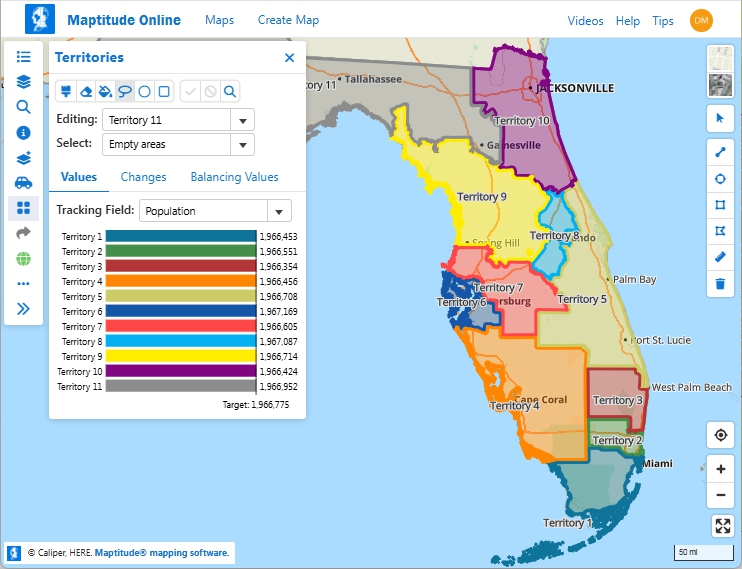
A territory map created in Maptitude Online.
Do not just take our word for it. For an independent description of Maptive, see its profile on G2 and compare it to Maptitude. Use the buttons below to get an objective, third-party AI comparison of Maptive, Maptitude, and Maptitude Online.
Compare Maptive, Maptitude, and Maptitude Online on:

|
“Great Map Software. Works perfectly for our needs. Building territories are simple and we just used the heat map functionality to adjust our service routes. Pros: Fair Price - a great amount of data is included with the software and their support is awesome. Cons: not much - fairly intuitive to navigate.” Alternatives
Considered
|
Who It's For
Few mapping tools do what Maptitude does: full GIS power and built-in demographic data, beautiful maps by default, in your browser or on the desktop, all at one fixed price with no metered fees. And the power is approachable: guided wizards and a sleek, modern interface, on the desktop and in the browser, mean professional results without a GIS background. That is why a wide range of teams choose Maptitude, whether they are buying their first mapping tool or moving off one that hit its limits.
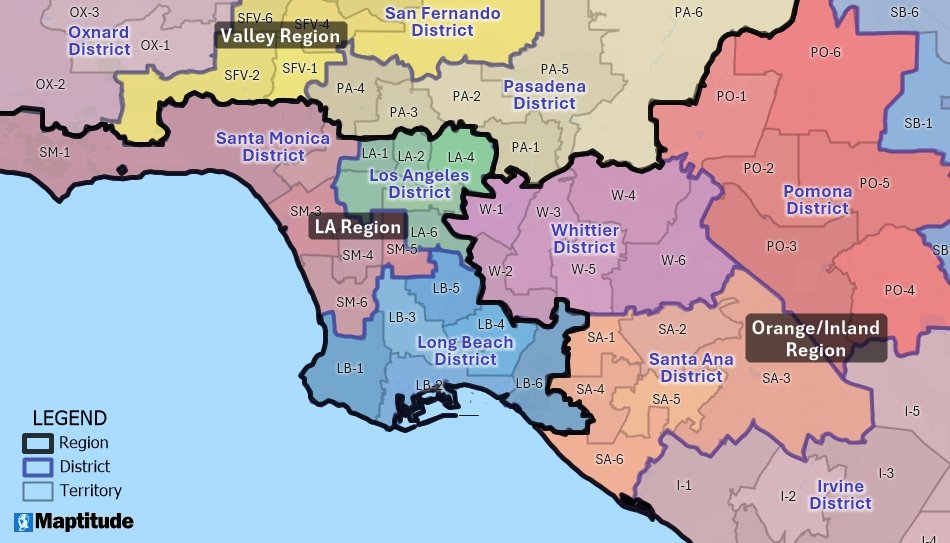
Hierarchical territories in Maptitude
Build and rebalance territories by population, revenue, or accounts, with no per-seat data charges.
Build optimized multi-stop routes and drive-time coverage, with no route caps or per-route fees.
Layer 900+ demographic variables to size markets and choose locations, with the data already included.
Keep sensitive locations private: Maptitude Online geocodes on Maptitude-managed infrastructure, so your addresses are not sent to an outside service, and Desktop Maptitude can run offline.1
Run everything in Maptitude Online on any device, with 70+ tools and the data included, and nothing to install.
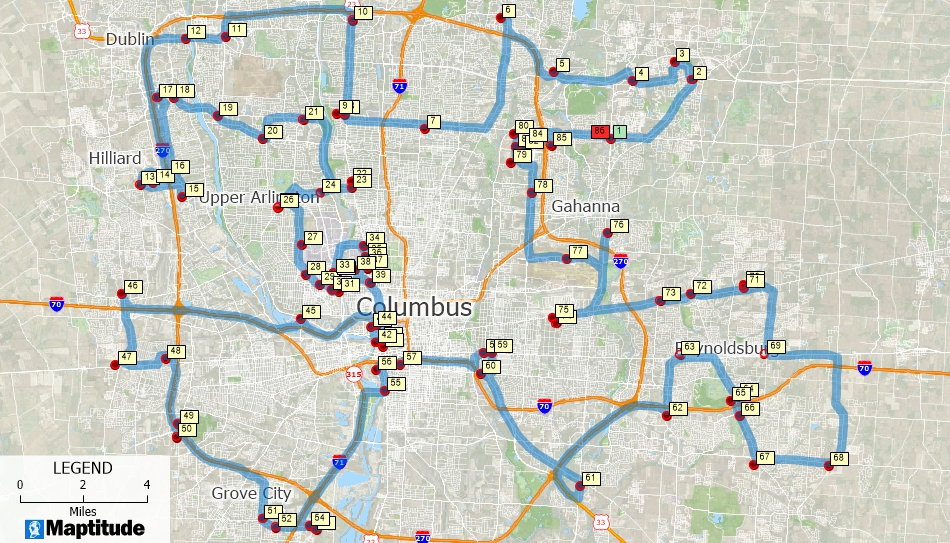
Route optimization in Maptitude
Switching
Switching is straightforward, and you do not have to commit first. With a 30-day free trial, you can run Maptitude next to your current tool and compare the results before you decide.
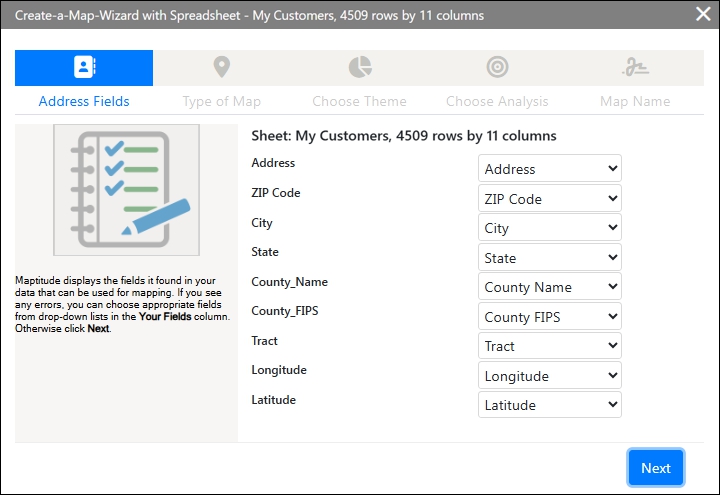
Geocoding your data in Maptitude Online
Maptitude Online Free Trial Desktop Maptitude Free Trial
Cloud or desktop
Maptitude comes two ways. Choose Maptitude Online for a browser app with real-time sharing and nothing to install. Choose Desktop Maptitude for offline access, full cartographic control, and data that never leaves your computer. Your maps stay with you, and you keep access after a subscription ends.2 Either way, your data stays private: on the desktop it stays on your computer,1 and in Maptitude Online geocoding and mapping are hosted on Maptitude-managed infrastructure, so your locations are not sent to an outside service.
| Specification | Maptitude Online | Desktop Maptitude |
|---|---|---|
| Price | $795 per year (subscription) | $1095 one-time, or $795 per year (subscription) |
| Platform | Any web browser, no installation | Windows desktop application (PC or Mac) |
| Devices | Windows, macOS, Linux, iOS, Android | Windows, on a PC or Apple Mac |
| Geocoding | Unlimited* | Unlimited, runs offline |
| Drive-time rings | Unlimited*, up to 10 hours | Any time or distance interval |
| Route optimization | Unlimited routes*, up to 100 stops each | Multi-stop routing and logistics tools |
| Locations per map | Up to 200,000a | Large datasets, processed locally |
| Demographic variables | 900+ per layer (Census, ACS, health, GDP, and more) | 900+ variables, down to Block Group level, included |
| Software updates | Continuous, live updates | Subscriptions: Yes; One-time License: Yes for current version, no upgrades |
| Data privacy | Maptitude-managed, 256-bit SSL | Runs locally, data stays on your computer1 |
| Free trial | 30 days, no credit card | 30 days, no credit card |
For the full feature set, see the Maptitude Online overview and Desktop Maptitude features. Maptitude also handles territory mapping, drive-time analysis, route optimization, heat maps, and demographic analysis.
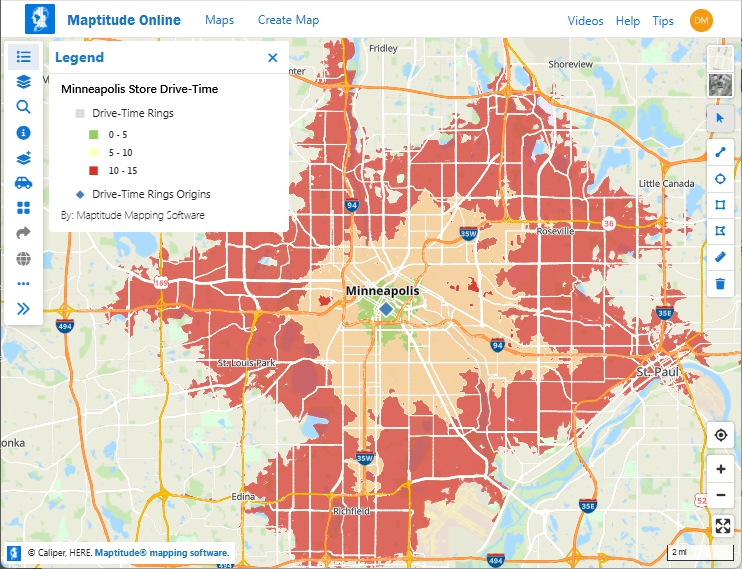
Drive-time rings around a store location in Maptitude Online
This interactive map shows median income for U.S. ZIP Codes and detailed, 30-minute drive-time rings around major U.S. airports.
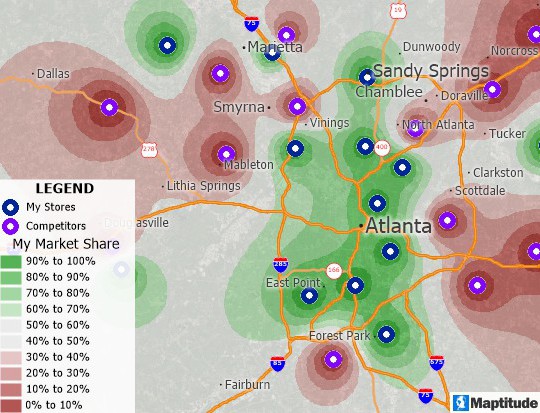
Market share map created with desktop Maptitude
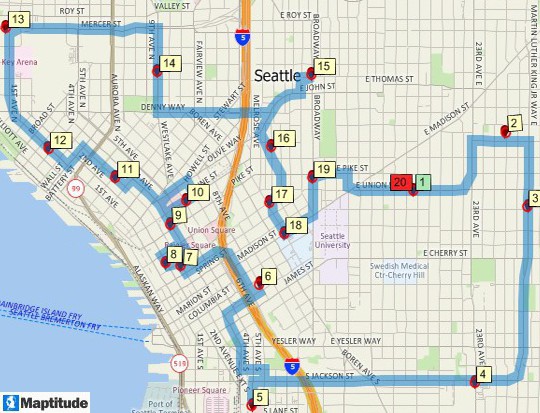
Delivery route that minimizes cost created with Maptitude desktop software
Awards and ratings
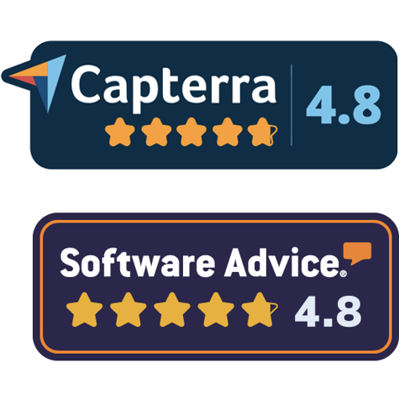
Maptitude is trusted at enterprise scale. More than 70% of Fortune 50 companies rely on Maptitude for business development. It holds a 4.7/5 rating from 150 verified G2 reviews and is highly rated across Capterra, Google, Trustpilot, and SoftwareReviews.





Testimonials
Maptitude is used across sales, logistics, finance, healthcare, retail, and government. Here is what some of those teams report.
 |
“The software is very easy to use and can do a lot of analysis. It has helped me a lot with making strategic decisions for my analysis.”
|

|
“Fantastic product which facilitates breakthrough ideas for their clients; and [the] team provides white glove service to ensure that their customers can extract the full value of the Maptitude product!”
|

|
“Pros: Cost. Much easier to reach a purchasing decision. I loved the integrated country data package so I didn't have to download census layers and other info - it was all built in.”
|
 |
“I've been using Maptitude for more than 15 years. It is simply the best tool available for businesses that need a market planning mapping and data resource. It can do everything I need it to do - from the very simple to the complex. It integrates nicely with other programs and file types making analysis and presentation very easy. I highly recommend Maptitude to firms who need a function-rich GIS mapping solution. It is the best!”
|
 |
“Pros: Helps Innovate; Continually Improving Product; Reliable; Performance Enhancing.”
|
 |
“Amazing product at a great value with even better customer service! The benefits have been providing invaluable insight to upper management regarding what kinds of opportunities are out there and consequently, giving the company a chance to grow via acquisitions. Moreover, the additional features within Maptitude allow you to identify new areas of growth or new markets to enter given the plethora of demographic data it has embedded within the software.”
|
 |
“We use Maptitude extensively for running complex Territory Alignment scenarios. The depth of the product, its total utility and functionality is immense. Import-Export capability with Excel is seamless. It is easy to work with and Maptitude support is second to none. My complements to the Maptitude team: They have created a solid product and it is one of the best software investments we have made as an organization.”
|
 |
“Great product and customer support. Its extremely user friendly and the maps are easily customized to display the information our clients are most interested in. Their customer service is second to no one and they've always worked to resolve any minor issues I've ever had.”
|
 |
“They continually outpace the industry with customer support and provide it in a timely manner. If you are looking for a premier organization that provides cutting edge product and service, Caliper is the company to call. I have taken our organization to an entirely different level with the capabilities of Maptitude. I'm able to plot sales or potential and pull data out of the map to effectively summarize and give results.”
|
FAQ
Maptitude includes the data, analysis tools, and territory features that other tools often charge extra for, at a fixed annual price. Maptitude Online is rated 5/5 on G2. It also adds a secure desktop option for teams that want offline access. You get a 30-day free trial to test it first.
Yes. Maptitude is built for business users, not GIS specialists. Maptitude Online is rated 5/5 on G2, and Maptitude is rated 93% for Ease of Doing Business With. Every task is a step-by-step wizard, and you get a 24/7 AI support assistant, free live training sessions, and phone and email support. You also will not outgrow it, because you can move from simple maps to advanced GIS on the same platform.
Maptitude is still the better choice. It is just as quick for a simple map, it costs less than many alternative applications, and includes the demographic data that others often charge for. If your needs grow later, you already have territory balancing, drive-time analysis, routing, online-sharing, and much more, without switching tools or migrating your data.
Yes. Upload your locations from an Excel or CSV file, or import GIS formats like Esri Shapefiles and Google KML in Desktop Maptitude. Maptitude geocodes your addresses for you, so you can rebuild your maps quickly without manual re-entry. Direct Google Sheets and Salesforce object connections also available in Maptitude Online.
Yes. Maptitude Online offers a 30-day free trial with no credit card, and Desktop Maptitude offers a trial too. You can run Maptitude next to your current tool and compare the results before you switch.
Maptitude Online is $795 per year. That single fee covers unlimited geocoding, territories, drive-time rings, routes, and maps,*† plus all data and updates. Desktop Maptitude is $1095 for a one-time license, which includes patches, fixes, and slipstreams for that version but not new yearly versions, or $795 per year as a subscription, which includes new versions too. There are no usage fees and no separate data charges.
Yes. All demographic data is included at no extra cost. Every subscription comes with 900+ demographic variables per layer, including Census, ACS, health, GDP, and business data, plus street maps and postal boundaries. You map straight away, with no separate data purchase.
Yes. In Maptitude Online, geocoding, territories, drive-time rings, routes, and maps are all unlimited within your plan.*† Drive-time rings go up to 10 hours of travel time. Each optimized route can have up to 100 stops, and the number of routes is unlimited. Shared maps keep running even if you exceed the monthly map-load allowance or your subscription lapses.‡
Yes. Desktop Maptitude can run fully offline and geocodes records locally,1 so sensitive locations stay on your computer. In Maptitude Online, geocoding and mapping are hosted on Maptitude-managed infrastructure, so your location data is not sent to an outside service, and everything is encrypted with 256-bit SSL. Both options suit healthcare, financial, and government users.
Maptitude Online Free Trial Request a Demo
* Unlimited up to 20GB storage per account.
† All public and private map loads count toward a combined 100,000 map loads per month. If that allowance is exceeded, shared maps continue to run without interruption.
‡ Map access for inactive subscriptions or in excess of monthly allowances is provided at Caliper Corporation's discretion.
a For best responsiveness, cluster themes are recommended for single layers that approach the maximum features per map (for example, a single layer of 200,000 locations).
1 Desktop Maptitude runs all mapping functions (geocoding, routing, drive-time analysis, and demographic queries) locally on your computer. The default installation uses a software key with periodic online license validation, and some features such as online background imagery need a connection. Fully air-gapped configurations, with manual activation and no online check-ins, are available free on request from Maptitude support.
2 Desktop files always remain on your computer. Opening them requires an active subscription or a one-time license.

 Check out our G2 Reviews
Third-party trademarks are used for identification and descriptive purposes and do not imply affiliation or endorsement. See Third-Party Trademarks.

Home | Products | Contact | Secure Store

