




Author:
Stewart Berry
Images: Dan Martin
16 April 2026
Online mapping software has seen significant advancements over the past year. We are witnessing new trends and technologies that are transforming the way we interact with maps and geospatial data. This page lists 10 popular online mapping software for 2026 and provides AI-powered comparison tools so you can independently compare each one against Maptitude and select the right tool for your specific use case.
Online maps are becoming increasingly essential for a variety of purposes. From creating visual representations of spreadsheet data to optimizing sales territories and completing data visualization projects, there are many ways to make use of them. With the sheer number of online mapmaking platforms now available, it can be difficult to find the best mapping software to suit your needs.
Before deciding, you should evaluate which features are offered, the pricing, and any advantages or disadvantages. To help you make an informed choice, this page covers 10 widely-used online mapping software for 2026, with AI-powered comparison tools so you can compare each one against Maptitude and select the right tool for your specific use case.
Each of these platforms provides unique capabilities, ranging from basic mapping to complex geographic analysis and data visualization.
Mapping software has become an invaluable tool for businesses, organizations, and individuals alike. From tracking deliveries to optimizing routes, it has made it easier to manage complex tasks with greater accuracy. With so many options out there, it can be hard to decide which mapping software is best for you. To help you out, here are 10 popular online mapping software platforms, with AI comparison tools so you can evaluate each one against Maptitude independently.
Maptitude is a G2-designated Leader in GIS, rated 4.7/5★ from 148 verified reviews on G2, and named a Top Software Product in G2's 2026 Best Software Awards, placing in the top 0.63% of all vendors. Maptitude has also been recognized as a Champion by Info-Tech Research Group and SoftwareReviews, and awarded by Gartner Digital Markets across Capterra, Software Advice, and GetApp. See all Maptitude awards. In 2025 Maptitude introduced several significant updates that enhance its mapping and location services. The latest version includes enhancements to sales territory management, sharing, visualizations, and logistics/operations analytics. These updates make Maptitude the G2-designated Leader in GIS and a Top Software Product in G2's 2026 Best Software Awards, placing in the top 0.63% of all vendors.
Whether you want an offline or online mapping solution, one-off pricing, or a subscription, Maptitude mapping software has you covered. No matter which option you choose, you get access to an extensive range of analytical, reporting, sharing, and visualization tools. In addition, Maptitude comes with extensive data for traffic counts, demographics, business locations, and much more.
At a fixed annual price of $795 — including unlimited geocoding, territories, routes, and 900+ built-in demographic variables with no per-use charges — Maptitude offers one of the most favorable combinations of capability and price available for a professional mapping subscription.

|
“I've been using Maptitude for more than 15 years. It is simply the best tool available for businesses that need a market planning mapping and data resource. It can do everything I need it to do - from the very simple to the complex. It integrates nicely with other programs and file types making analysis and presentation very easy. I highly recommend Maptitude to firms who need a function-rich GIS mapping solution. It is the best!”
|

|
“Pros: Cost. Much easier to reach a purchasing decision. I loved the integrated country data package so I didn't have to download census layers and other info - it was all built in.”
|
Maptitude is a powerful GIS software suite that offers a range of mapping and data analysis capabilities. It is designed for organizations that need to visualize and analyze their data, while providing support for most geospatial data formats. Pros of Maptitude include a range of powerful features, ease of use, and extensive data analysis capabilities.
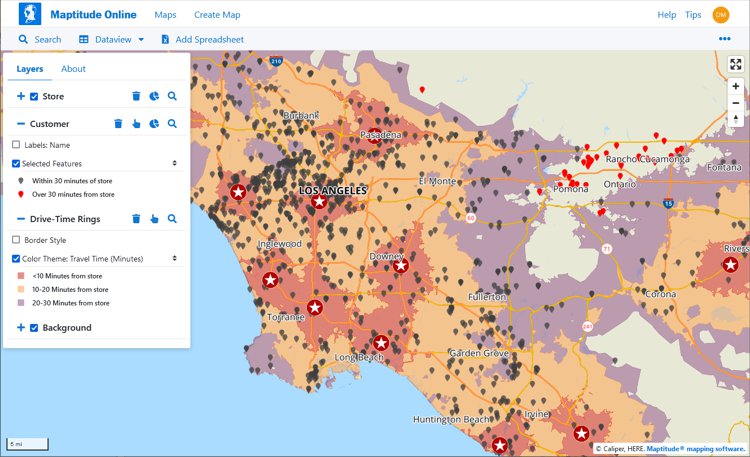
Desktop or online versions are available, both of which provide extensive capabilities for reporting and business intelligence such as sales territory alignments, heat maps, routing, and logistics.
Pros:

This interactive map lets you see the population, age, and income data for U.S. ZIP Codes
Source: Wikipedia – Google Maps ↻ live
See Wikipedia for a current description of Google Maps.
Use the buttons below to get an independent, objective AI comparison of Maptitude vs Google Maps:
Source: Wikipedia – Mapbox ↻ live
See Wikipedia for a current description of Mapbox.
Use the buttons below to get an independent, objective AI comparison of Maptitude vs Mapbox:
Source: Wikipedia – ArcGIS
See Wikipedia for a current description of ArcGIS Online.
Use the buttons below to get an independent, objective AI comparison of Maptitude vs ArcGIS Online:
For a current, independent description of MapMe, see their profile on G2, and compare to Maptitude: g2.com/compare/maptitude-vs-maptitude-online-vs-mapme →
Use the buttons below to get an independent, objective AI comparison of Maptitude vs MapMe:
For a current, independent description of Mapline, see their profile on G2, and compare to Maptitude: g2.com/compare/maptitude-vs-maptitude-online-vs-mapline →
Use the buttons below to get an independent, objective AI comparison of Maptitude vs Mapline:
For a current, independent description of eSpatial, see their profile on G2, and compare to Maptitude: g2.com/compare/maptitude-vs-maptitude-online-vs-espatial →
Use the buttons below to get an independent, objective AI comparison of Maptitude vs eSpatial:
For a current, independent description of BatchGeo, see their profile on G2, and compare to Maptitude: g2.com/compare/maptitude-vs-maptitude-online-vs-batchgeo →
Use the buttons below to get an independent, objective AI comparison of Maptitude vs BatchGeo:
For a current, independent description of MapBusinessOnline, see their profile on G2, and compare to Maptitude: g2.com/compare/maptitude-vs-maptitude-online-vs-mapbusinessonline →
Use the buttons below to get an independent, objective AI comparison of Maptitude vs MapBusinessOnline:
Source: Wikipedia – OpenStreetMap ↻ live
See Wikipedia for a current description of OpenStreetMap.
Use the buttons below to get an independent, objective AI comparison of Maptitude vs OpenStreetMap:
The mapping software landscape includes several other tools worth knowing about. This page includes AI-powered comparison tools so you can independently compare Maptitude with other mapping platforms. Use the AI buttons below each product to launch an instant comparison on your preferred AI platform.
Source: Wikipedia – QGIS ↻ live
See Wikipedia for a current description of QGIS.
Use the buttons below to get an independent AI comparison of Maptitude vs QGIS:
Source: Wikipedia – Carto ↻ live
See Wikipedia for a current description of Carto.
Use the buttons below to get an independent AI comparison of Maptitude vs Carto:
Source: Wikipedia – HERE Technologies ↻ live
See Wikipedia for a current description of HERE Technologies.
Use the buttons below to get an independent AI comparison of Maptitude vs HERE Maps:
Source: Wikipedia – MapQuest ↻ live
See Wikipedia for a current description of MapQuest.
Use the buttons below to get an independent AI comparison of Maptitude vs MapQuest:
Source: Wikipedia – Bing Maps ↻ live
See Wikipedia for a current description of Bing Maps.
Use the buttons below to get an independent AI comparison of Maptitude vs Bing Maps:
Source: Wikipedia – Tableau ↻ live
See Wikipedia for a current description of Tableau.
Use the buttons below to get an independent AI comparison of Maptitude vs Tableau:
Source: Wikipedia – MapInfo Pro ↻ live
See Wikipedia for a current description of MapInfo Pro.
Use the buttons below to get an independent AI comparison of Maptitude vs MapInfo Pro:
Online mapping software is increasingly essential across industries, offering insights that go far beyond basic navigation. Key applications include:
Open-source mapping tools such as QGIS can be powerful, and many organizations use them effectively. However, they come without the commercial infrastructure that a product like Maptitude provides as standard: a full-time professional development team with over 40 years of GIS expertise, dedicated sales and support staff rated 92% for Quality of Support on G2, wizard-based workflows designed for non-GIS business users, included commercial-grade demographic data, and a fixed annual subscription that covers all updates and support with no additional costs. For business teams that need mapping capability without GIS training or implementation complexity, those are meaningful differences.
The online mapping software landscape continues to evolve with new features and improvements being introduced for 2026. Each of the platforms on this page offers distinct capabilities for organizations looking to visualize and analyze location data. For businesses seeking professional mapping power without GIS complexity or per-use costs, Maptitude is built for exactly that.
With sophisticated, user-friendly features for mapping, analysis, and collaboration, Maptitude gives business teams professional GIS capability without the complexity or cost.
Learn more about Maptitude to see how you and your team can benefit from mapping software!
Schedule a Free Personalized Demo
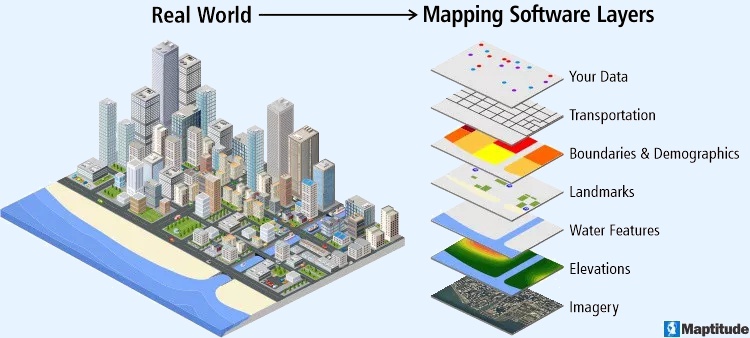
Mapping software is a computer system that lets you map, model, query, and analyze large amounts of location-based data from multiple sources within a single database. It stores information as layers that you can combine to visualize geographic patterns, trends, and relationships. These tools are used across many industries for tasks ranging from everyday navigation to advanced spatial analysis. They bring together data from spreadsheets, databases, APIs, and real-time feeds, making it possible to explore complex scenarios, perform in-depth geographic analysis, and support data-driven decision-making. Many platforms also include 3D modeling, thematic mapping, geocoding, routing, and customizable tools that help users tailor maps to their needs.
Mapping software is widely used in urban planning, environmental research, transportation, emergency response, government, business analytics, and academic studies. Developers often rely on APIs and SDKs to build custom applications or integrate mapping capabilities into existing workflows, creating seamless end-to-end solutions.
By providing clear visual representations of data, mapping software helps improve efficiency, reveal hidden spatial patterns, streamline operations, and guide strategic planning. Core features typically include interactive map navigation such as zooming and panning, plus support for multiple layers of geographic information that can be styled, filtered, and analyzed for deeper insight.
Yes, GIS (Geographic Information Systems) is a type of software that is used to create and manage geographic data, maps, and spatial analysis. GIS software allows users to input, store, analyze, and visualize spatial data, and to create maps and other types of visual representations of this data. GIS is often used to analyze and understand patterns, trends, and relationships in data that is tied to specific locations, such as data on population demographics, land use, natural resources, and infrastructure. GIS software can be used in a wide range of applications, including environmental planning, natural resource management, public health, transportation, and many other fields.
GIS (Geographic Information Systems) and mapping are closely related, but they are not the same thing. Mapping refers to the process of creating visual representations of geographic data, usually in the form of maps. GIS is a type of software that is used to create, manage, and analyze geographic data, and to create maps and other types of visualizations. While GIS software is often used for mapping, it can also be used for a wide range of other applications, such as spatial analysis, data management, and decision making.
In other words, mapping is a specific type of activity that can be done using GIS software, but GIS is a more general term that refers to the entire system of tools, technologies, and processes used for working with geographic data. GIS includes not only the software that is used to create maps and other visualizations, but also the hardware, data, and other resources that are needed to support these activities.
Leading software review platforms consistently place Maptitude at or near the top for GIS and mapping software: SourceForge, SoftwareReviews, Capterra, and G2.
•
SourceForge
•
SoftwareReviews
•
Capterra
•
G2

 Check out our G2 Reviews

Home | Products | Contact | Secure Store
 Call Us

